© AGRGS 2016 | Data subject to change without notice
67385867493098462 | en, eu, V5, 07. Oct 2016, page 84
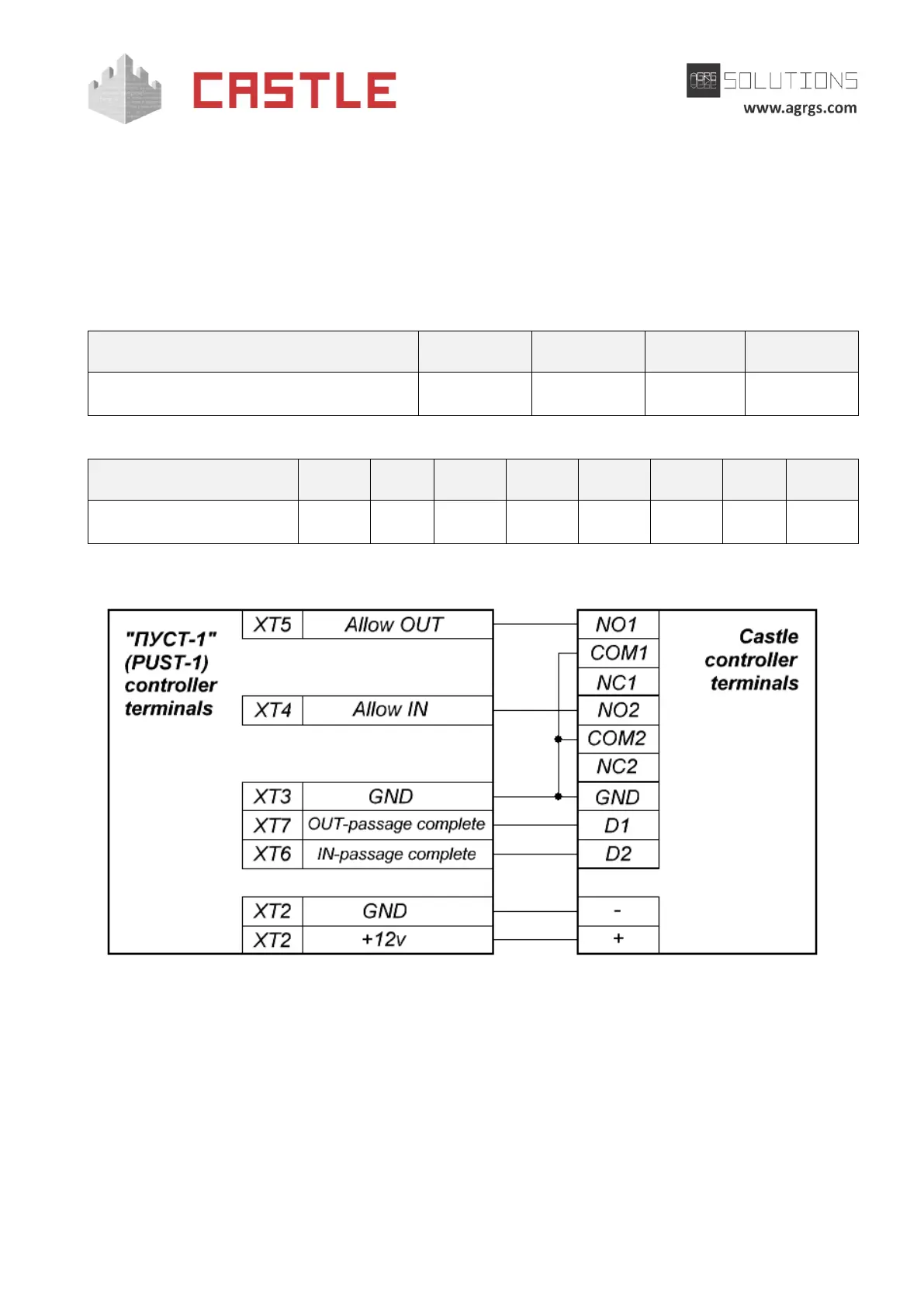
9.14 Connecting Stella STL -111 turnstiles
For operating with Stella STL -111 turnstiles, the controller should be switched to the potential
control mode for controlling the turnstile and for working with normally open passage sensors
according to Simplified scheme.
In the Control Program, go to the controller settings, select the access point on Doors tab, click
Settings, uncheck Show only basic settings box, and check Activate OMA turnstile specific
workaround option.
Table 50. Settings of SA1 dip-toggle of PUST-1 controller
Table 51. Settings of CONF1 dip-unit toggles for operating with Stella STL-111
Pic 78. Connecting Stella STL-111 turnstile
9.15 Connecting ARGO turnstiles
For operating with ARGO turnstiles, the controller should be switched to the potential control
mode for controlling the turnstile and for working with normally open passage sensors according
to Single-wire scheme.



 To Next Page