© AGRGS 2016 | Data subject to change without notice
67385867493098462 | en, eu, V5, 07. Oct 2016, page 80
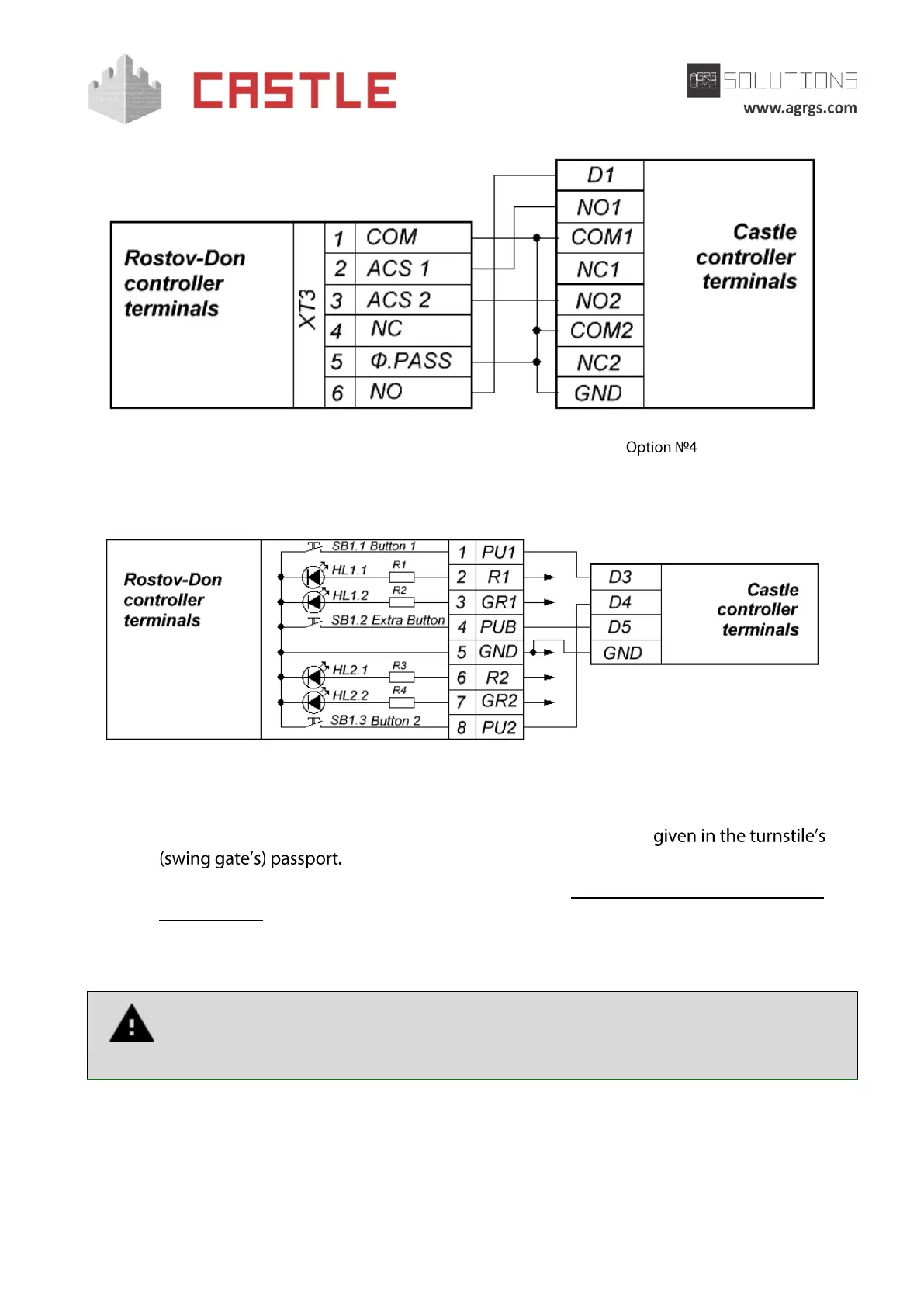
Pic 66. Connecting Rostov-Don turnstiles and swing gates.
9.10.1 Connecting the Rostov-Don turnstile control panel
Pic 67. Connecting Rostov-Don control panel
● Terminals 2, 3, 5, 6, and 7 of the control panel are connected to Rostov-Don ECU
(electronic control unit) terminals according to wiring diagrams
● The control panel operating logic is described in Sec. 11.8.2 Working with the turnstile
control panel.
9.11 Connecting Gunnebo GlasStile turnstiles
Note that the built-in GlasStile control unit can have different designs. Before
connecting, make sure that the terminal captions on the PCB and those given on a
wiring diagram are identical.
For operating with Gunnebo GlasStile turnstile, the controller should be switched to the pulse
control mode for controlling the turnstile and for working with normally closed passage sensors
according to Simplified scheme.
In the Control Program, go to the controller settings and enable the additional option (on Doors
tab, select the access point, click Settings, uncheck Show only basic settings box, check Activate



 To Next Page