© AGRGS 2016 | Data subject to change without notice
67385867493098462 | en, eu, V5, 07. Oct 2016, page 66
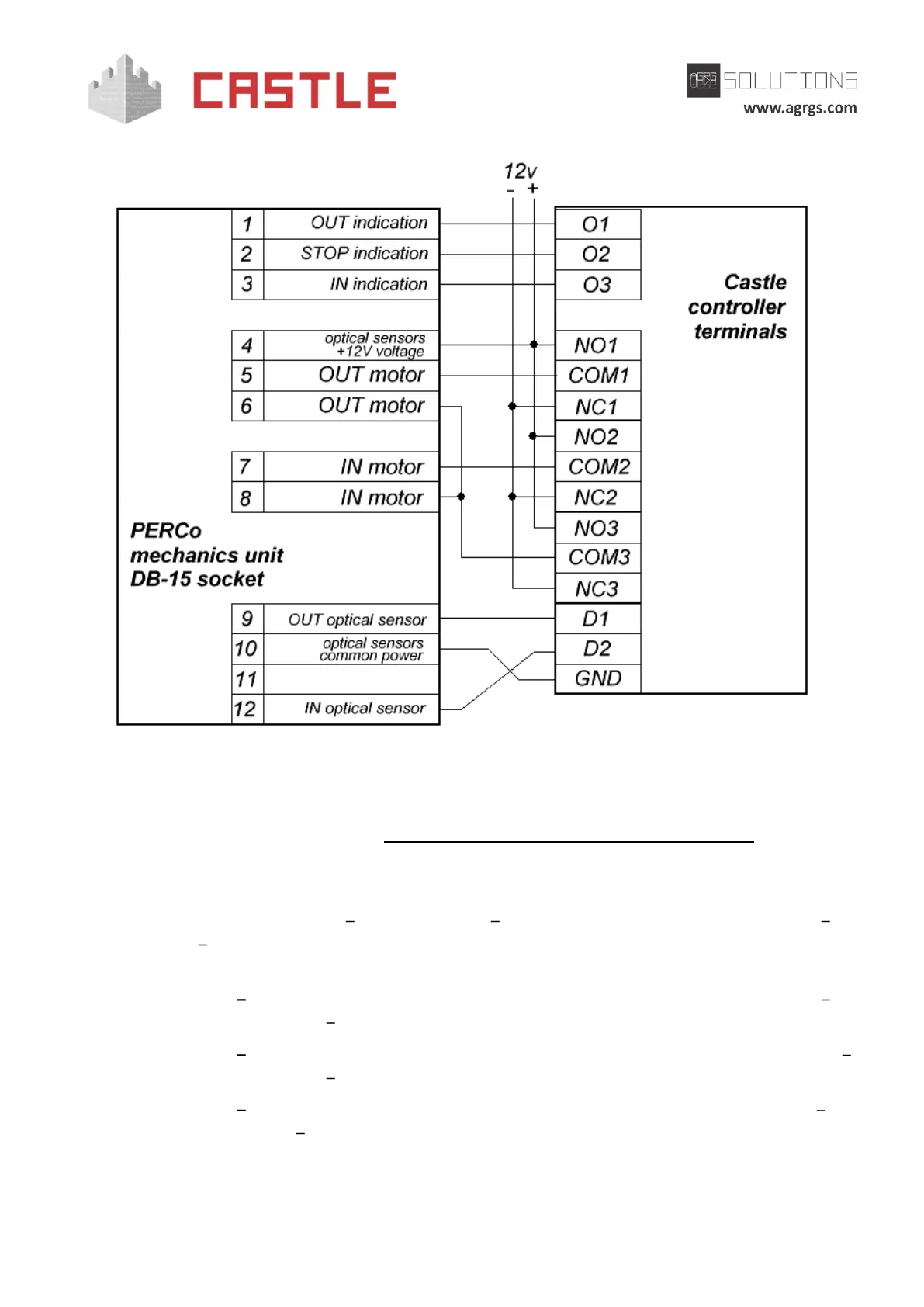
Pic 45. Connecting PERCo T-04 turnstile stand
Notes:
To connect the control panel, see Sec. 9.6.11 Connecting PERCo turnstile control panel.
Before starting the access point, that operates PERCo T-04 turnstile stand, you need to make its
mandatory settings.
To do this, run Control Program select Doors tab select the desired controller from the list
click Settings switch to Clamps reassignment (Terminal reassignment) tab. Then add the
following strings:
● Function Turnstile: Control panel "Exit" indicator (OUT LED), Door (access point)
"1", Clamp (terminal) "O1, normally not active".
● Function Turnstile: Control panel "Block" indicator (STOP LED), Door (access point)
"1", Clamp (terminal) "O2, normally not active".
● Function Turnstile: Control panel "Enter" indicator (IN LED), Door (access point) "1",
Clamp (terminal) "O3, normally not active".



 To Next Page