CONSOLE AI | Managing Channels (CP2) | 187
Symbol Meaning
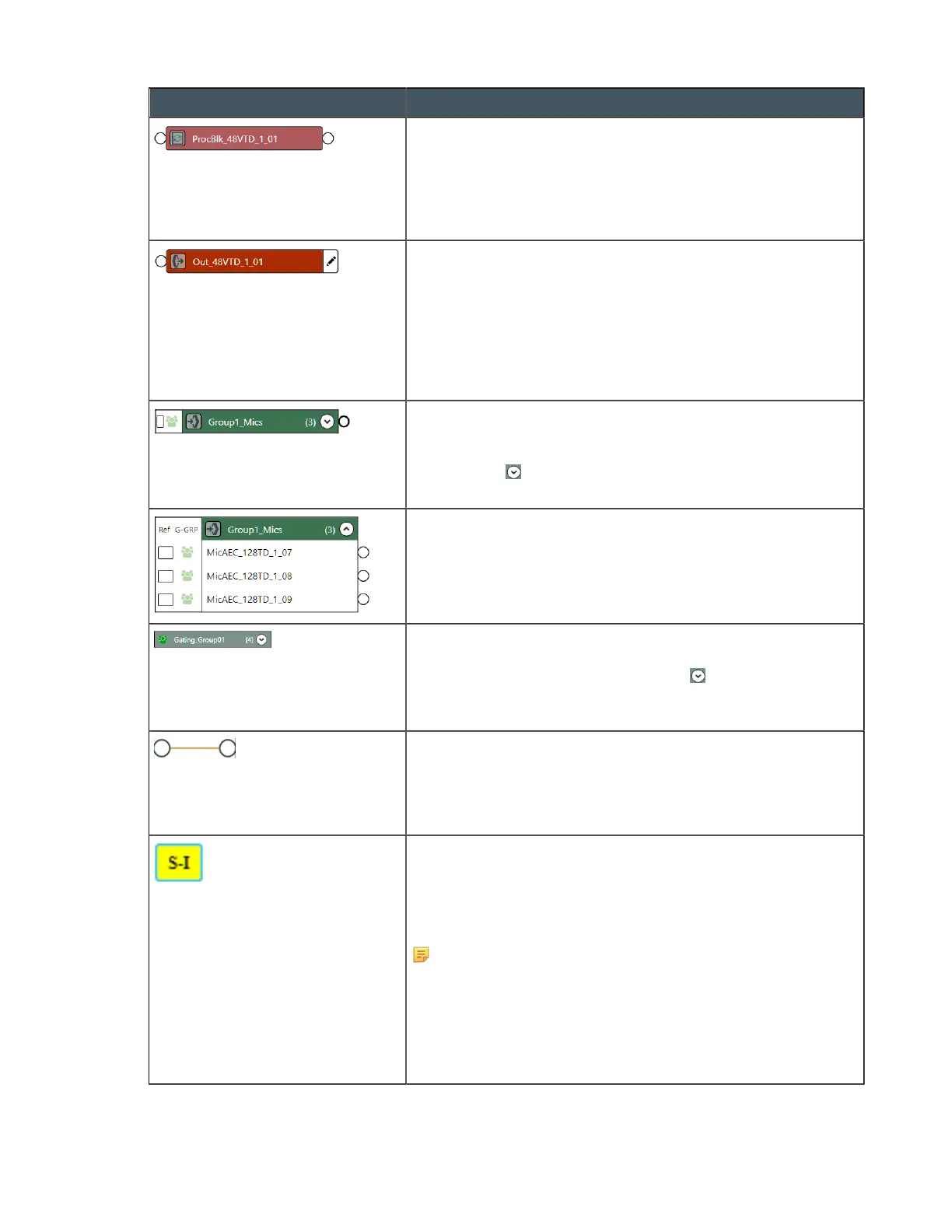
This icon represents a mixer channel, such as a processing
block or a fader. It is labeled with its name, and it has connectors
on the left (an input) and on the right (an output). It can receive
input from an input channel, such as a microphone, or from
another mixer channel, and it can output to another mixer
channel or to an output channel.
This icon represents an output channel. It is labeled with its
name, and it has two possible connectors. The circle-shaped
connector on the left is used to make a route from an input
channel or a mixer channel. The pencil icon lets you specify that
this output be used as a reference. If you have specified that the
channel be used as a standard or custom reference, a reference
box appears, which can be used as a reference connector. If a
reference assignment has been made, the box turns yellow.
This icon represents a channel group, in this case a group of
Mic/Line Input channels. The number, in parentheses, to the
right of the name tells you how many channels are in the group.
You can click to expand the group. See “Add Channels to a
Channel Group” later in this topic for more details.
This shows a channel group that has been expanded to show
all the channels that are part of the group.
This icon represents a gating group. The number, in
parentheses, to the right of the name tells you how many
channels are in the group. You can click to expand the group.
See “Add Channels to a Gating Group” later in this topic for
more details.
A solid brown line between two channel icon connectors
represents a channel route. This means that audio is routed
from the channel connector on the left to the channel connector
on the right. See “Add a Channel Route” later in this topic for
more details.
A yellow box like this on an input channel and an output channel
represents an AEC reference assignment. Standard reference
assignments come in matching pairs that start with the letter “S”
and are numbered consecutively. Custom references start with
the letter “C” and are numbered consecutively.
Note:
For more information about references, see About
References.
See Adding Standard References (CP2), Adding Custom
References (CP2), and Assigning References (CP2) for more
details about adding references.
CONSOLE AI User Manual









 To Next Page