Doosan Robotics User Manual v2.6.1
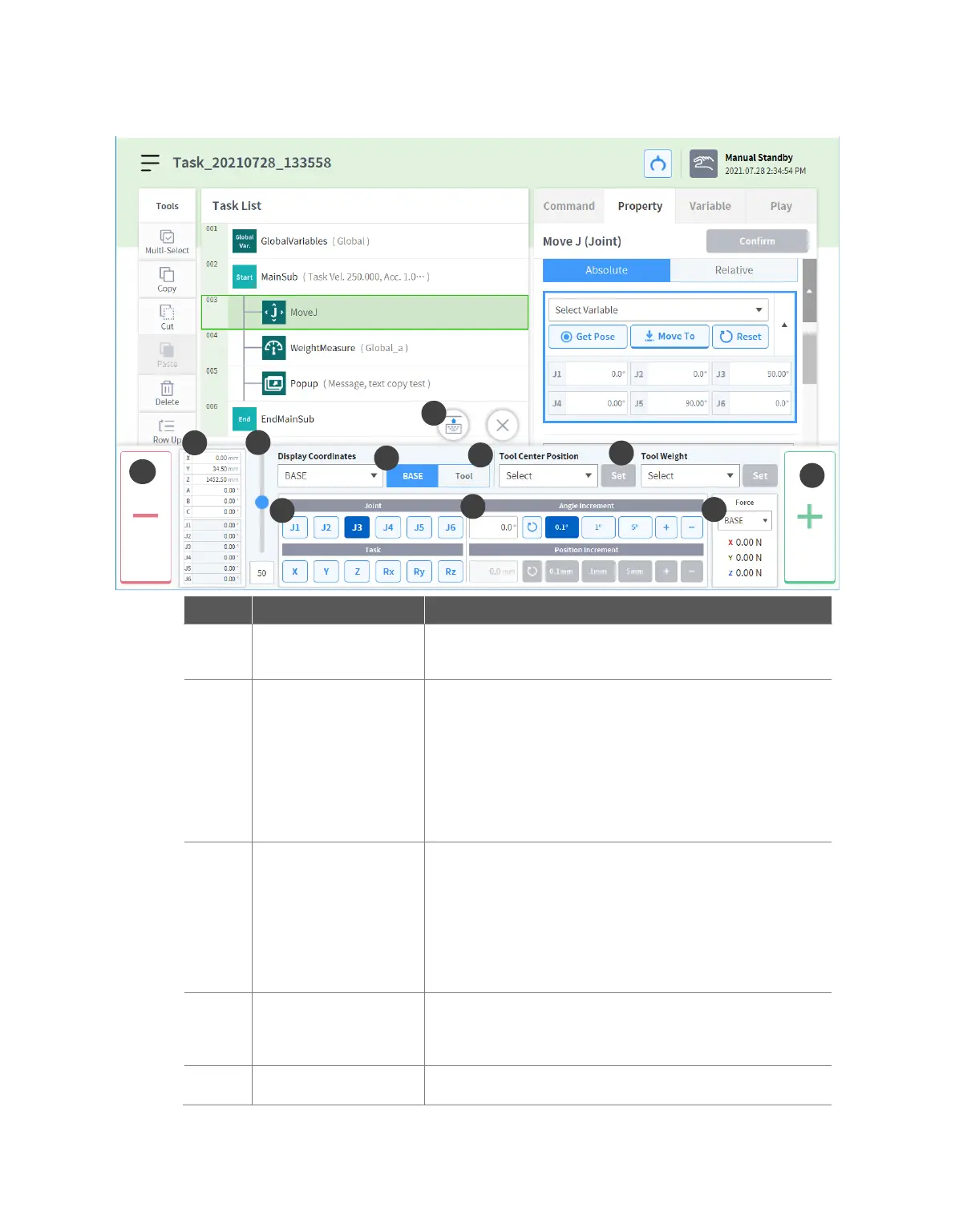
Displays the robot pose based on the set display
coordinates.
Configures the robot movement speed in manual mode. The
speed can be adjusted by dragging the slider pointer.
If the slider pointer is at 100%, the corresponding maximum
joint speed on the Jog tab will be 30 deg/s, and the
maximum task speed will be 250 mm/s. This speed
influences the speed controlled by the jog and movement
buttons.
It configures the reference point to align the task coordinate.
Base: It configures the task coordinate based on
the robot base.
World: Sets task coordinates based on the set
World Coordinates.
Tool: It configures the task coordinate based on
the tool installed on the end of the robot’s six-
axis.
Selects the axis to move.
Joint Tab: Select one axis among J1 - J6.
Task Tab: Select one axis among X - Rz.
Enters a number regarding how much the selected axis is to
be moved.



 To Next Page