122 |
ETAS ES800 System | User Guide
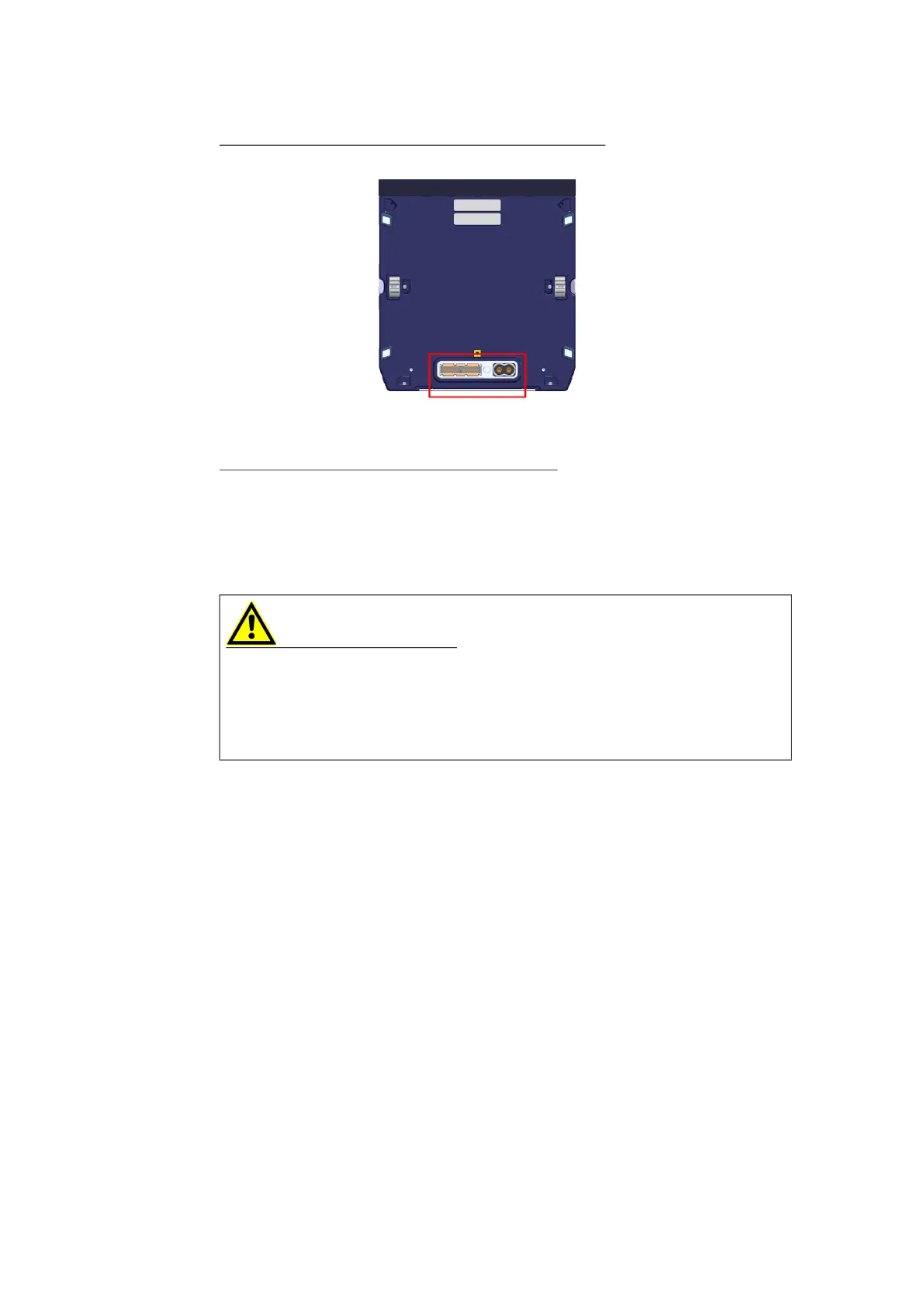
Attaching the protective cap to the system connector
1. Turn the top module over and place it on its top side.
2. Place the protective cap onto the lower system connector of the discon-
nected module (see marking in the illustration).
Closing the protective flap on the lower module
3. Close the protective flap on the lower module.
13.5 Fastening Modules to Carrier Systems
Modules or module stacks of the ES800 system can be fastened to a carrier sys-
tem.
- Only use carrier systems and attachment elements that do not damage the
housing of the modules.
- Do not damage the housing of the modules. They may neither be drilled into
nor provided with holes.
- When selecting the carrier system, observe the static and dynamic forces
that could be created by the module or the module stack on the carrier sys
-
tem.
- Only use materials that are suitable for absorbing static and dynamic forces
to secure the module or module stack.
13.6 Securing Modules with a Kensington Lock
The rear side of each module features two openings to which the module can be
secured using a Kensington lock.
WARNING
Risk of injury due to inadequate fastening
- Secure the product so that it does not move uncontrollably.
- Only use carrier systems and fastening materials that can accommodate the
static and dynamic forces of the product and are suitable for the ambient
conditions.


 To Next Page