83 | Functions of the System
ETAS ES800 System | User Guide
11.6 Configuring the Modules (Web Interface)
Configuring the modules ES830.1 and ES88x/ ES89x is done on the PC using a
graphical user interface. A web browser application is used as the interface. No
Internet access is required for the configuration.
The web interface consists of a start page (home page), pages for customer-spe-
cific configuration of the interfaces and additional pages for information about the
status of the module and the module stack.
11.6.1 Representation of the Modules in the Web Interface
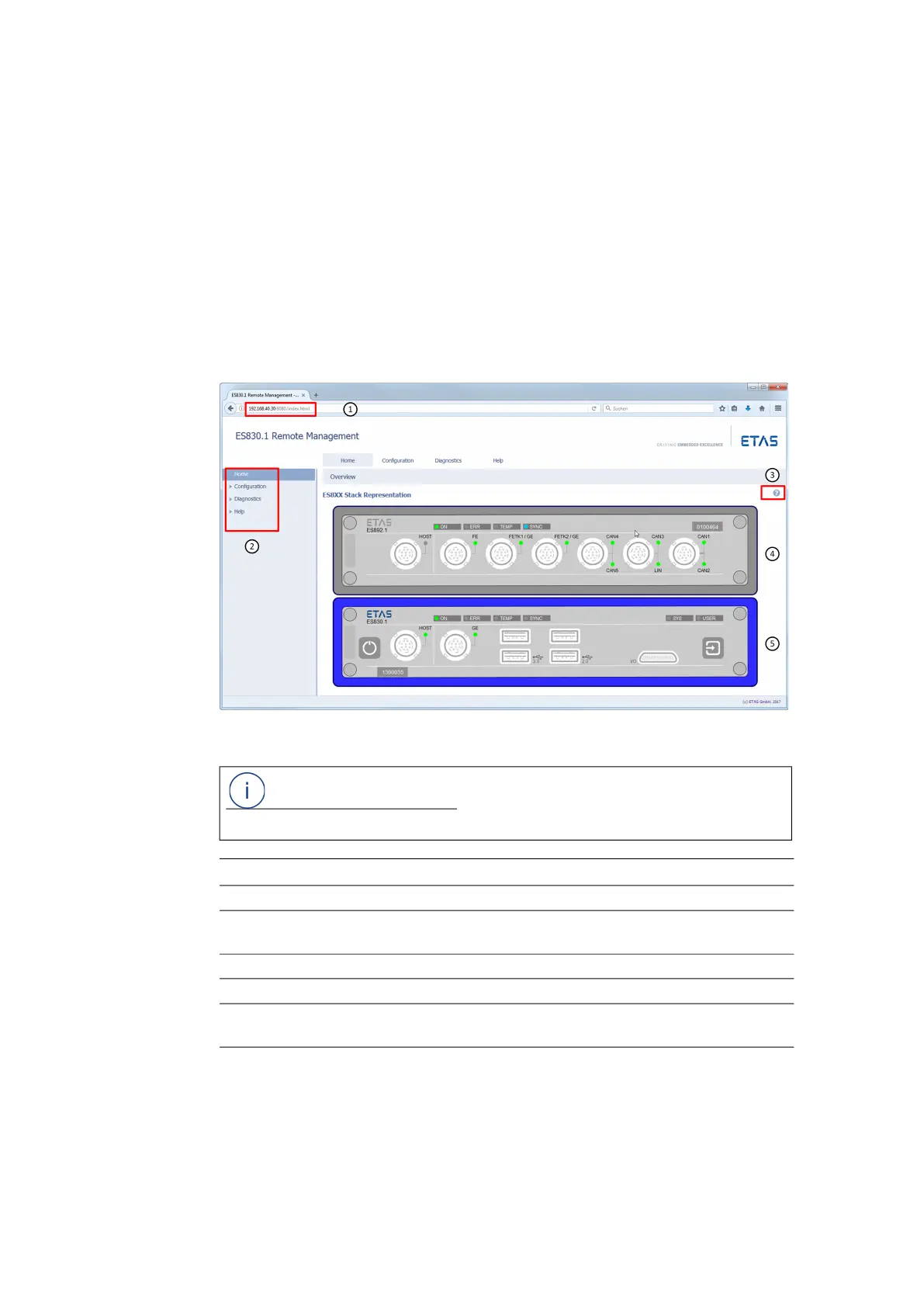
The front of the modules in the stack with the assigned LEDs are shown in the web
interface.
Fig. 11-1 ES800 Web Interface (Start Page)
Configuring an individual Module
After calling up the start page of the Web interface of the module, the module can
be configured.
NOTE
The user interface of the ES800 Web interface is available in English.
Nb. in Fig. 11-1 Description
1 Network address of the ES800 module or the module stack
2 Menu for selecting the configuration pages:
Home, Configuration, Diagnostics, Help
3 Web interface online help
4 Module within an module stack (example)
5 Module within an module stack (example), activated in the web
interface for configuration (module blue marked)



 To Next Page