Executing 2 Sided Color Scanning Calibration
101
Maintenance
3
Executing 2 Sided Color Scanning Calibration
This section describes the procedures to adjust scan colors for side 1 and side 2 of the
duplex automatic document feeder.
Important • For the correct output result, execute the calibration in advance. For the calibration, refer to
"Executing Calibration" (P.97).
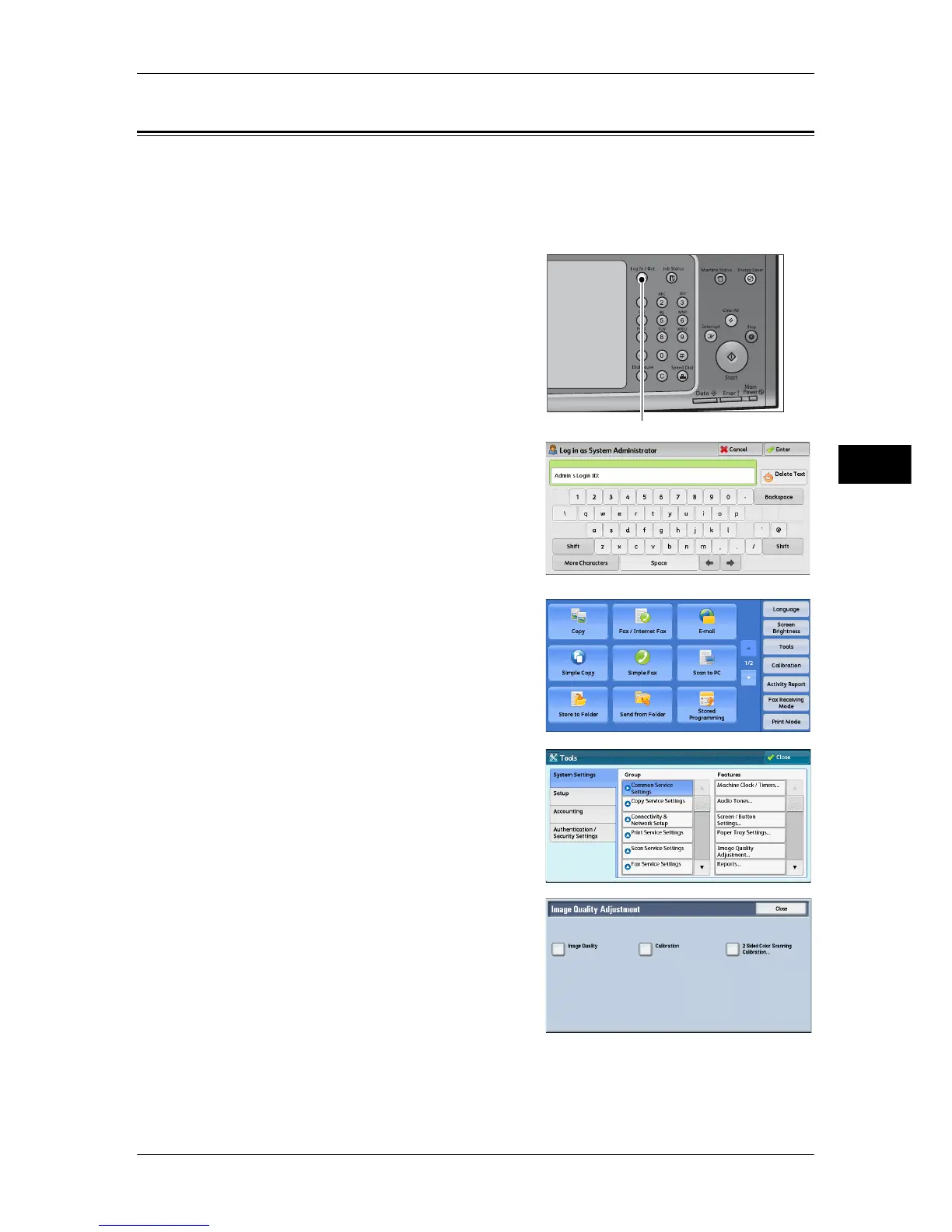
1 Press the <Log In/Out> button.
2 Enter the system administrator’s user ID with
the numeric keypad or the keyboard
displayed on the screen, and select [Enter].
When a passcode is required, select [Next]
and enter the system administrator’s
passcode, and select [Enter].
Note • The default user ID is "11111".
• The default passcode is "x-admin".
3 Select [Tools] on the [Services Home]
screen.
Note • When the [Services Home] screen is not
displayed on the touch screen, press the
<Services Home> button.
4 Select [System Settings] > [Common
Service Settings] > [Image Quality
Adjustment].
5 Select [2 Sided Color Scanning Calibration].
6 Select [Print Chart].
Note • Selecting [Restore Previous Values] and then [Start] restores the previous settings. To
restore factory default settings, select [Restore Factory Default Values] and then [Start]. In
both cases, a message is displayed on the touch screen when the restoration completes.
<Log In/Out> button



 To Next Page
 Loading...




