KAYENNE — User Manual 255
eDPM Operations
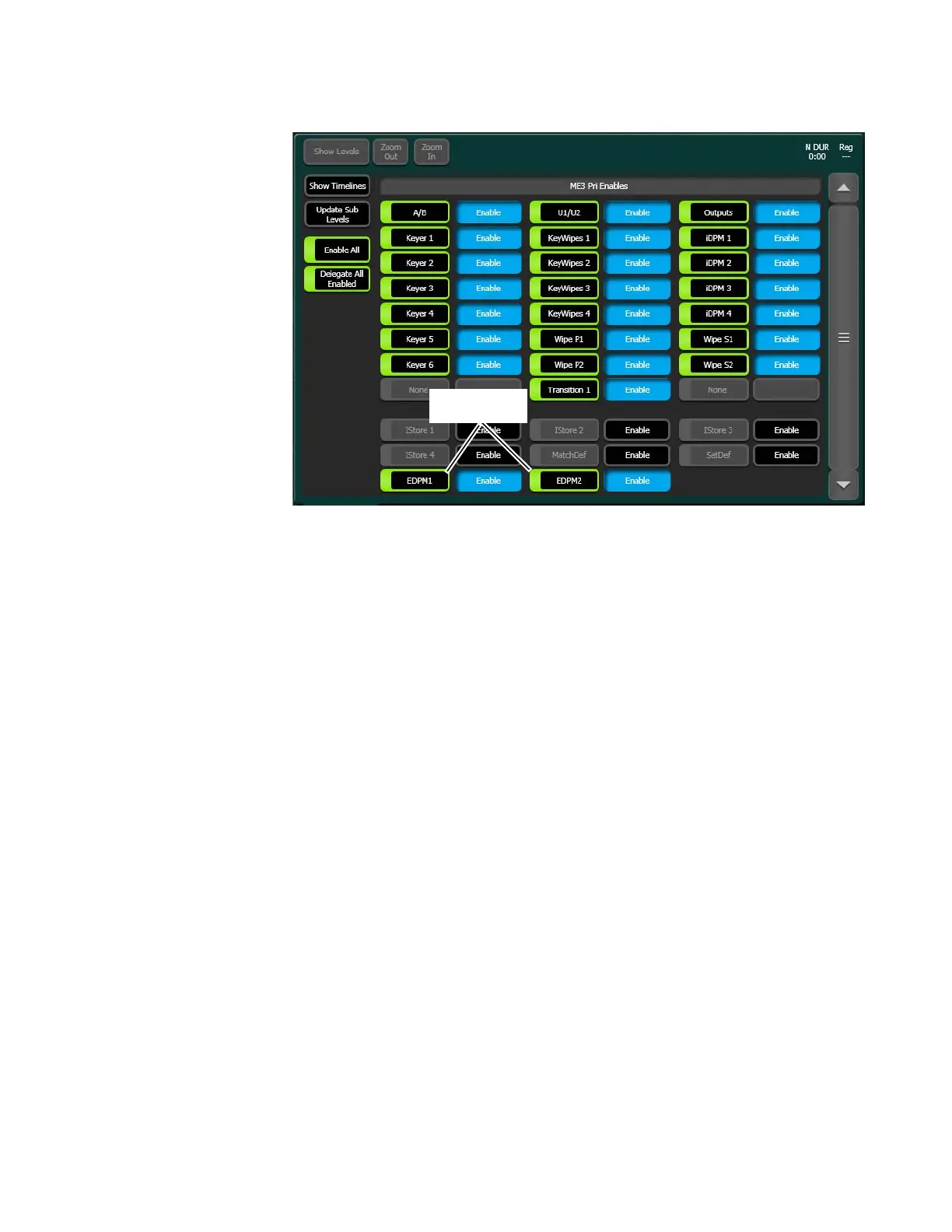
Figure 171. eDPM Sub-levels in the E-MEM Master Timeline
Using definable sub-Levels allows for the recall of eDPM effects from Local
E-MEM. For example, effects created for ME 1 can have the eDPM definable
sub-levels and will then run eDPM effects.
Aux Delegation
eDPM input source selection is provided in three locations:
• Switcher Mode, Source Ops menu, eDPM Inputs,
• eDPM Mode, Source Ops, or
• The Local Aux Module (or any ME using the
Aux delegation button on
the Source Select Module).
To assign the delegation for the eDPM V/K inputs to the Local Aux
Module:
1. Go to the Aux Delegate Mapping menu by touching User Setups, Panel
Prefs
, Aux Delegate Mapping (Figure 172).
2. Select a Local Aux Module button in the Button/Delegation scrolling
list (
Figure 172).
3. Select an eDPM channel (eDPM 1-4) in the eDPM V/K Inputs button
delegation column (
Figure 172, right side of menu).
4. Repeat Steps 2 and 3 for up to four eDPM inputs.



 To Next Page
 Loading...

