MFG-2000 Series User Manual
104
3. There are two ways to set its
value :
a,Use the arrow keys and
scroll wheel
b, number pad to enter the
Duty range.
Press F5 to choose the % unit.
0.01%~99.99% (limited by the
current frequency setting)
4. To set parameter
Load/Frequency/Amplitude/DC
Offset/Phase, please see page 109 - 113.
Setting the Pulse Width
The pulse width settings depend on the rise & fall time settings or
the edge time setting and the period settings, as defined below:
Pulse Width ≥ Minimum Pulse Width
Pulse Width < Pulse Period - Minimum Pulse Width
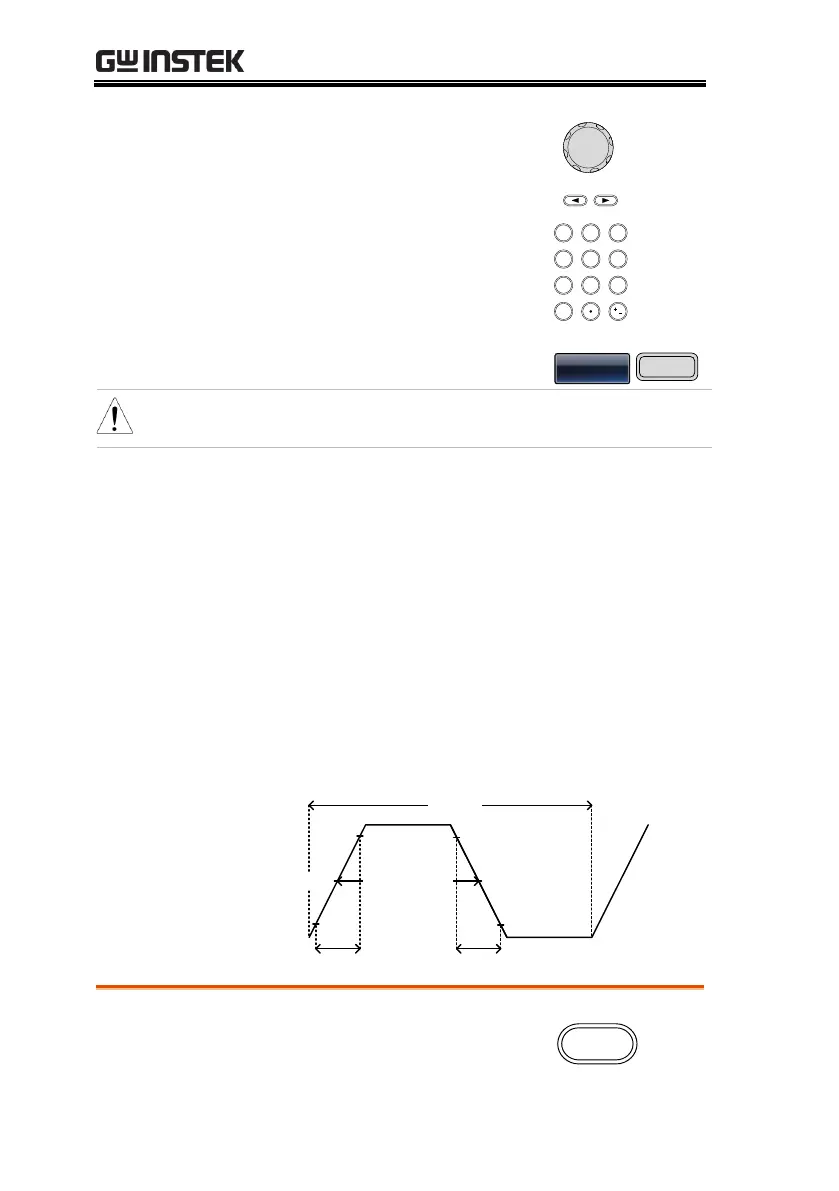
Pulse width is defined as the time from the 50% rising edge
threshold to the 50% falling edge threshold of one full period.
Fall timeRise time
Pulse Width
Period
50%
90%
10%
90%
50%
10%
1. Press the Waveform key.


 To Next Page
 Loading...