624074/07 10-35
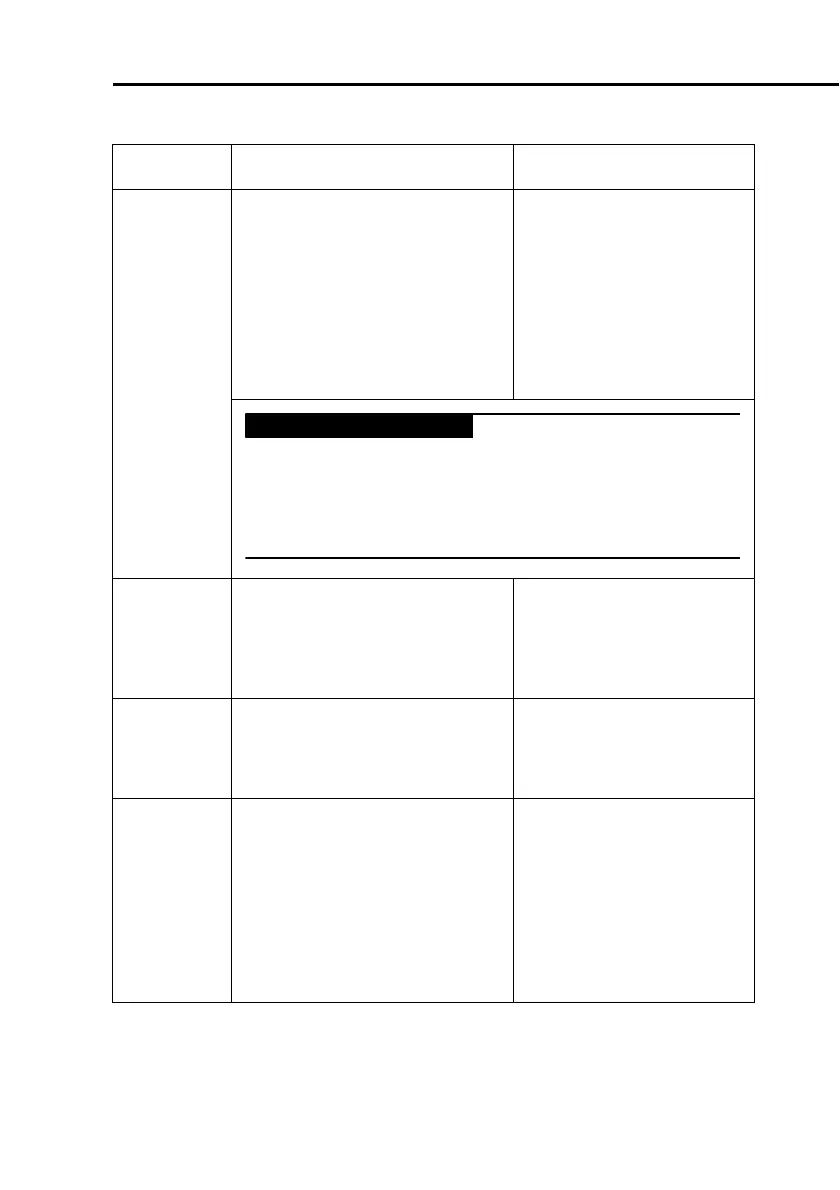
TF: xxxx Technical fault.
A hardware or software malfunc-
tion was detected. The ventilator
may switch to the ambient state,
and the patient will breathe room
air unassisted. You will hear the
high-priority alarm tone, or the
continuous-tone buzzer will
sound as long as possible.
Provide alternative ventila-
tion. Have the ventilator
serviced.
WARNING
To prevent possible patient injury arising from an
equipment malfunction, HAMILTON MEDICAL recom-
mends that you immediately remove any ventilator
with a technical fault from use, record the number of
the fault, and have the ventilator serviced.
Tighten
patient
system
Operator Message. Instruction
message during tightness test.
Block the patient side of the
patient end of the flow sen-
sor (a finger covered with
an alcohol pad may be
used).
Tur n Flow
Sensor
Operator Message. Instruction
message during flow sensor cali-
bration.
Reverse the ends of the
flow sensor so that the blue
tube is closest to the Y-
piece.
Tur n the
Flow Sensor
Medium priority.
The flow sensor connections are
reversed. The flow trigger is
turned OFF and the device
switches to a pressure trigger.
Rotate the flow sensor. The
blue sensing line is close to
the patient and must be
attached to the blue con-
nector. The
colorless sensing line is
close to the ventilator and
must be attached to the
white connector.
Table 10-2. Alarms and other messages
Alarm Definition Complete these actions



 To Next Page