System
Password
MGCplus A0534-30.0 HBM: public 239
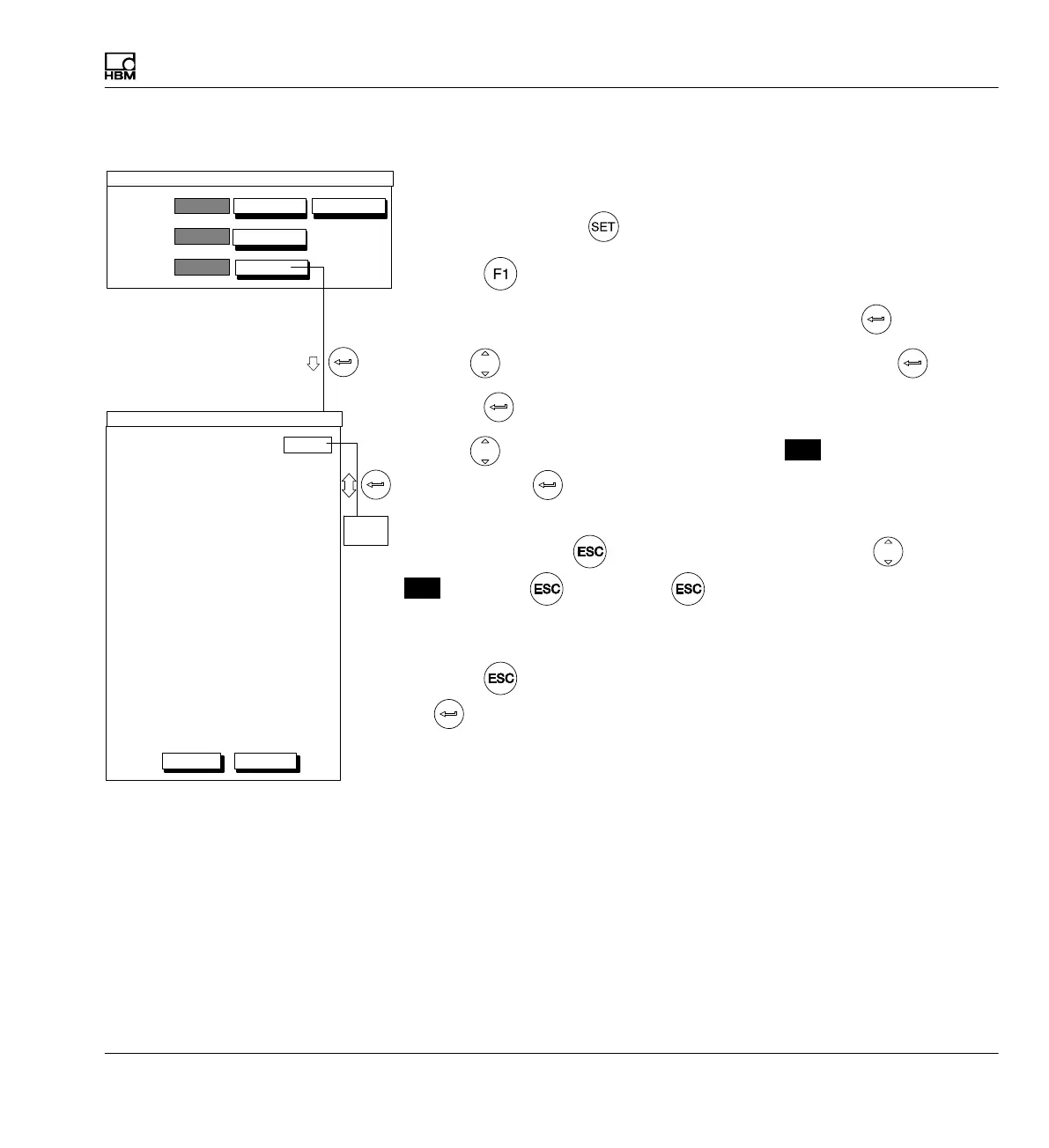
10.1.2 Password protection activation
If you are still in the Password setup window, continue with item 4.
1. Use the Switch key
to switch to Setup mode.
2. Press
.
3. In the pull-up menu select Password and confirm with
.
4. Use
to select the set... button symbol and confirm with .
5. Press
.
6. Use
to select the Password protection
On
selection field and
confirm with
.
If the error message No user with system rights present appears, first
press the Cancel key
to delete the error message. Use to select
Off
and press again. Press twice. You will then be in the
PASSWORD setup window. Now define a user with system authorization as
described in
è section 10.1.1, page 238.
7. Press (so you will go immediately to the OK key) and confirm with
.
Access:
User:
Password:
new...
change...
set...
delete...
PASSWORD
Password protection
Access rights for operator
System Password Yes
Save/load No
Recording No
Interfaces No
Print No
Language No
Time No
Display Display format No
F−keys No
Channel names No
Amplifier Transducer No
Signal conditioning No
Display No
Analog outputs No
Switch No
Options Control inputs No
Limit switch No
Limit value combination No
Peak−value memory No
Version No
Off
OK Cancel
Off
On



 To Next Page