Measuring
Adapting to the transducer
162 A0534-30.0 HBM: public MGCplus
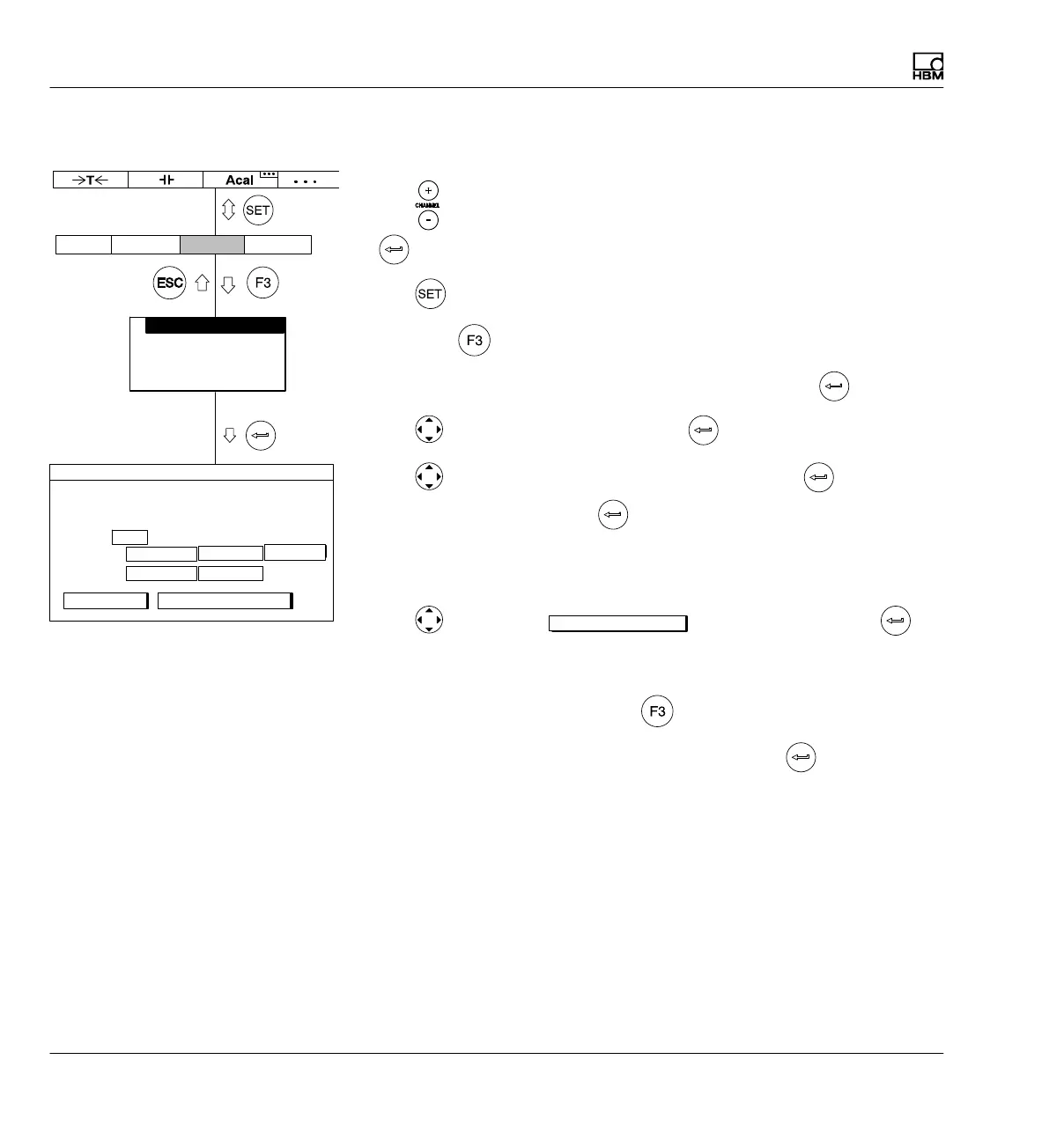
7.3.6 Adjusting the rotational speed channel, power measurement
1. Use
or a direct entry to choose the desired channel (for example 3.2
).
2. Use
to switch to Setup mode.
3. Press the
function key.
4. In the pull-up menu select Transducer and confirm with
.
5. Use
to select 10V and confirm with .
6. Use
to switch to the Unit selection field and press . Select kW
as the unit and confirm with
.
7. In the left edit field Nominal (rated) value enter the value 10.472.
8. In the right edit field Nominal (rated) value enter the value 10.
9. Use
to select the
Adjust amplifier
button and confirm with . If
you do not want to make any more changes to the display, you can now
continue with step 19.
10. Go back to the pull-up menu with
.
11. In the pull-up menu select Display and confirm with
.
AmplifierSystem Display Options
Transducer
Signal conditioning
Display
Analog outputs
Switch
10.0000 ...
Type 10V
Current feed None
Unit: V
i
Zero pt.:
Nom. val.:
TRANSDUCER CHANNEL1
kW
0.0000 ...
0.0000 ...
10.4720 ...
calibrate... Adjust amplifier
measure



 To Next Page