60
Setting Measurement Conditions (basic settings)
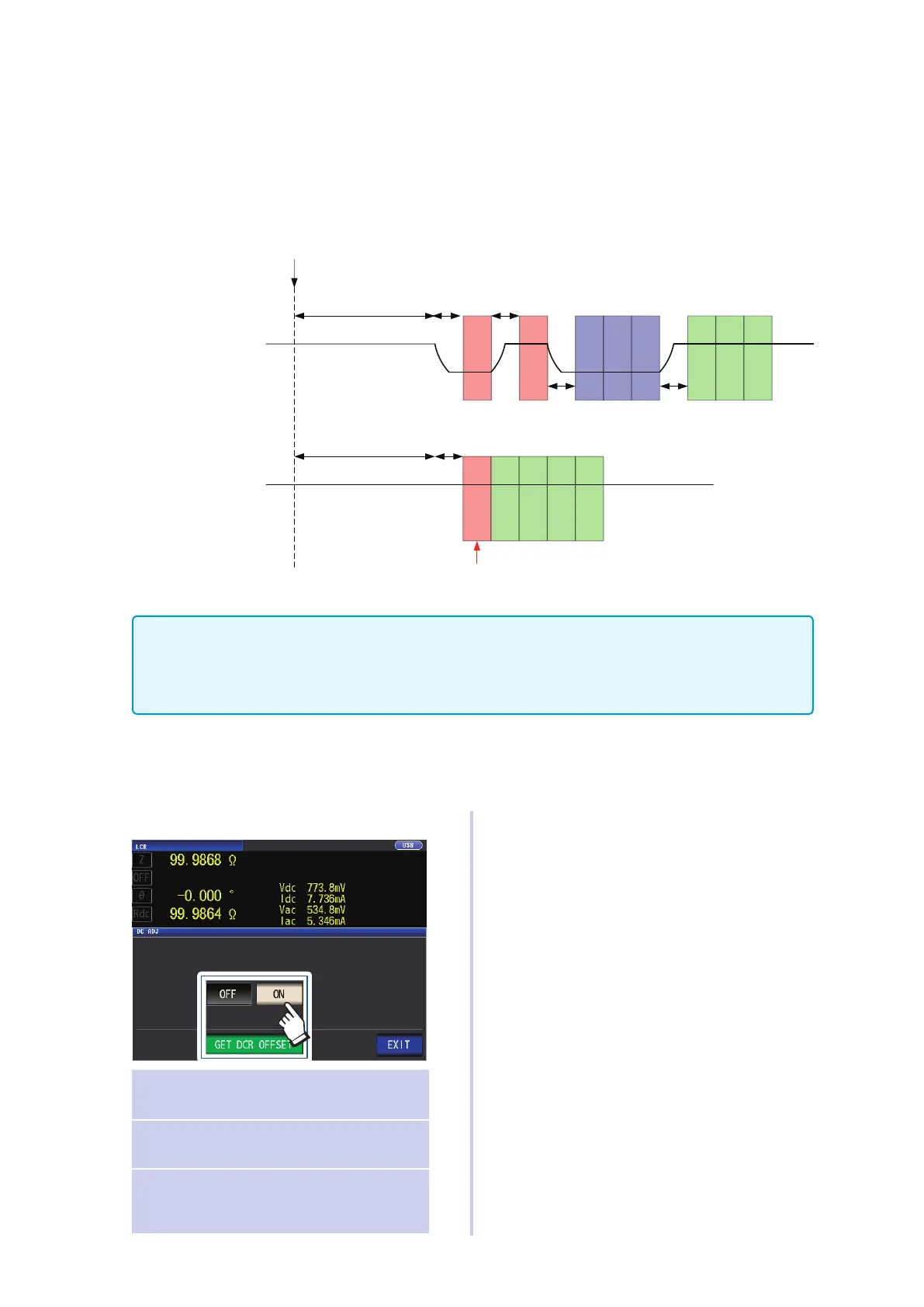
DC adjustment (reducing measurement error) (DC)
Enabling the DC adjustment function causes the instrument to set the generated voltage to 0 V and
acquire the offset value generated by its internal circuitry in order to reduce measurement error.
(Default setting: ON)
Disabling the DC adjustment function allows high-speed DC resistance measurement since the
offset value is not acquired before each measurement is performed.
11 ・・・ ・・・ nn
1 2 ・・・ n
DC adjustment on
With n average iterations
AC measurement complete
DC
delay
Adjustment
delay
During auto-range operation, the instrument performs measurement
to determine the range (the result is not applied to measured values).
DC
delay
DC resistance value
acquisition
Adjustment value
acquisition
DC
delay
AC measurement/
DC measurement switching
Adjustment
delay
AC measurement/
DC measurement switching
DC resistance value
acquisition
DC adjustment off
With n average iterations
• Disabling DC adjustment may cause the measurement error to increase.
• When using the instrument with DC adjustment disabled, acquire the adjustment value with the sample (or
a circuit with equivalent DC resistance [Rdc]) connected.
• Because the adjustment value will vary when the sample’s Rdc or ambient temperature changes, disabling
DC adjustment will prevent accurate measurement.
Screen display method (For more information, see p. 24.):
(Measurement screen) SET key>(SET screen) Rdc tab>DC ADJ key
1
Touch the ON key.
OFF
Acquires the offset value at the time
shown below.
ON Obtains the offset value for each
measurement.
GET DCR
OFFSET
Acquires the DC adjustment value.
(Valid only when the DC ADJ setting
is disabled.)
Selecting OFF will cause the following
message to be displayed.
"Please Get DCR Offset." (Acquire the
DCR offset value.)
Touching EXIT will close the message.
2
Touch the EXIT key twice.
Displays the measurement screen.



 To Next Page