Panther System
®
Operator’s Manual
AW-17791-001 Rev. 002 (EN)
141
System Operation
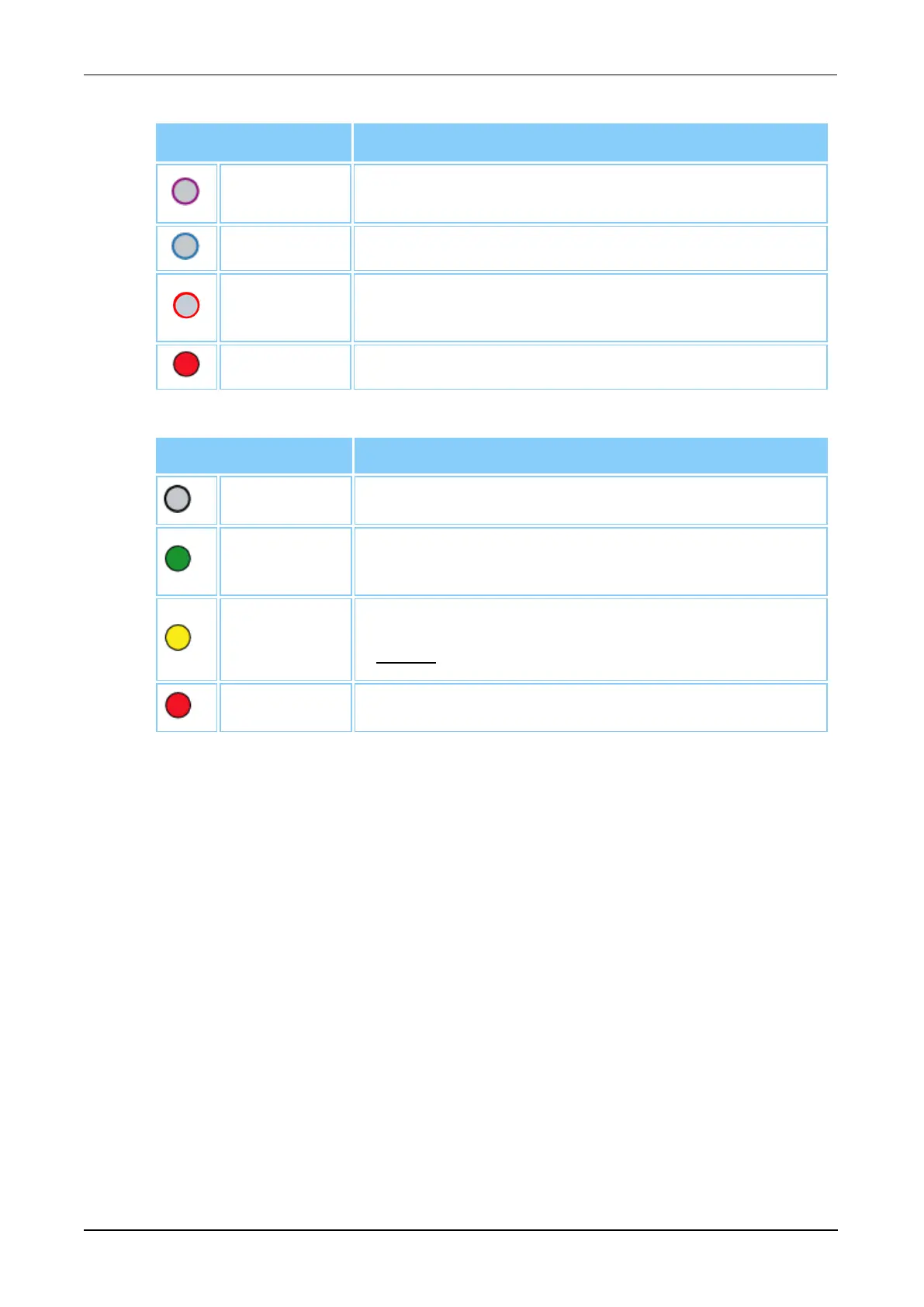
Icon Color
Meaning
Purple
Border
Reagent Bay Lane is available for loading.
Blue Border Reagent Bay Lane has been selected.
Red Border
Reagent Rack is currently being pipetted by the
system.
Red Rack Invalid Reagent Rack entry.
Table 64. Reagent Rack Status Color Legend
Icon Color Meaning
Gray No Reagent Rack is loaded.
Green
Reagents have been successfully loaded and are
ready for use.
Yellow
Reagent kit is currently being pipetted by the system.
Do not remove the Reagent Rack from this lane.
Red Invalid reagent.
Table 65. Assay Reagent Status Color Legend
Assay Reagent Loading Screen
The Assay Reagent Loading screen, accessible through the Panther Assay
Reagent Bay screen, provides detailed information on the selected assay
reagent kit.



 To Next Page