How the Group Access Control List Works
In order to access a screen of the MOBOTIX camera, you need to have access to
certain functions of the camera software.
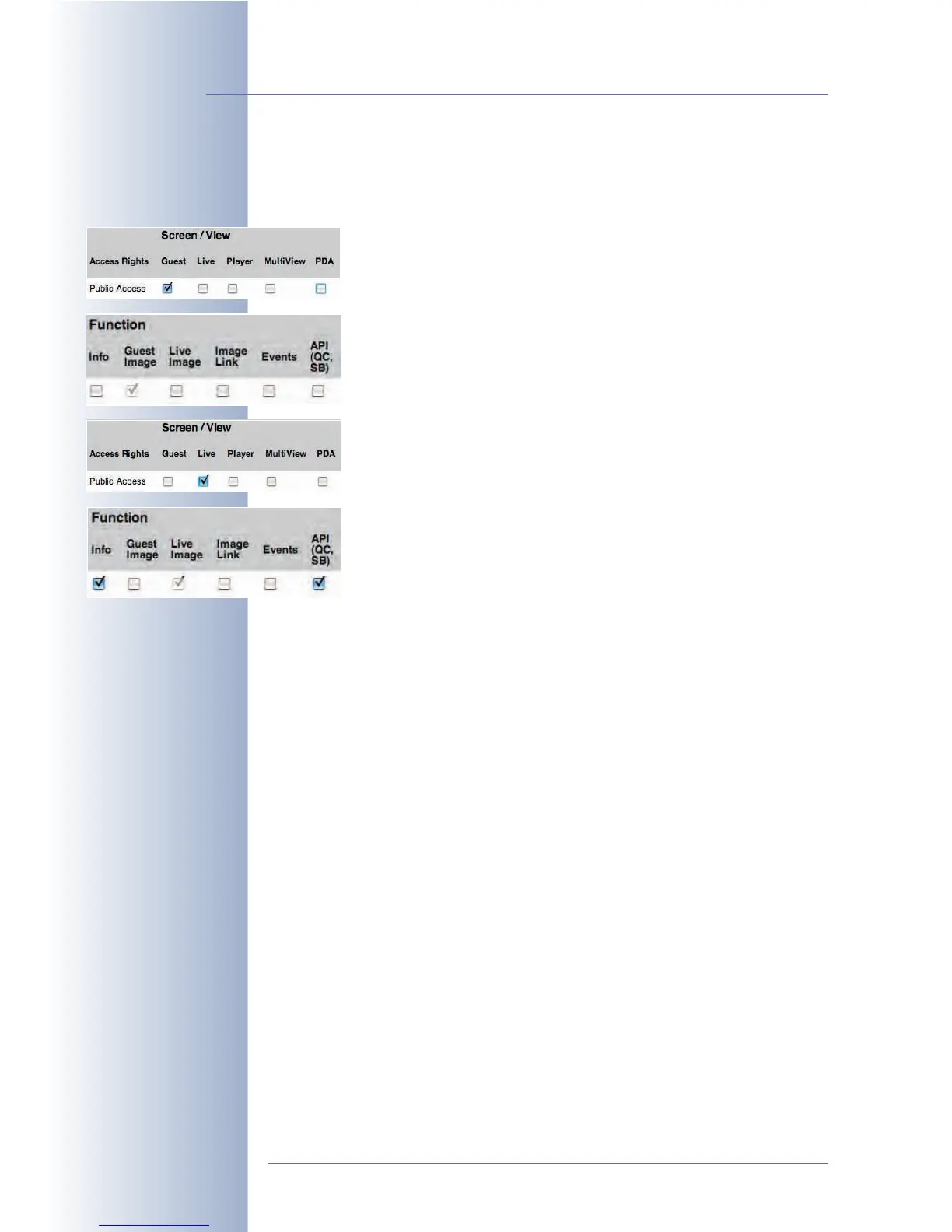
For viewing the Guest screen, for example, access to the /cgi-bin/
guestimage.html web page is necessary. The camera, however,
uses other script features to properly display this screen. For one thing,
the Guest screen has to be activated (Screen/View section, Guest
checkbox), but also the required functions (Function section, Guest
checkbox). Hence, when activating the Guest screen, the Guest func-
tion will be activated automatically. The latter checkbox cannot be
deactivated as long as the Guest screen has been activated, since this
function is required for properly showing this screen.
For viewing the Live screen, on the other hand, access to the /cgi-
bin/userimage.html web page is required. This page also uses
other script features to properly display this screen. For one thing, the
Live screen has to be activated (Screen/View section, Live checkbox),
but also the required functions (Function section, Live Image check-
box). Hence, when activating the Live screen, the Live Image function
will be activated automatically. The latter checkbox cannot be deacti-
vated as long as the Live screen has been activated, since this func-
tion is required for properly showing this screen.
The functions required to make the Live screen fully accessible will be
activated automatically (Info und API (QC, SB)), but they can be deactivated (in
contrast to the Live Image function) as they are not required for displaying the Live
screen itself (Info button in the top right corner as well as the Quick Controls and
the softbuttons). You may want to deactivate these two rights, e.g. if a user must
not see the camera status information and must not use the softbuttons on the Live
screen.
For the MultiView and PDA screens, no other rights but Live Image are necessary,
whereas MxViewer uses all functions (including Live Image). Since the required
functions strongly depend on how they will be used (e.g. by MxViewer), all func-
tions can be set individually for the screens and for MxViewer.
Making a MOBOTIX Camera Secure
By factory default, most of the camera's screens and functions are publicly accessi-
ble, i.e. they do not require a user name and password to access them. Once users
enter the camera's IP address, they can access the Guest and Live screen of that
camera, provided it still has the factory default configuration. A yellow warning in
the Users and Passwords dialog informs you of this situation.
In order to fully protect the MOBOTIX camera from unauthorized access, you
should perform the following steps:
• Reset the configuration to factory defaults, if feasible. This resets all users,
passwords and group access rights to the factory default values.
© MOBOTIX AG • Security-Vision-Systems • Made in Germany
www.mobotix.com • sales@mobotix.com • 10.10.2006
86/288
Software Camera Manual Part 2
Block the camera from
public access!



 To Next Page