R&S
®
ZVA / R&S
®
ZVB / R&S
®
ZVT Annexes
Configuration Files for External Devices
Operating Manual 1145.1084.12 – 30 1160
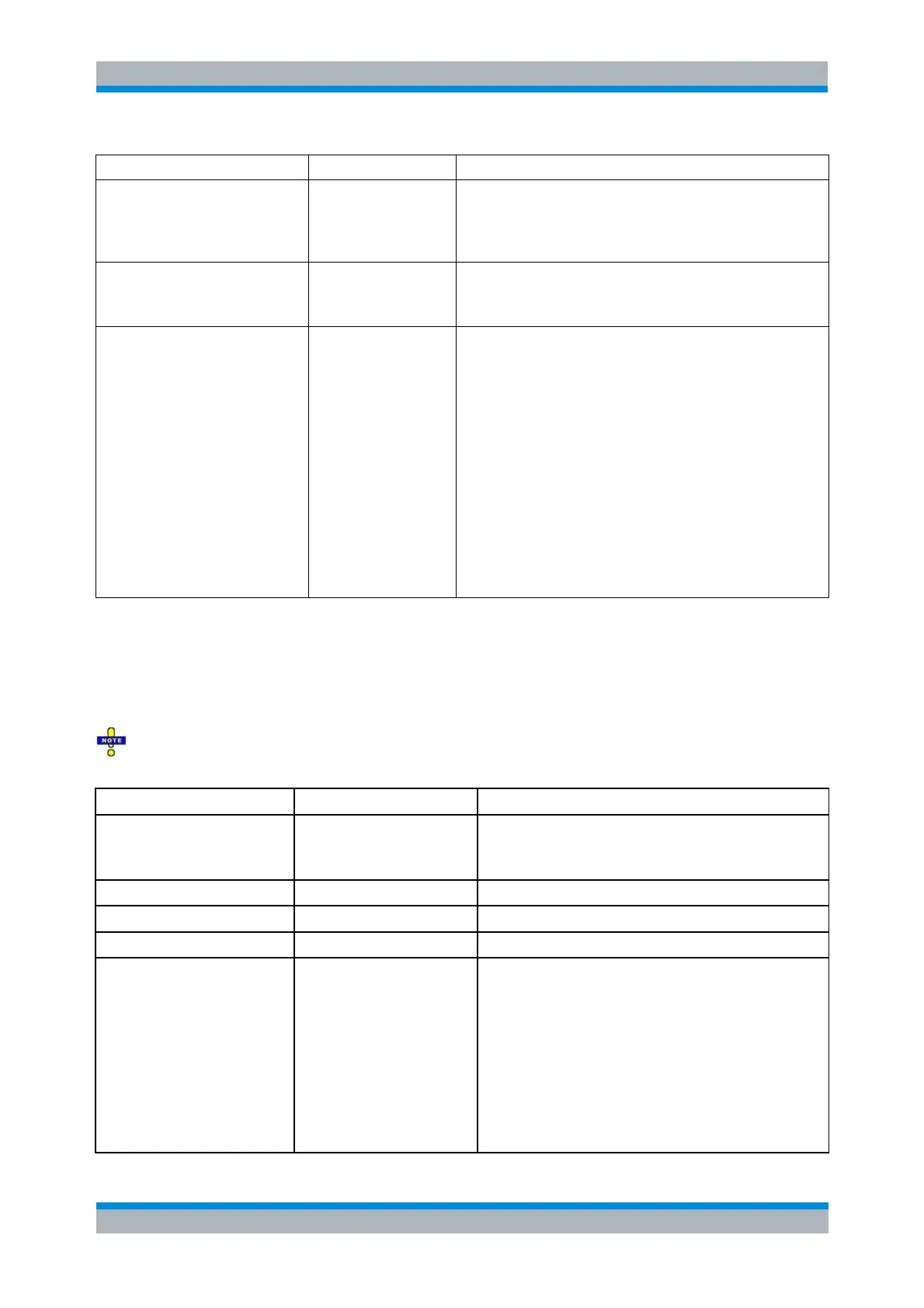
Command sequence for every measurement point:
POWERMEASSETUP (optional)
POWERMEAS_SETUPDELAY (optional)
POWERMEASQUERY
POWERMEAS_CONVERSION (optional)
Additional delay time [sec] after POWERMEASSETUP command:
May be used for measurement preparation (optional).
Default value = 0.
Optional conversion factor for the measured value obtained by
POWERMEASQUERY.
May be used e.g. to convert the measured value into [dBm], in
case that the external device delivers the measurement result in
a different unit.
Format: Math expression as string, with the measured value as
‚Data’.
Examples:
10 * Data + 2
2.5E-3 * log (Data) - 5 + Data
Supported operators: +, -, *, / , ^, ( )
Supported functions: ln, log, abs, sqrt
Supported constants: e, Pi
The function/constant names are identical and consistent with the
NWA firmware.
Generator Parameters
The following parameter set is used to control external generators from the network analyzer.
The "mandatory" parameters must be included in every generator configuration file; see General
Rules for Configuration Files. "Unnecessary" parameters are ignored.
Minimum output frequency [Hz]
Example:
GENERATORMINFRQ = 300e3
Maximum output frequency [Hz]
Minimum output power [dBm]
Maximum output power [dBm]
SCPI command sequence sent to the generator for
initialization. This command has to:
- Clear and reset status
- Set the (frequency and) power to initial values
- Set trigger and blank polarity
- Set frequency mode to fixed/CW freq
- Delete all fast sweep lists
It is not allowed to set/modify the reference frequency in the
GENERATORINIT command!
Reason: You can modify the reference frequency manually
and independent of the configuration file. During initialization,



 To Next Page