R&S
®
ZVA / R&S
®
ZVB / R&S
®
ZVT System Overview
Basic Concepts
Operating Manual 1145.1084.12 – 30 20
delete or reset global resource data using the Resets tab in the System Config dialog.
Setups
A setup comprises a set of diagram areas with all displayed information that can be stored to a NWA
setup file (*.zvx) and reused. Each setup is displayed in an independent window. The setup file contains
the following information:
General settings related to the setup
The trace settings for all traces in the diagram areas
The channel settings for all channels associated to the traces
The display settings for each diagram area
The File menu is used to organize setups.
In the System – External Tools submenu, you can find demo setups *.vbs for various measurement
scenarios. You can modify the demo setups and store them to a *.zvx file for later use. Moreover the S-
Parameter Wizard provides predefined, optimized setups for many measurements.
Traces, Channels, and Diagram Areas
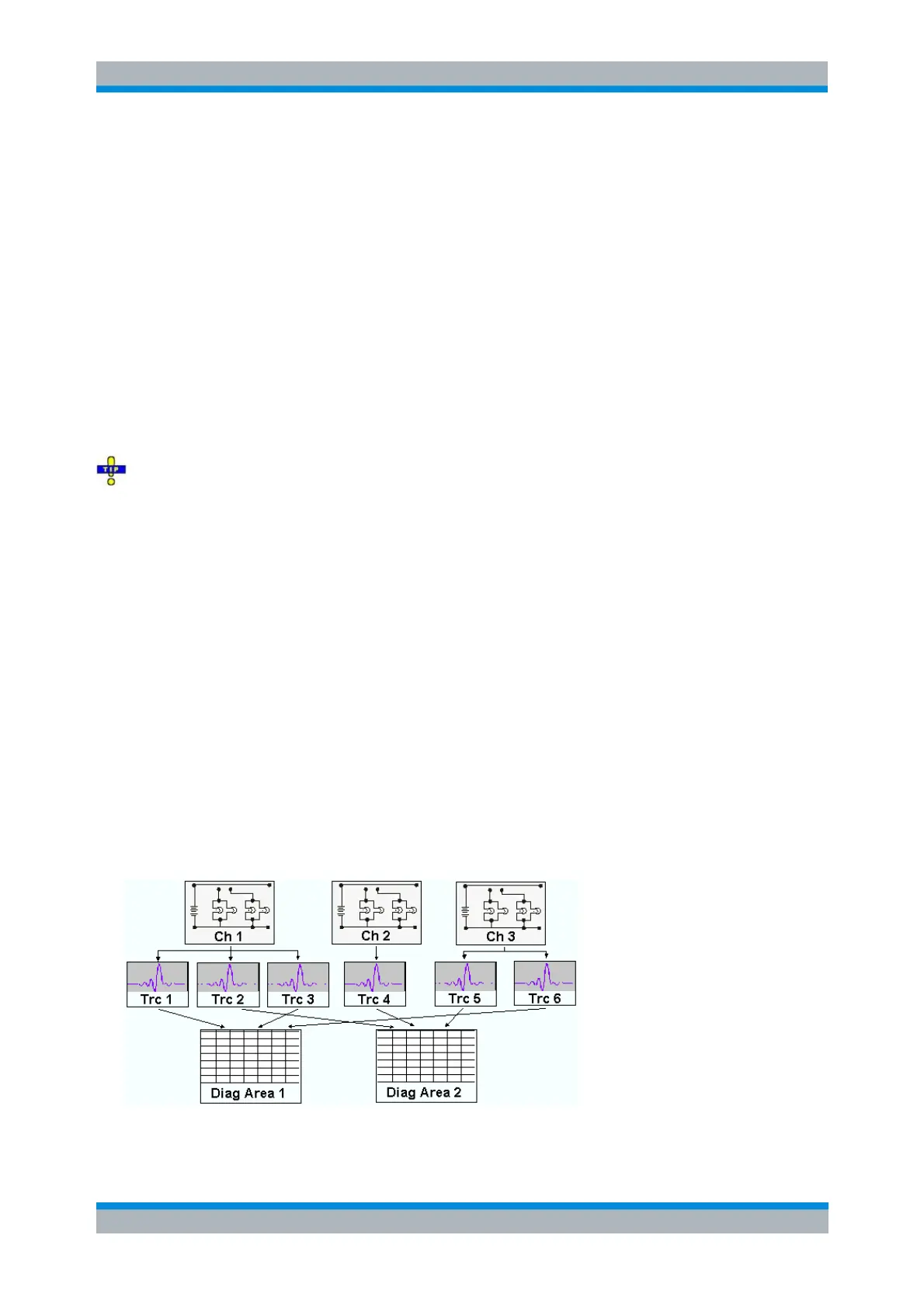
The analyzer arranges, displays or stores the measured data in traces which are assigned to channels
and displayed in diagram areas. To understand the menu structure of the instrument and quickly find the
appropriate settings, it is important to understand the exact meaning of the three terms.
A trace is a set of data points that can be displayed together in a diagram area. The trace settings
specify the mathematical operations used in order to obtain traces from the measured or stored
data and to display them.
A channel contains hardware-related settings to specify how the network analyzer collects data.
A diagram area is a rectangular portion of the screen used to display traces. Diagram areas
belonging to the same setup are arranged in a common window. The settings for diagram areas
are described in section Display Elements in this chapter.
A diagram area can contain a practically unlimited number of traces, assigned to different channels.
Diagram areas and channels are completely independent from each other.



 To Next Page