6
6-19
INTERNAL MEMORY
32180 Group User’s Manual (Rev.1.0)
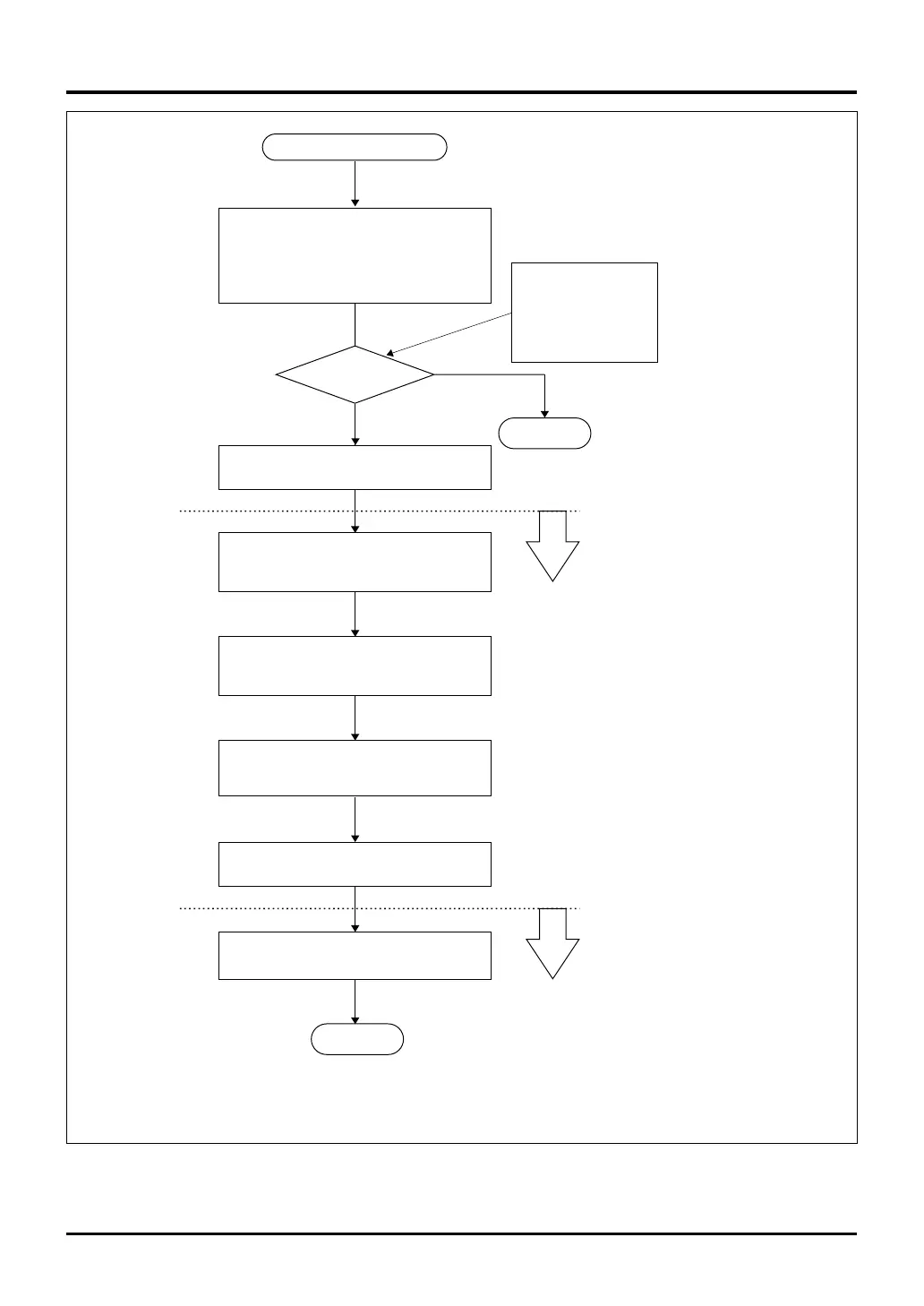
Figure 6.5.6 Procedure for Entering Flash E/W Enable Mode
END
START
Enter one of the following modes:
• Single-chip mode
• Boot mode
• External extension mode
Transfer the flash write/erase program
into the internal RAM
Set the Flash Control Register in SFR area
(FCNT1, H'0080 01E2) FENTRY bit to 0
Set the Flash Control Register in SFR area
(FCNT1, H'0080 01E2) FENTRY bit to 1
Execute flash write/erase command and
various read commands (Note 1)
Switched to the flash write/erase
program
Wait for 1 µs
(using a hardware or software timer)
Jump to the flash memory or apply reset
Switched to normal mode
Check
MOD0/1 and FP pin
levels
OK
NO
END
FMOD(H'0080 01E0)
FPMOD
P8DATA(H'0080 0708)
D0 = MOD0DT
D1 = MOD1DT
Note 1: For details about each command, see Section 6.5.4, "Procedure for Programming/Erasing
the Internal Flash Memory."
→ Go to flash E/W enable mode
6.5 Programming the Internal Flash Memory


 To Next Page
 Loading...