Front Panel Operation Power-On Procedure
ML2437A/38A OM/PM PN: 10585-00001 Rev. P 5-3
5-2 Power-On Procedure
At power-on, the power meter performs a brief power-on self test (POST). After the POST, the
instrument loads the last used configuration and display settings. If a POST error occurs,
information and available options are displayed on the screen.
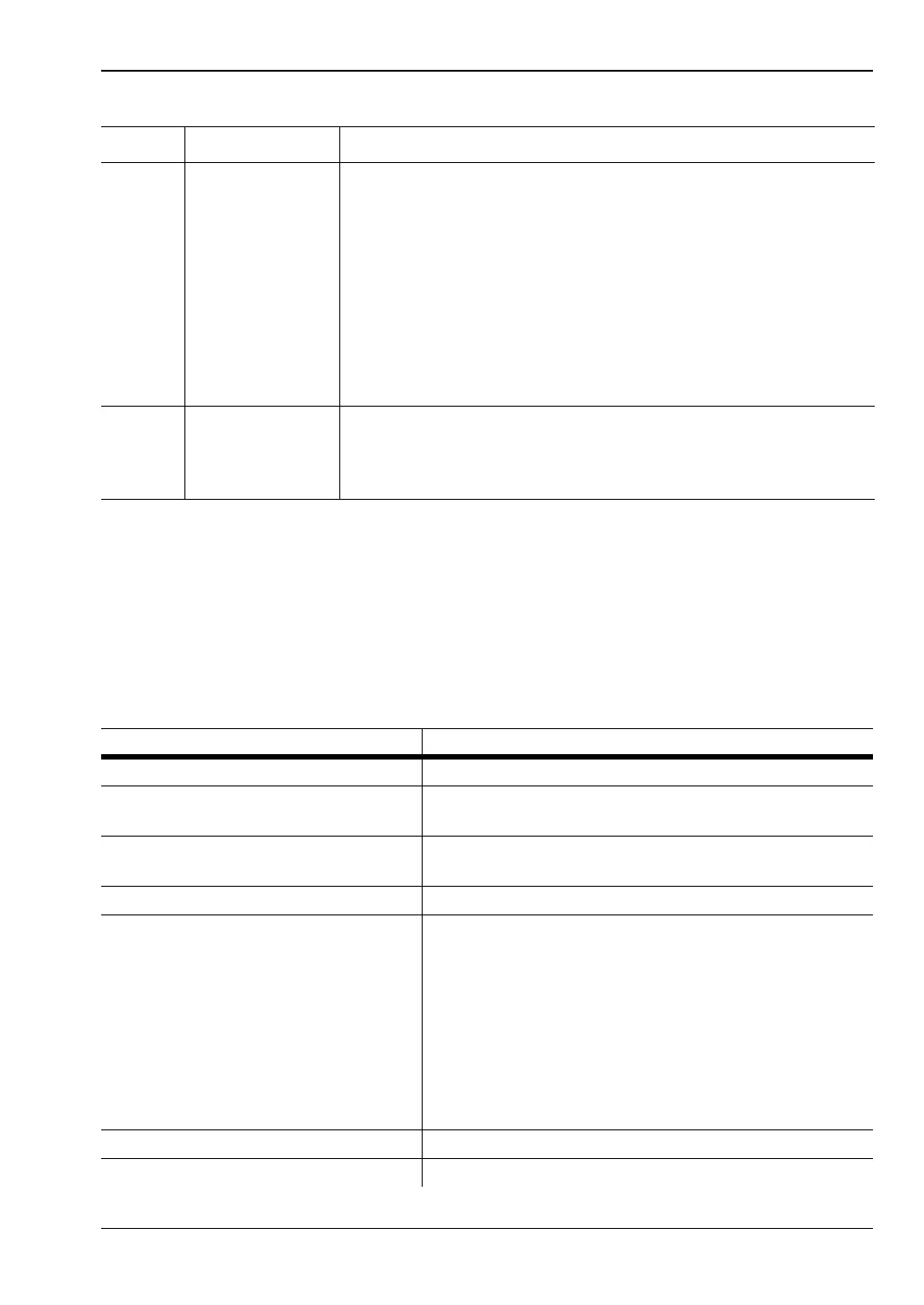
The following tests are performed during the power-on self test, and also when the GPIB
*TST? command is sent.
E Clear Key The clear (CLR) key performs various functions depending on
when it is pressed. For example, when editing an entry in a menu,
pressing the CLR key clears the digits. If in a menu screen,
pressing the CLR key returns to the previous menu level.
If the limits FAIL indicator HOLD audible alarm is sounding,
pressing the CLR key stops the alarm. The FAIL indication is not
affected by the clear key, and can only be cleared by turning fail
hold off. If the GPIB box is on the screen and the system is not in
a menu screen, and the system is in local mode (menus
available), and no GPIB operations are pending, then pressing the
CLR key clears the GPIB box off the screen.
F Menu Keys When pressed, the first level submenus appear on the display
directly above the soft key for that menu function. Refer to the
following sections of this chapter for detailed information on using
the menu keys.
Table 5-2. Power-on Self Test
Test sequence Possible status
Flash EPROM code checksum Pass or Fail
Flash EPROM personality data
checksum
Pass or Fail
Flash EPROM calibration data
checksum
Pass or Fail
Volatile RAM tests Pass or Fail
Non-volatile RAM checksums Pass or Fail
WARNING - Software version changed - all non-vol
stores reset
Current store failed - current store reset
Saved store(s) failed - failed store status changed to
not saved
WARNING - Secure mode clear memory - all non-vol
stores reset
Display Pass or Fail
Keyboard Pass or Fail
Table 5-1. Front Panel Connectors
Key Item Description












 To Next Page