Measurement Examples Example 10: Power Versus Time Data Logging
ML2437A/38A OM/PM PN: 10585-00001 Rev. P 7-27
7-10 Example 10: Power Versus Time Data Logging
To take power measurements over a user-defined period of time, press [System] > [Setup]
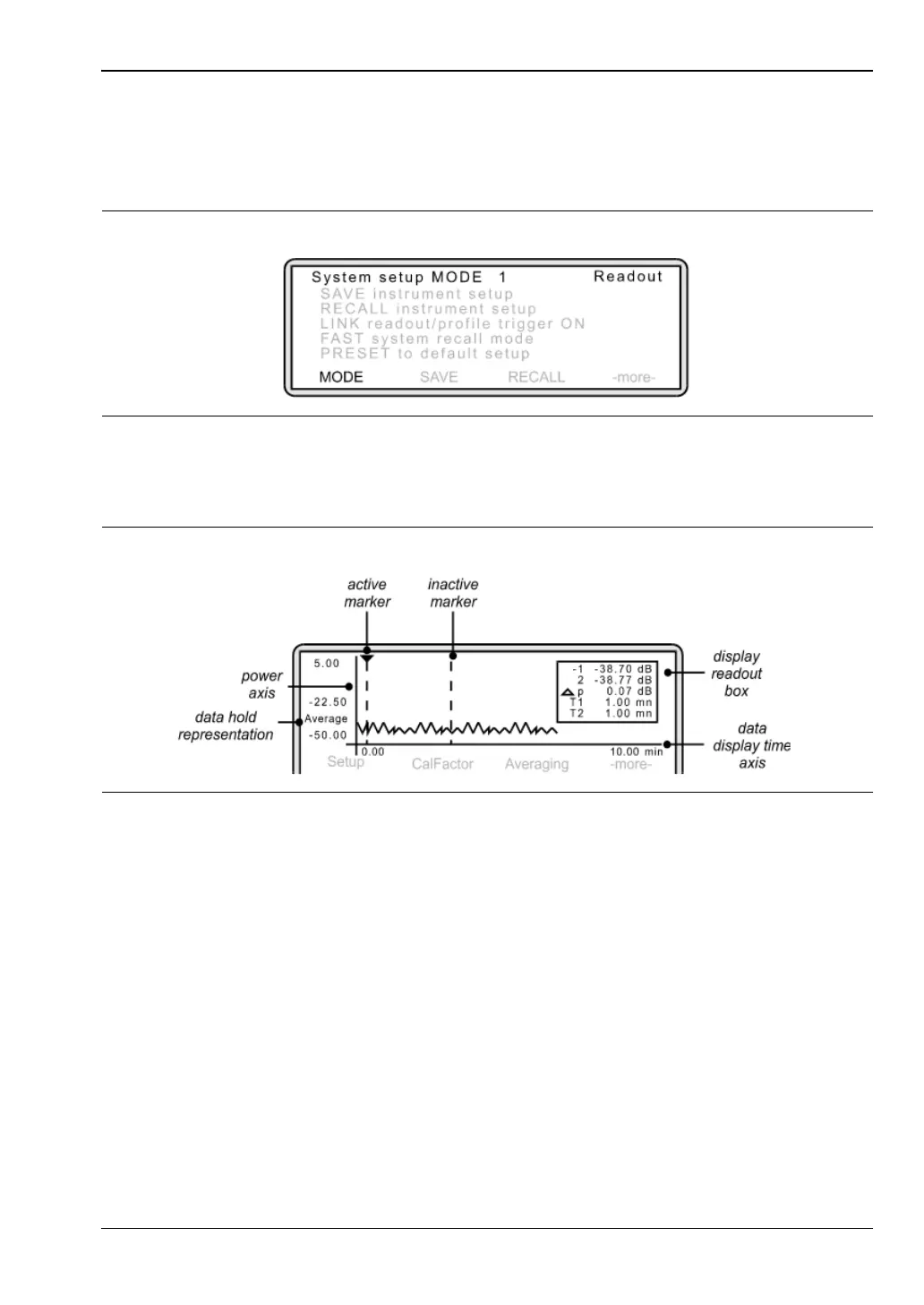
The following screen is displayed:
Press [MODE] and toggle this setting until "Power v Time" is displayed. Press any hard key
to display the Measurement screen.
1. Changing the axis scaling
The data display time axis shows the length of time over which you wish to take
measurements. Press [System]
> [PwrVsTime] > [TIME].
Using the keypad, enter the required time. Press either [hr.Enter] or [min.Entr].
To change the power axis, press [System]
> [Control] > [-more-] > [SCALE].
Press [TOP] and/or [BOTTOM] to set the dB values as required. Press [Enter] to accept
the values.
Alternatively, rather than entering top and bottom values, you can select [AUTO
SCALE].
2. Selecting the data hold representation
The data hold representation allows you to specify how you would like these
measurements displayed on the screen. Press [System]
> [PwrVsTime].
Figure 7-40.
Figure 7-41. Power versus Time Measurement Screen












 To Next Page