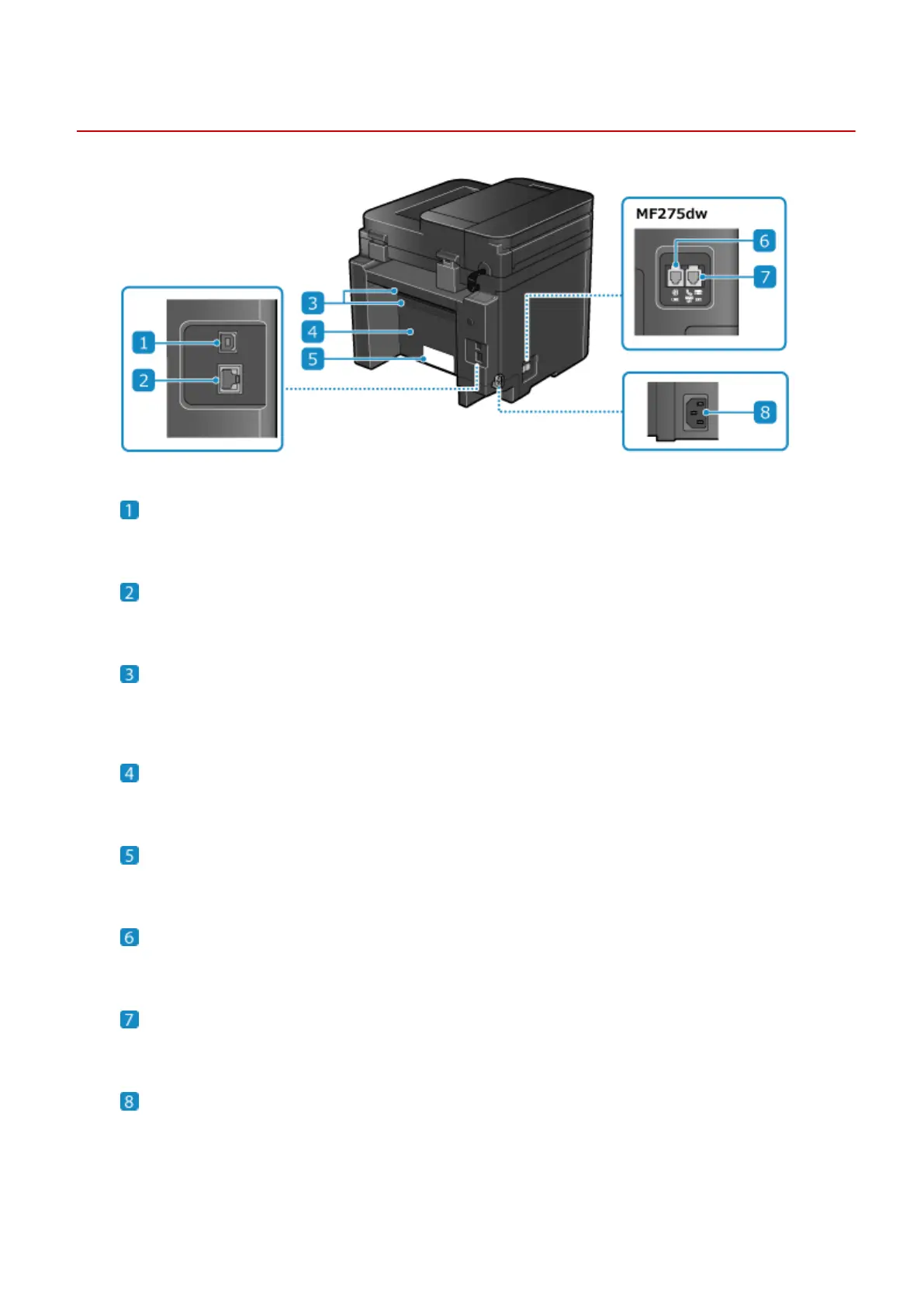
Rear Side
94LS-007
USB port (for computer connection)
Y
ou can connect a computer to the USB port using a commercial USB cable.
LAN port
Y
ou can connect the machine to a wired LAN using a commercial Ethernet cable connected to the LAN port.
Ventilation slots
Air inside the machine is r
eleased through the ventilation slots to cool down the inside of the machine.
Do not place objects next to the ventilation slots, as this can prevent ventilation.
Rear cover
Open the r
ear cover when a paper jam occurs inside the machine.
Rating label
This label sho
ws the serial number, which is needed when making inquiries about the machine.
Telephone line jack (LINE)
Use the supplied telephone cor
d to connect the machine to the telephone line.
External telephone jack (EXT.)
Connect a commer
cial telephone to this jack.
Power socket
Connect the po
wer cord to the power socket.
About the Machine
11











 To Next Page