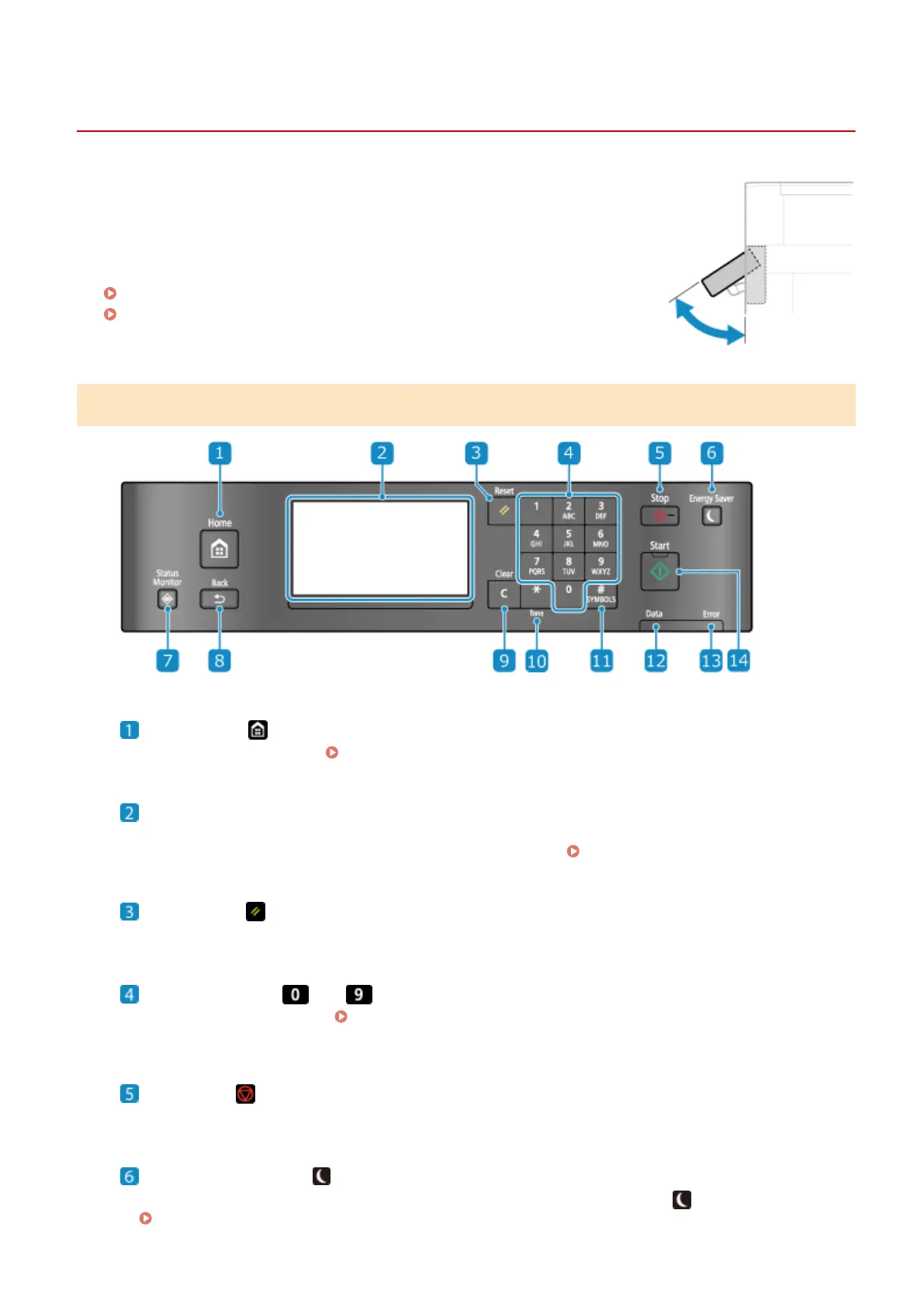
Operation Panel
94LS-009
Use the operation panel to operate the machine and congur
e the settings.
If the display is dicult to see, adjust the angle of the operation panel, as shown on
the right. (Touch Panel Model, MF273dw)
Operation Panel of Touch Panel Model(P. 13)
Operation Panel of 5 Lines LCD Model(P. 15)
Operation Panel of Touch Panel Model
Home key ( )
Displays the [Home] scr
een.
[Home] Screen(P. 113)
Display
Displays the scr
eens for operating the functions, usage, messages, and other information. This touch panel
can be operated by directly touching the screen with your nger.
Using the Operation Panel(P. 109)
Reset Key ( )
Clears the settings and r
eturns the printer to its previous status.
Numeric keys ( to )
Enter numbers or char
acters.
Entering Characters Using the Operation Panel (Touch Panel Model)
(P
. 122)
Stop key ( )
Cancels printing and other oper
ations.
Energy Saver key ( )
Puts the machine into sleep mode to r
educe power consumption. In sleep mode,
lights up yellow-green.
Reducing Power Consumption (Sleep Mode)(P. 107)
About the Machine
13











 To Next Page