Registering Non-standard Size Paper (Custom Paper)
94LS-035
Custom paper is non-standar
d size paper whose side lengths can be freely dened within the range supported by the
machine.
You can register sizes when frequently using specic non-standard size paper. You can call up the paper on the size
input screen, saving you the trouble of entering the size.
You can register up to three custom sizes.
This section describes how to register the settings using the operation panel.
You can also register the settings using Remote UI from a computer.
Managing the Machine from a Computer
(Remote UI)
(P. 349)
Touch Panel Model(P. 145)
5 Lines LCD Model(P. 146)
Touch Panel Model
1
On the operation panel, press [Paper Set.] in the [Home] screen.
[Home]
Scr
een(P. 113)
2
Press [Register Custom Paper].
➠ The [Register Custom Paper] scr
een is displayed.
3
Select the registration number.
If you have selected the registered number, continue on to select [Edit].
4
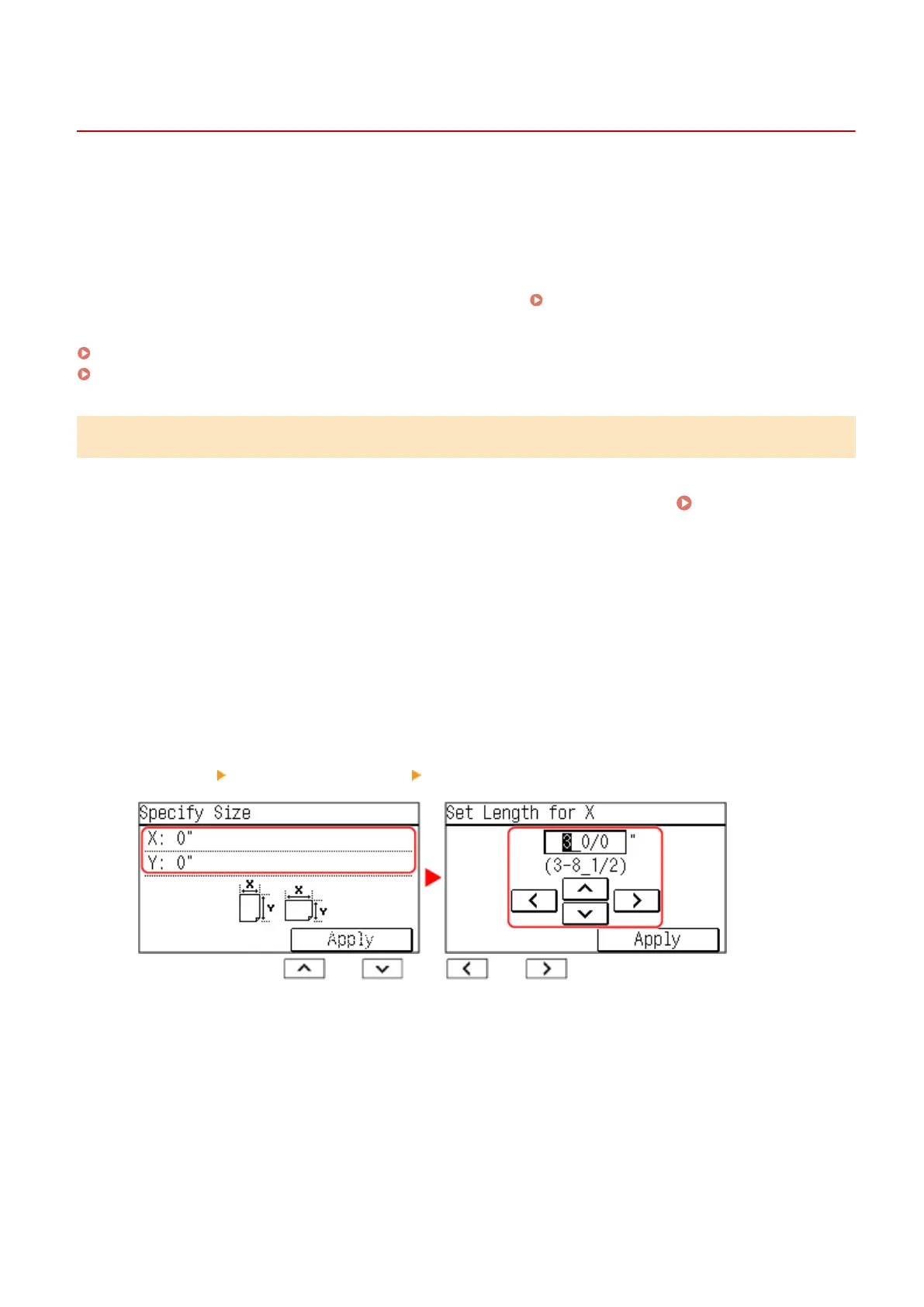
Press [x] enter the value in [x] press [Apply].
Enter the value using and , with and to move the cursor between the digits for
inputting whole numbers and fr
actions.
5
Enter the value in [y] in the same way as [x].
6
Press [Apply].
7
Select the type of the paper.
Basic Operations
145











 To Next Page