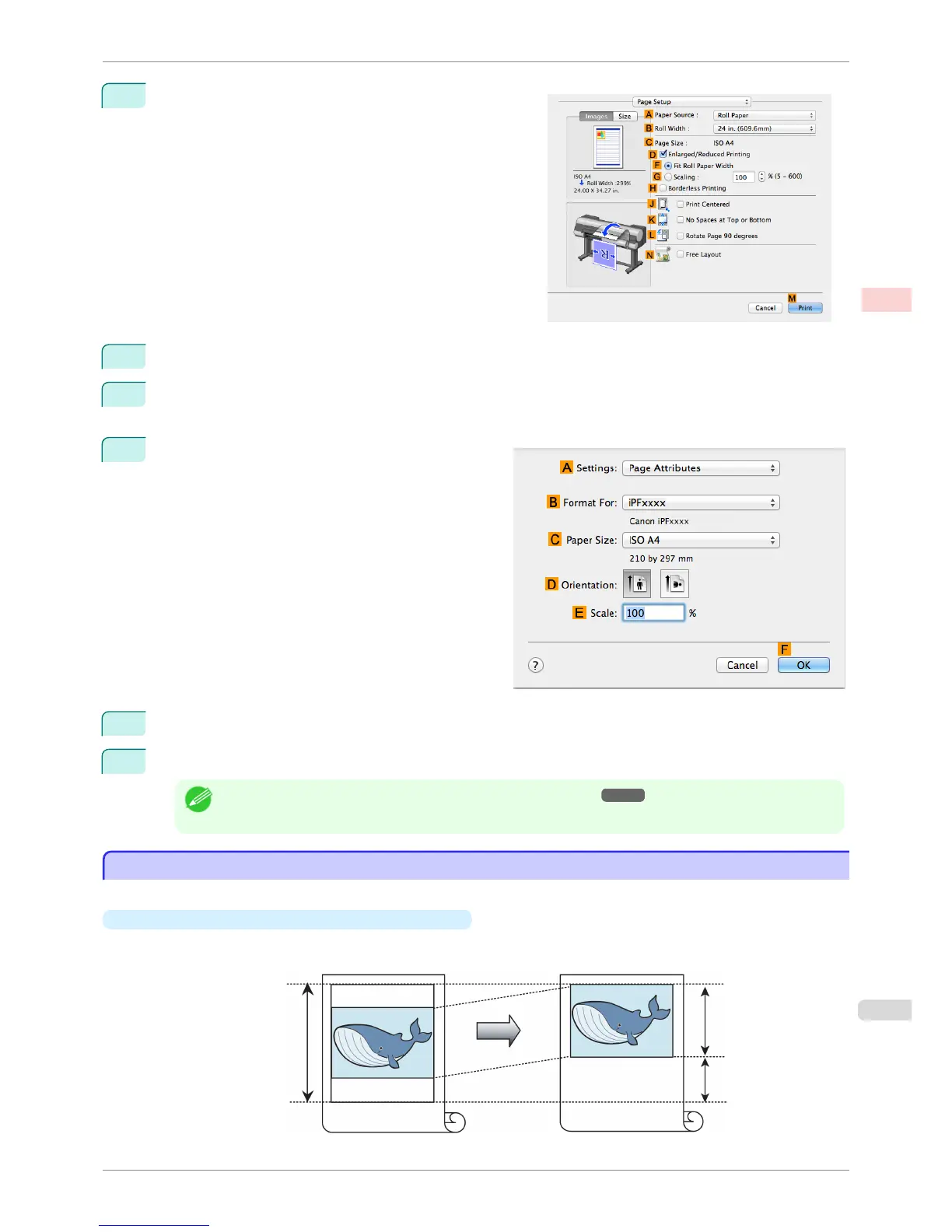
7
Access the Page Setup pane.
8
Select and click a roll paper in the A Paper Source list.
9
Select the paper width of the roll loaded in the printer for B Roll Width. In this case, ISO A3/A4 (297.0mm)
is selected.
10
Make sure the C Page Size setting matches the orig-
inal size as selected in C Paper Size in the Page At-
tributes dialog box—in this case, ISO A4.
11
Select the L Rotate Page 90 degrees check box.
12
Confirm the print settings, and then click M Print to start printing.
Note
• For tips on confirming print settings, see "Confirming Print Settings ." ➔ P.321
Conserving Roll Paper by Printing Originals Without Top and Bottom Margins
Conserving Roll Paper by Printing Originals Without Top and Bottom Margins
You can conserve roll paper by specifying particular settings as suitable for your original.
•
No Spaces at Top or Bottom (Conserve Paper)
You can print without feeding the paper for blank portions of originals if there are top and bottom margins in
originals. This enables you to conserve as much paper as the size of the margins.
iPF8400S
Conserving Roll Paper by Printing Originals Without Top and Bottom Margins
User's Guide
Enhanced Printing Options Conserving roll paper
131














 To Next Page