Setting Item Details
Pattern Size To increase the precision of the color check, we recommend that you configure the same
setting as when Auto Adjust (High Precision) was executed in color calibration.
Calibration Select this check box to execute color calibration if the result of the color check exceeds the
value of ΔE configured in the Color Check Settings dialog box.
4
is displayed at the bottom left of the Color Measurement sheet.
This completes configuring the color check schedule.
Registering Execution Logs in Favorites
Registering Execution Logs in Favorites
You can register frequently used execution logs in favorites for Acquire Color Measurement Data. Registering an
operation in favorites allows you to attach a separate name for easily recalling the operation.
Note
• This step can be executed when a printer that has a spectrophotometer unit installed is selected.
• You can register up to 30 execution logs in the favorites.
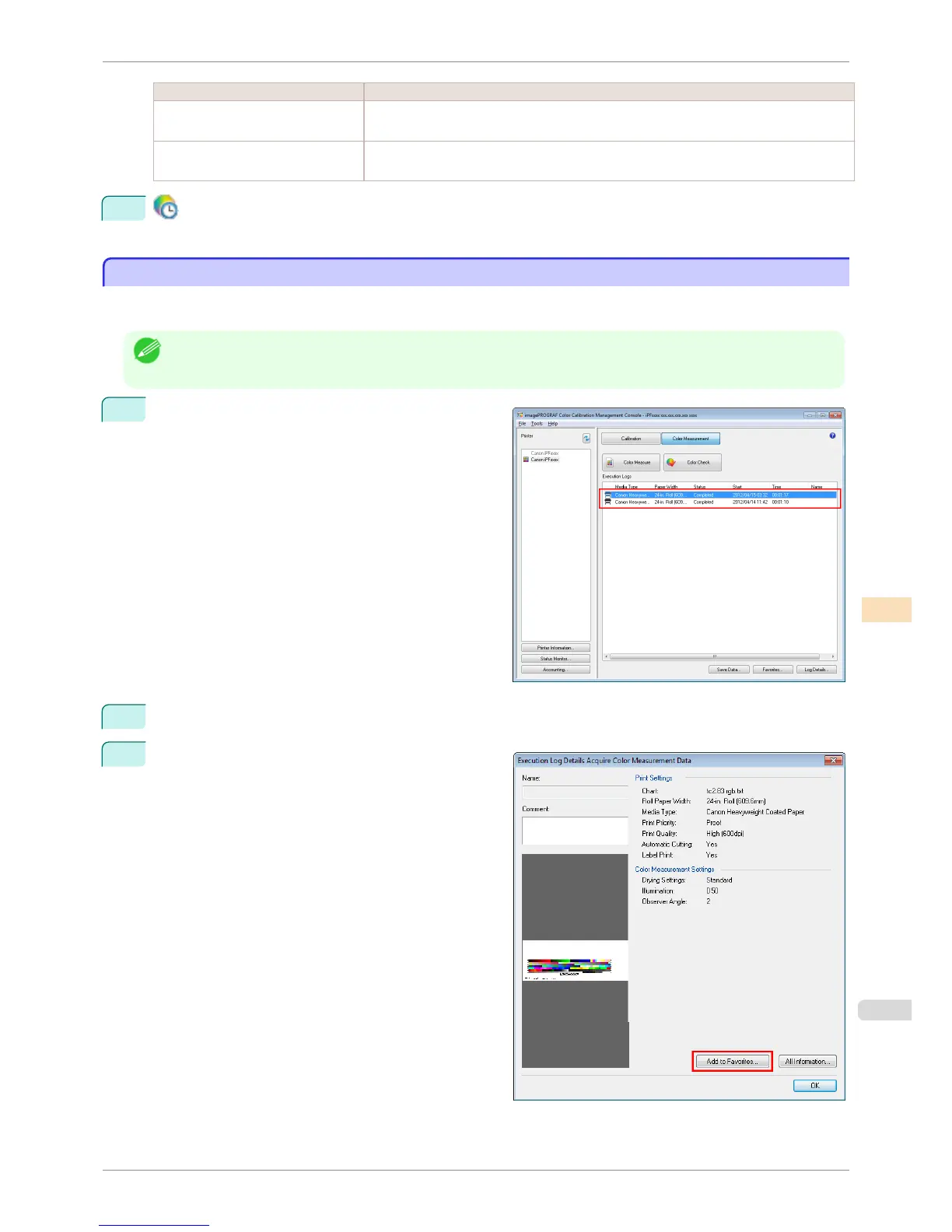
1
Select the execution log to register in favorites in Ex-
ecution Logs in the main window (Color Measure-
ment sheet).
2
Click the Log Details button.
3
Click the Add to Favorites button in the Execution
Log Details dialog box.
iPF8400S
Registering Execution Logs in Favorites
User's Guide
Color Management Color Calibration Management Console (Windows)
771














 To Next Page