Handling rolls
Handling rolls
Attaching the Roll Holder to Rolls ........................................................................................................................... 469
Loading Rolls in the Printer ........................................................................................................................................ 471
Changing the Type of Paper ..................................................................................................................................... 475
Specifying the Paper Length ..................................................................................................................................... 477
Removing the Roll from the Printer ....................................................................................................................... 477
Removing the Roll Holder from Rolls .................................................................................................................... 479
➔ Clearing Jammed Roll Paper .............................................................................................................................. 853
Feeding Roll Paper Manually ..................................................................................................................................... 481
Keeping Track of the Amount of Roll Paper Left ............................................................................................ 481
Specifying the Ink Drying Time for Rolls ............................................................................................................. 482
Specifying the Cutting Method for Rolls ............................................................................................................. 483
Cutting the Leading Edge of Roll Paper Automatically ................................................................................. 489
Reducing Dust from Cutting Rolls .......................................................................................................................... 491
Roll Holder Set ................................................................................................................................................................. 620
Attaching the Roll Holder to Rolls
Attaching the Roll Holder to Rolls
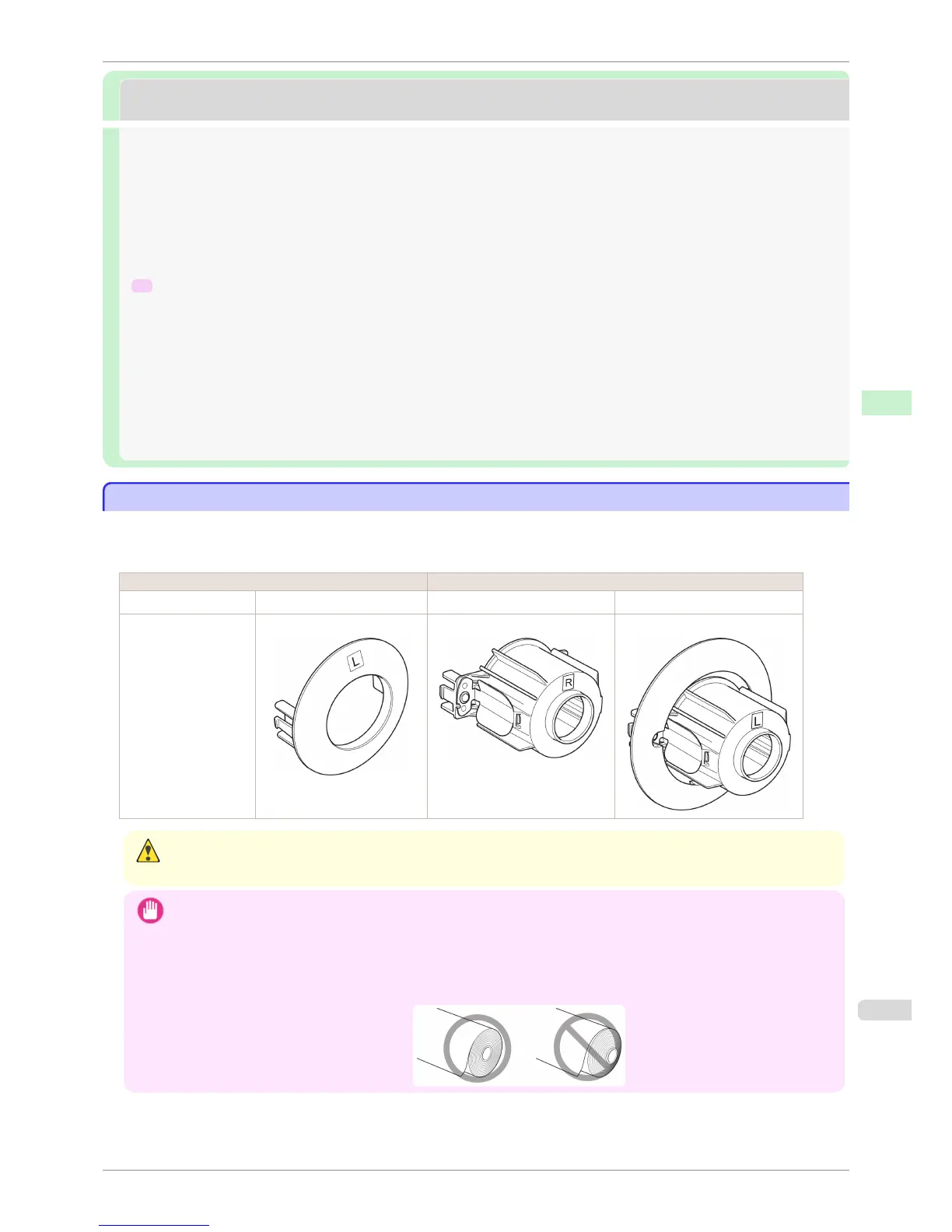
When printing on rolls, attach the Roll Holder to the roll.
Rolls have a two- or three-inch paper core. Use the correct attachment for the paper core. The printer comes
equipped with the 2-Inch Paper Core Attachment installed.
Using Rolls with a 2-inch Paper Core Using Rolls with a 3-inch Paper Core
Roll Holder Side Holder Stopper Side Roll Holder Side Holder Stopper Side
No Attachment Needed 2-Inch Paper Core Attachment 3-Inch Paper Core Attachment #1 3-Inch Paper Core Attachment #2
Caution
• Set the roll on a table or other flat surface so that it does not roll or fall. Rolls are heavy, and dropping a roll may cause
injury.
Important
• When handling the roll, be careful not to soil the printing surface. This may affect the printing quality. We recommend
wearing clean cloth gloves when handling rolls to protect the printing surface.
• Use scissors or a cutting tool to cut the edge of the roll paper if it is uneven, dirty, or has tape residue. Otherwise, it may
cause feeding problems and affect the printing quality. Be careful not to cut through any barcodes printed on the roll.
• Align the edges of the paper on both ends of the roll. Misalignment may cause feeding problems.
iPF8400S
Attaching the Roll Holder to Rolls
User's Guide
Handling and Use of Paper Handling rolls
469














 To Next Page