Scheduling Color Check
Scheduling Color Check
You can configure a schedule to automatically perform color check at the specified dates and times.
Once configured, the color check is executed on the paper that is loaded at the specified date and time.
You can also configure whether or not to execute color calibration if the result of the color check exceeds the color
check threshold value.
Important
• The color check is not executed at the designated date and time if the printer is turned off.
• If the schedule settings are configured while the printer is in sleep mode, the schedule settings are applied when the
printer recovers from sleep mode. The color check will not be executed by the configured schedule unless the printer
recovers from sleep mode at least once.
Note
• This step can be executed when a printer that has a spectrophotometer unit installed is selected.
1
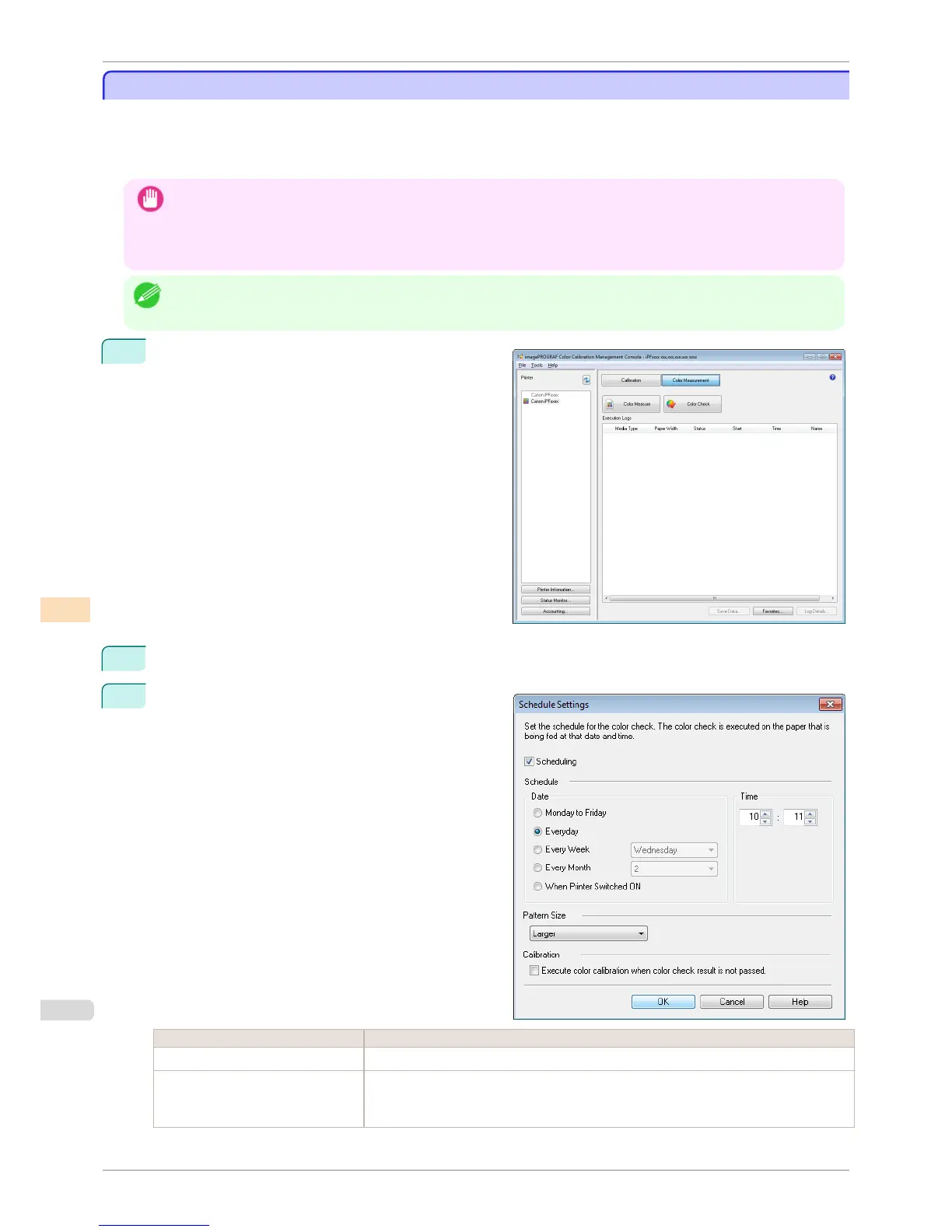
Open the Color Measurement sheet.
2
Select Schedule Settings from the Tools menu.
3
In the Schedule Settings dialog box, configure the
settings such as the date and time to execute the col-
or check and click the OK button.
Setting Item Details
Scheduling Select this check box to execute a color check at the date and time specified in Schedule.
Schedule Sets the date and time to execute the color check.
If When Printer Switched ON is selected, a color check is executed when the printer is
turned on.
Scheduling Color Check
iPF8400S
User's Guide
Color Management Color Calibration Management Console (Windows)
770














 To Next Page