Note
• If you specify the same position for multiple items, the items are printed from left to right in this order: date, user
name, and page number.
• When you print multiple pages per sheet using Page Layout Printing or similar functions, these items will be prin-
ted for each page.
Special Settings Dialog Box
Special Settings Dialog Box
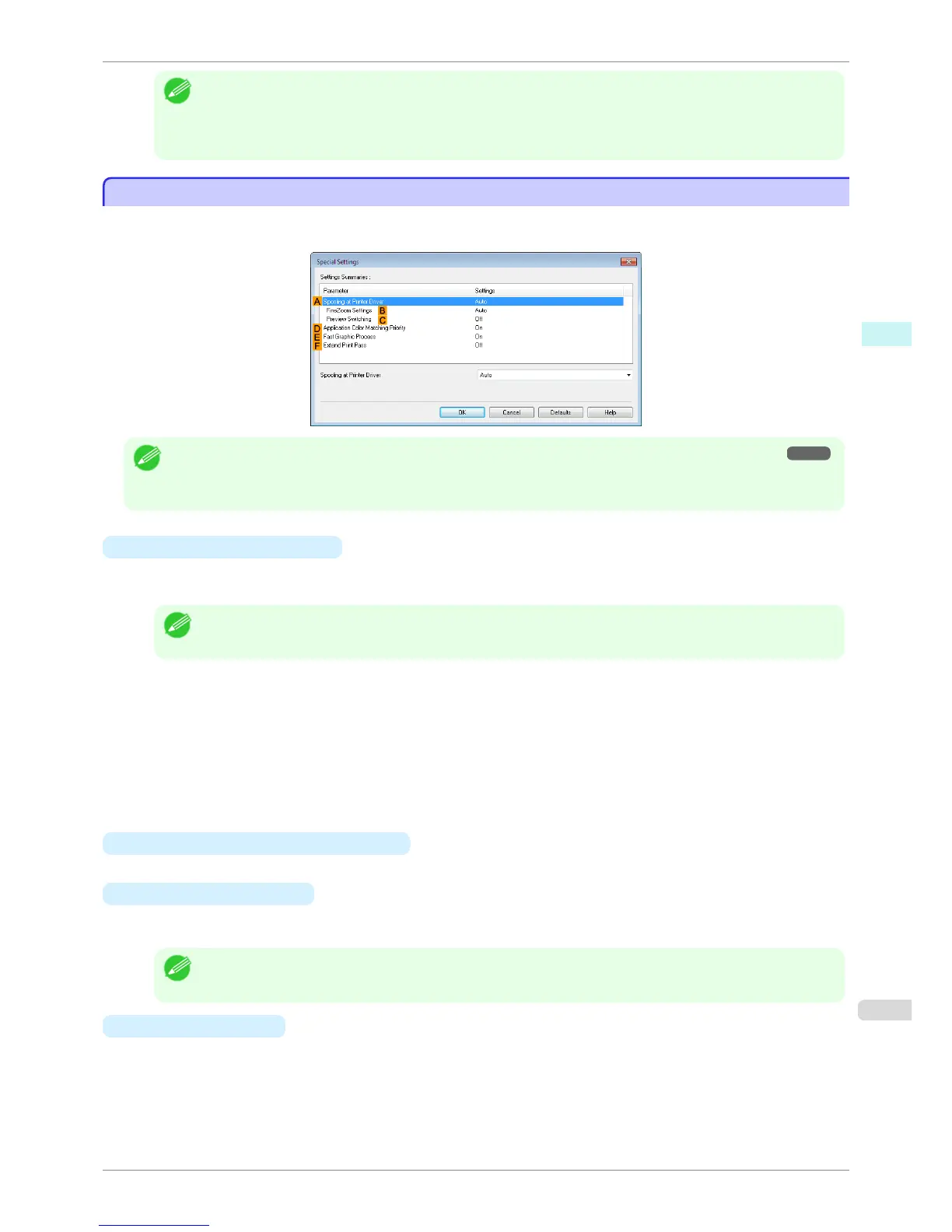
If the printing results are not as you expected, you can change how printing is processed in the Special Settings
dialog box.
Note
• To display the Special Settings dialog box, on the Layout sheet, click Special Settings. (See "Layout Sheet .") ➔ P.175
• Click the processing method for Parameter within the Settings Summaries frame to display a list of the setting details
under the frame.
• A Spooling at Printer Driver
Sets whether or not print jobs are spooled in the printer driver and processed by PageComposer.
Printing results may be improved in some cases by setting this to No or No (EMF Spooling).
Note
• When set to No or No (EMF Spooling), functions such as Page Layout, Watermark, Reverse Order, Page Op-
tions, FineZoom Settings, and Preview Switchingcan no longer be used.
•
B FineZoom Settings
This function is used in large-format printing.
If it is set to Yes, problems in the printing may be improved.
If it is set to No, image distortions such as fine lines disappearing may be improved.
•
C Preview Switching
When this setting is turned on, PageComposer starts when printing is performed with the Open Preview
When Print Job Starts check box selected in the Main sheet.
• D
Application Color Matching Priority
When this is on, you can give applications priority in color management.
• E
Fast Graphic Process
Turning this setting on may help produce the expected results if image colors are inconsistent in printed docu-
ments or if lines are printed in varying thicknesses.
Note
• This function cannot be used on 64-bit version of Windows.
• F
Extend print pass
If you are concerned about uneven colors in the print result of Highest quality, selecting this option may im-
prove printing results. However, printing may take longer.
iPF8400S
Special Settings Dialog Box
User's Guide
Windows Software Printer Driver
177














 To Next Page