Printer parts
Printer parts
Front .................................................................................................................................................................................... 608
Back ..................................................................................................................................................................................... 609
Top Cover (Inside) .......................................................................................................................................................... 610
Carriage .............................................................................................................................................................................. 611
Ink Tank Cover (Inside) ................................................................................................................................................ 612
Stand ................................................................................................................................................................................... 613
Parts of the Output Stacker ...................................................................................................................................... 499
Media Take-up Unit(Optional) ................................................................................................................................... 614
Control Panel .................................................................................................................................................................... 574
Front
Front
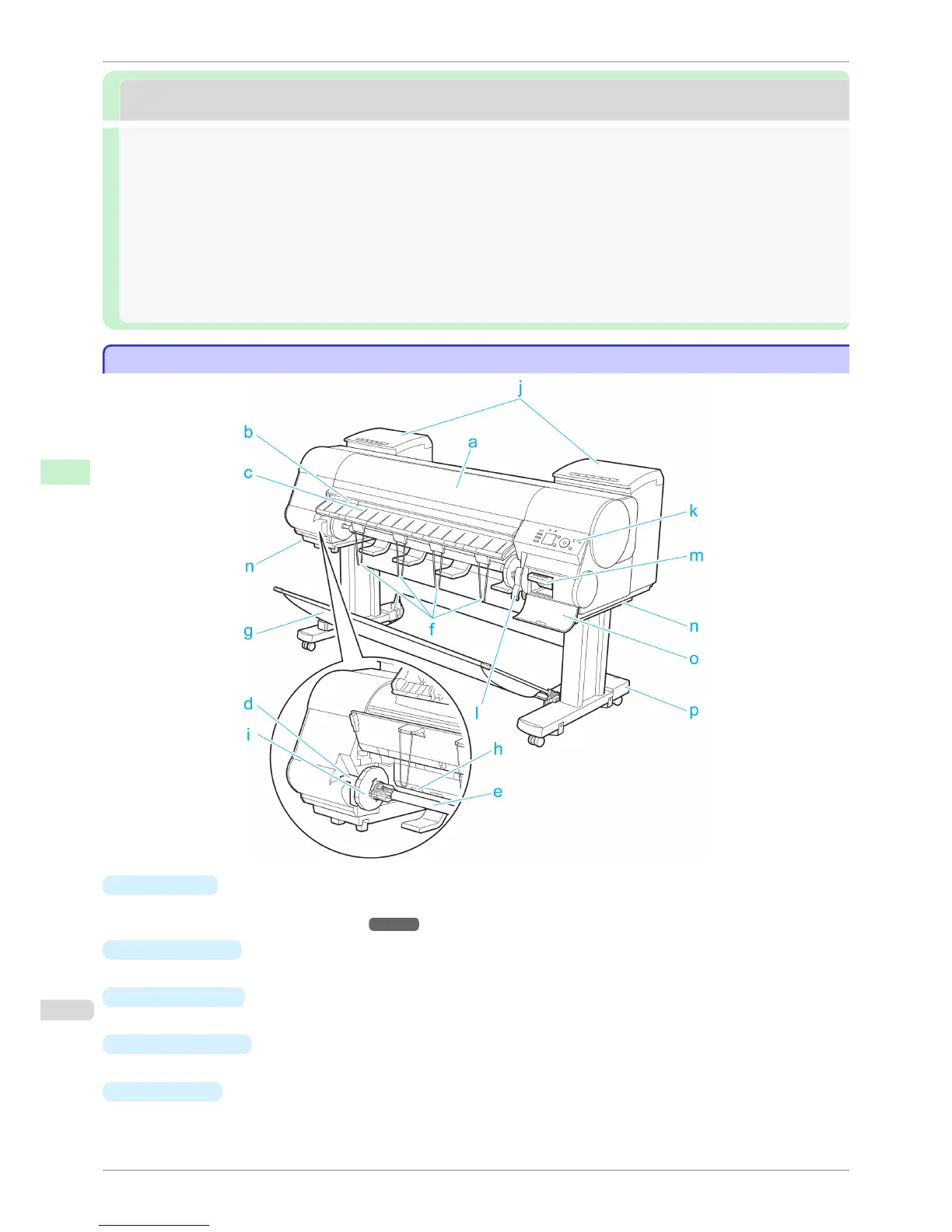
a
Top Cover
Open this cover to install the Printhead, load paper, and remove any jammed paper from inside the printer as
needed. (See "Top Cover (Inside).")
➔P.610
b
Cutter Groove
Paper is cut (using the cutter or manually with scissors) over this groove.
c
Ejection Guide
Guides printed documents as they are ejected. Raise the guide when loading a roll.
d
Roll Holder Slot
Slide the Roll Holder into this slot.
e
Roll Holder
Load the roll on this holder.
Front
iPF8400S
User's Guide
Printer Parts Printer parts
608














 To Next Page