Calibration Sheet
Calibration Sheet
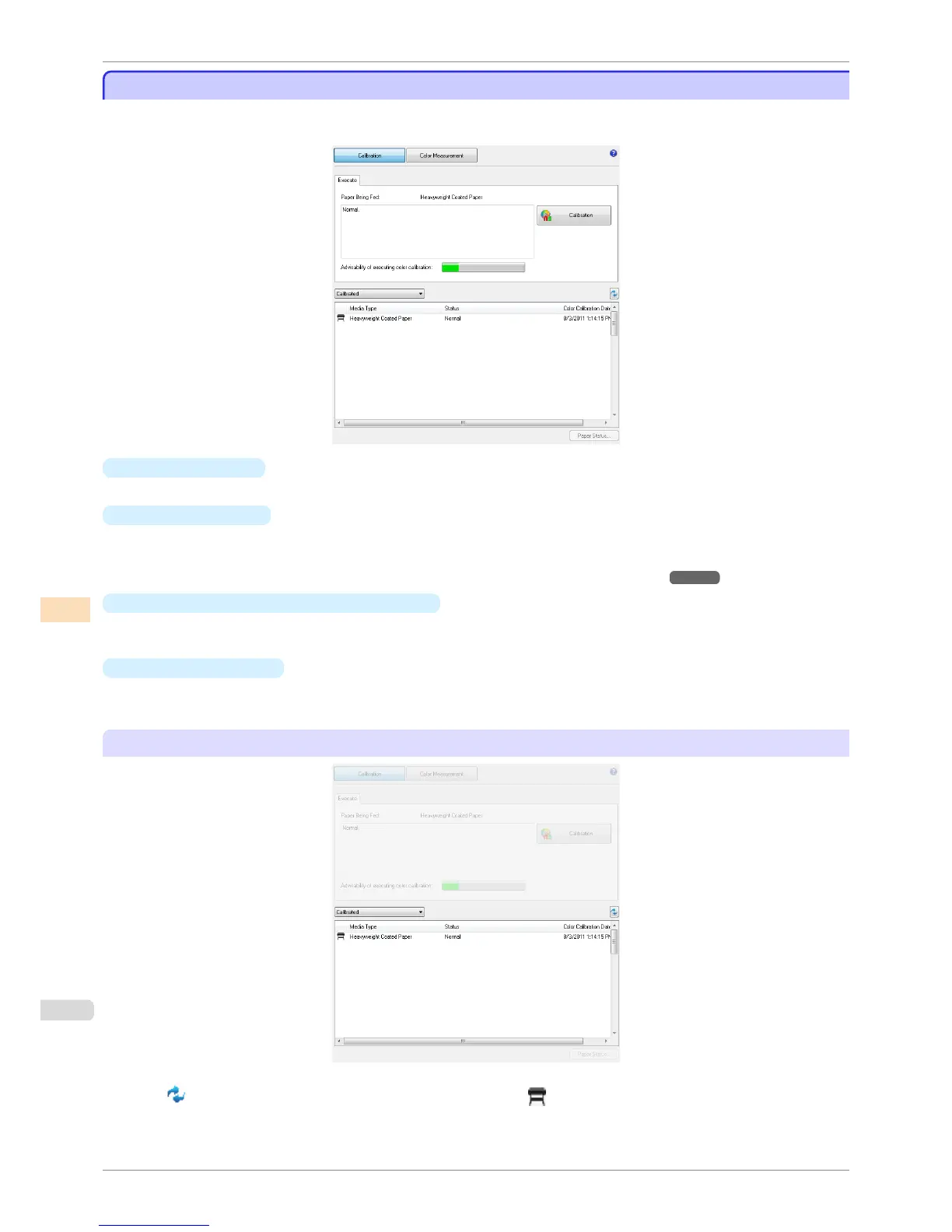
This sheet allows you to execute color calibration and check the color calibration status of the printer selected in
the Printer list.
•
Paper Being Fed
Displays the media type being fed in the printer.
•
Calibration button
Click this button to display the Execute Color Calibration dialog box.
Executes color calibration on the selected printer.
For the procedure for executing color calibration, see "Executing Color Calibration." ➔ P.757
•
Advisability of executing color calibration
Displays the status until it is recommended that you execute color calibration. The progress bar grows until the
time when calibration is recommended.
•
Paper Status button
Click this button to display the Paper Status dialog box.
This allows you to check the color calibration and color check execution logs for the selected paper.
Color calibration status for each paper
Click the button to refresh the list with the latest information. is displayed on the paper currently being fed
in the printer.
The paper types displayed in the list are as follows.
Calibration Sheet
iPF8400S
User's Guide
Color Management Color Calibration Management Console (Windows)
752














 To Next Page