Storing the Output Stacker
Storing the Output Stacker
Stow the Output Stacker if you will use the Media Take-up Unit or if you will not use the Output Stacker for an ex-
tended period.
1
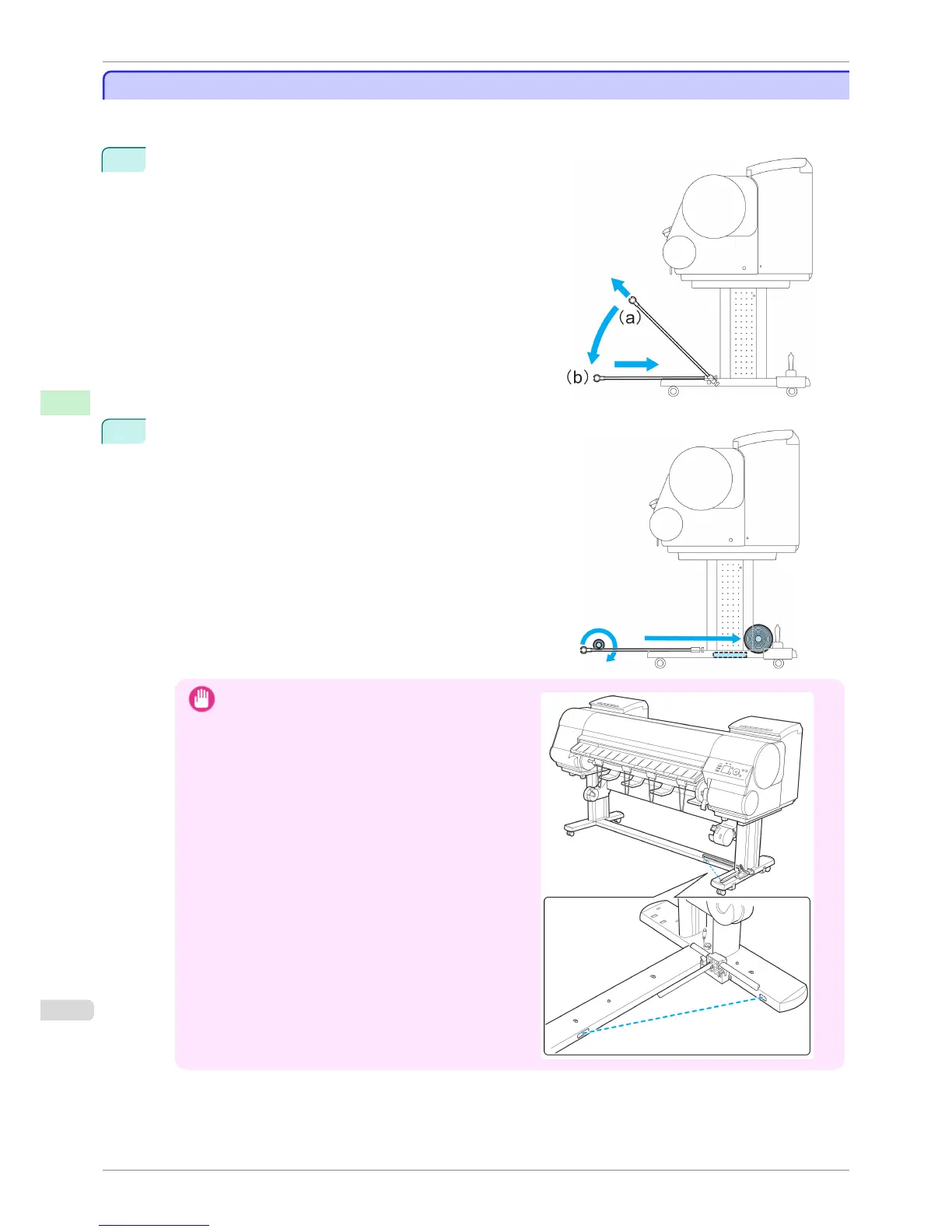
When the Output Stacker is in the position used when storing
printed documents (a), lift the front Basket Rod gently to re-
lease the lock, lower the stacker toward the front (b), and
push it all the way back.
2
Remove the front Basket Rod from the left and right basket
arms. Roll up the Basket Cloth and put it at the back of the Bot-
tom Stand Stay.
Important
•
When using the Media Take-up Unit, position the Bas-
ket Cloth and Basket Rod so they do not interfere with
the Media Take-up Sensor (wave portion). This may
impair operation.
Storing the Output Stacker
iPF8400S
User's Guide
Handling and Use of Paper Output Stacker
504














 To Next Page