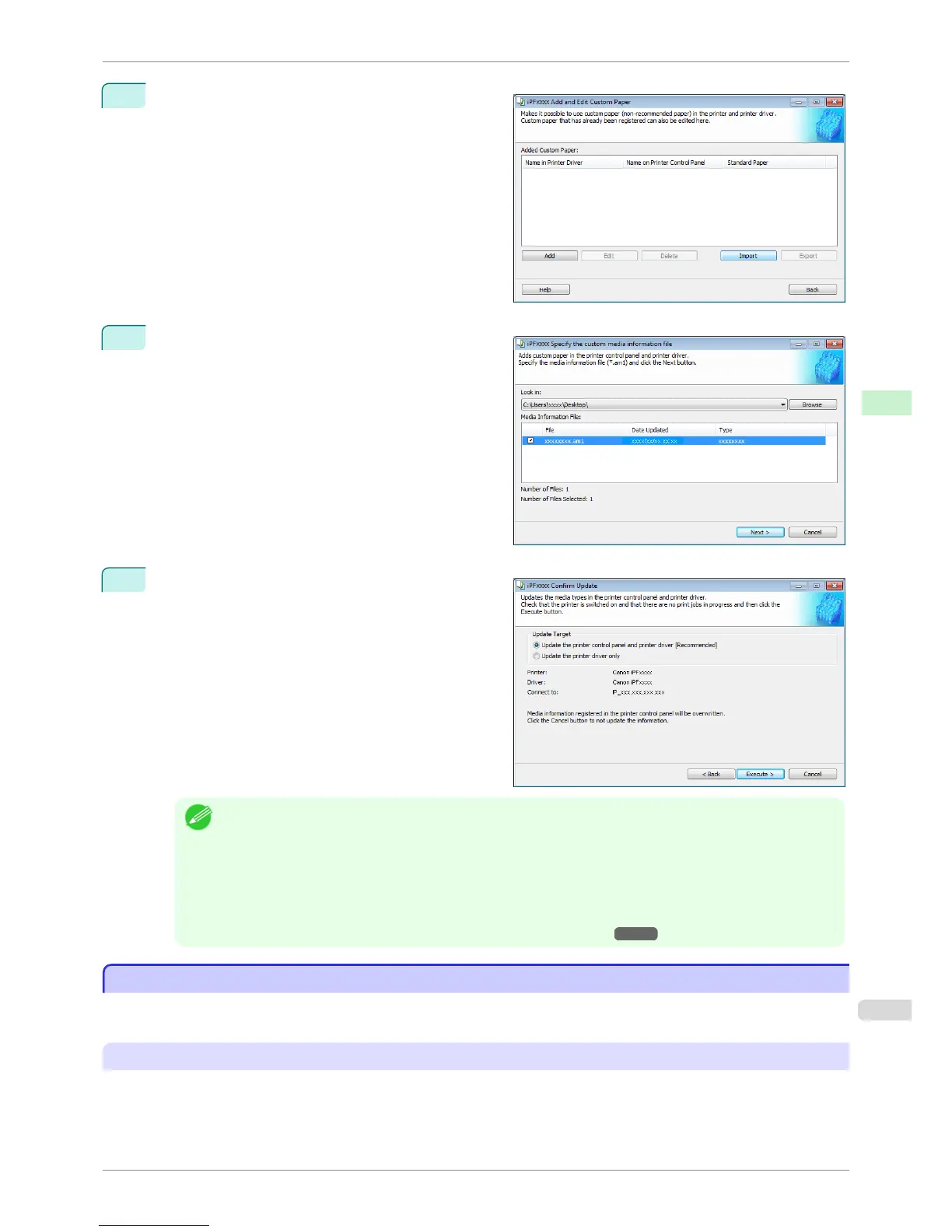
2
Click the Import button.
3
Select the Custom Media Information File (.am1 file)
to import.
4
The Confirm Update dialog box opens.
Click the Execute button.
Note
• You should normally select Update the printer control panel and printer driver.
The custom paper is added to the control panel of the printer and to the printer driver of the PC you are using.
• When the custom paper is correctly added to the printer driver, the name of the added custom paper is dis-
played in the Edit Media Types dialog box that is opened by Add Genuine Paper in the Media Configuration
Tool window.
•
After importing custom paper, adjust the paper feed amount for that custom paper. For details on the method for
adjusting the paper feed amount, see "Automatic Banding Adjustment." ➔ P.719
Warnings
Warnings
Take note of the following warnings when added custom paper other than Canon genuine paper and feed con-
firmed paper to the printer driver and the printer itself.
About the Cutter
•
Depending on the paper, there are types that cannot be cut by the cutter unit, and types that speed deteriora-
tion of the blade and cause damage to the cutter. For thick paper, hard paper, etc. do not use the cutter unit,
and instead cut the roll paper using scissors, etc. after printing. In this case, select User Cut as the Automatic
Cutting Settings in the Roll Paper Settings dialog box.
iPF8400S
Warnings
User's Guide
Handling and Use of Paper Media Configuration Tool (Windows)
541














 To Next Page