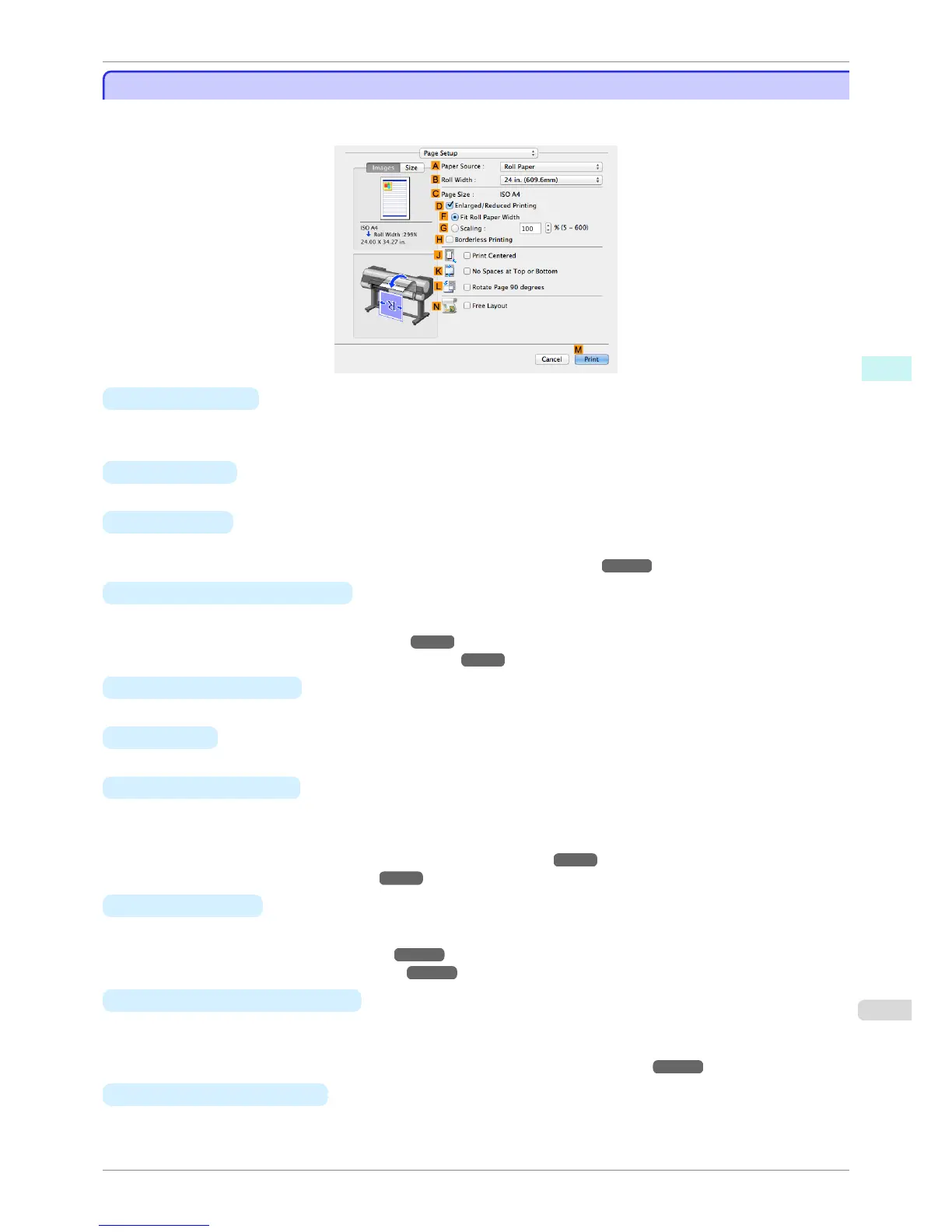
Page Setup Pane
Page Setup Pane
The following settings are available on the Page Setup pane. For details on settings items, refer to the printer driv-
er help.
• A Paper Source
Choose how paper is supplied.
Options displayed in the list vary depending on the selection in A Media Type in the Main pane.
• B Roll Width
Select the paper width of the roll loaded in the printer.
• C Page Size
Displays the size of the original, as specified in the page settings of the application.
For details on page sizes available in the application, see "Paper Sizes." ➔ P.458
• D Enlarged/Reduced Printing
Select this checkbox to choose the following options.
•
Resizing Originals to Fit the Roll Width ➔ P.65
•
Resizing Originals by Entering a Scaling Value ➔ P.69
• F Fit Roll Paper Width
Resizes the document image to match the roll width.
• G Scaling
Resizes the document image based on a specified scaling value. Enter a value in a range of 5–600.
• H Borderless Printing
Borderless printing is available if roll paper is selected in the A Paper Source list.
Activate this setting for borderless printing to match the size and width of the paper.
•
Borderless Printing by Resizing Originals to Fit the Roll Width ➔ P.87
•
Borderless Printing at Actual Size ➔ P.78
• J
Print Centered
Select this checkbox to print document images in the center of the paper.
•
Printing Originals Centered on Rolls ➔ P.119
•
Printing Originals Centered on Sheets ➔ P.123
• K
No Spaces at Top or Bottom
Select this checkbox to print the next image skipping blank areas above and below printable data in docu-
ments, which enables you to conserve the paper.
•
Conserving Roll Paper by Printing Originals Without Top and Bottom Margins ➔ P.131
• L
Rotate Page 90 degrees
Select this checkbox to rotate the document image by 90 degrees before printing.
iPF8400S
Page Setup Pane
User's Guide
Mac OS Software Printer Driver
335














 To Next Page