•
On
The Ink Tank is installed correctly.
•
Off
No Ink Tank is installed, or the ink level detection function is disabled.
•
Flashing Slowly
Not much ink is left.
•
Flashing Rapidly
Ink tank is empty.
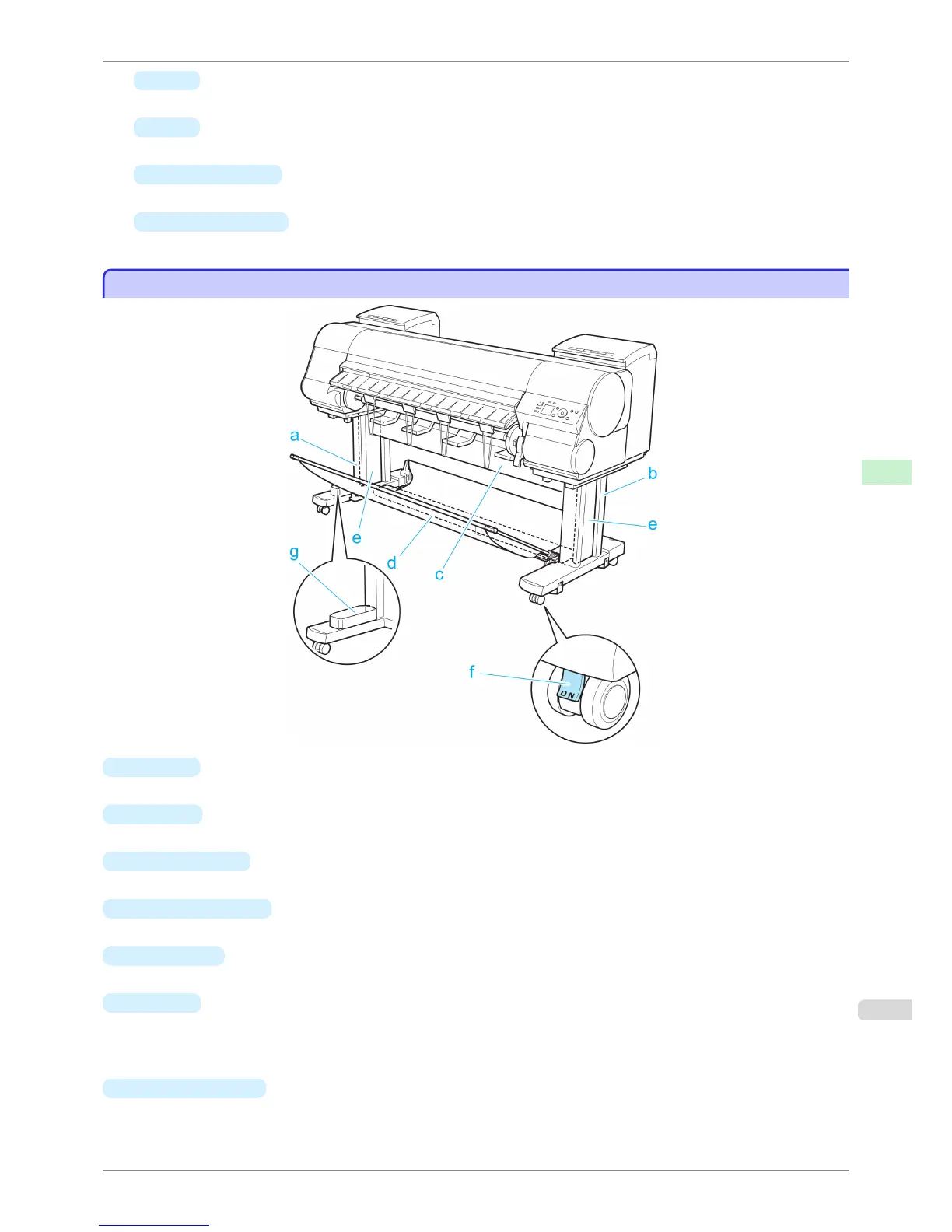
Stand
Stand
a
Stand L
The left leg of the Stand.
b
Stand R
The right leg of the Stand.
c
Top Stand Stay
Supports Stand L and Stand R. Attach the optional Media Take-up Unit to this part.
d
Bottom Stand Stay
Supports Stand L and Stand R.
e
Leg Covers
Covers for Stand L and Stand R.
f
Stopper
Locks the Stand casters.
Always release the Stopper before moving the printer. Moving the printer while the Stopper is locked may
scratch the casters or the floor.
g
Accessory Pocket
Stores printer accessories.
iPF8400S
Stand
User's Guide
Printer Parts Printer parts
613














 To Next Page