Important
• If you use paper other than genuine Canon paper and feed confirmed paper, Canon provides absolutely no guarantees
regarding print quality or paper feed properties. Refer to Paper Reference Guide for details on genuine Canon paper
and feed confirmed paper. (See "Displaying the Paper Reference Guide.") ➔ P.462
After loading the paper in the printer, select the media type in the control panel and printer driver and then perform
the printing. For the media type, you can select easily from existing settings or you can create and use settings for
the paper you are using.
Printing Using Existing Settings
You can print easily by selecting from existing settings provided in the printer control panel and printer driver. (See
"Printing on Paper Other Than Genuine Paper and feed confirmed Paper Using Existing Settings.") ➔ P.461
Printing Using Additional Settings
You can print by using the Add Custom Paper function in the Media Configuration Tool to create settings suitable
for the paper other than genuine paper and feed confirmed paper you are using and adding these settings as a
new media type to the printer control panel and printer driver. (See "Printing on Paper Other Than Genuine Paper
and feed confirmed Paper by Adding a Media Type.")
➔P.462
Printing on Paper Other Than Genuine Paper and feed confirmed Paper Using Existing Settings
Printing on Paper Other Than Genuine Paper and feed confirmed Paper Using Existing Settings
You can easily print on paper other than genuine Canon paper and feed confirmed paper without making complica-
ted settings by selecting existing settings provided in the printer control panel and printer driver depending on the
media type you are using. The existing settings consist of general-purpose paper settings provided for each media
type and special settings that allow you to select the amount of ink to use.
Important
• The genuine Canon paper settings provided in the printer control panel and printer driver are optimized for genuine Can-
on paper. If these settings are selected for printing on paper other than genuine Canon paper, the ink may bleed or the
printhead may rub against the paper. In order to easily print on paper other than genuine Canon paper and feed con-
firmed paper, we recommend that you select one of the following general-purpose paper settings or special settings.
Note
• For an overview of the media types, see "Types of Paper." ➔ P.458
• For details on how to select the media type in the control panel and printer driver, see "Types of Paper." ➔ P.458
Choosing General-Purpose Paper Settings
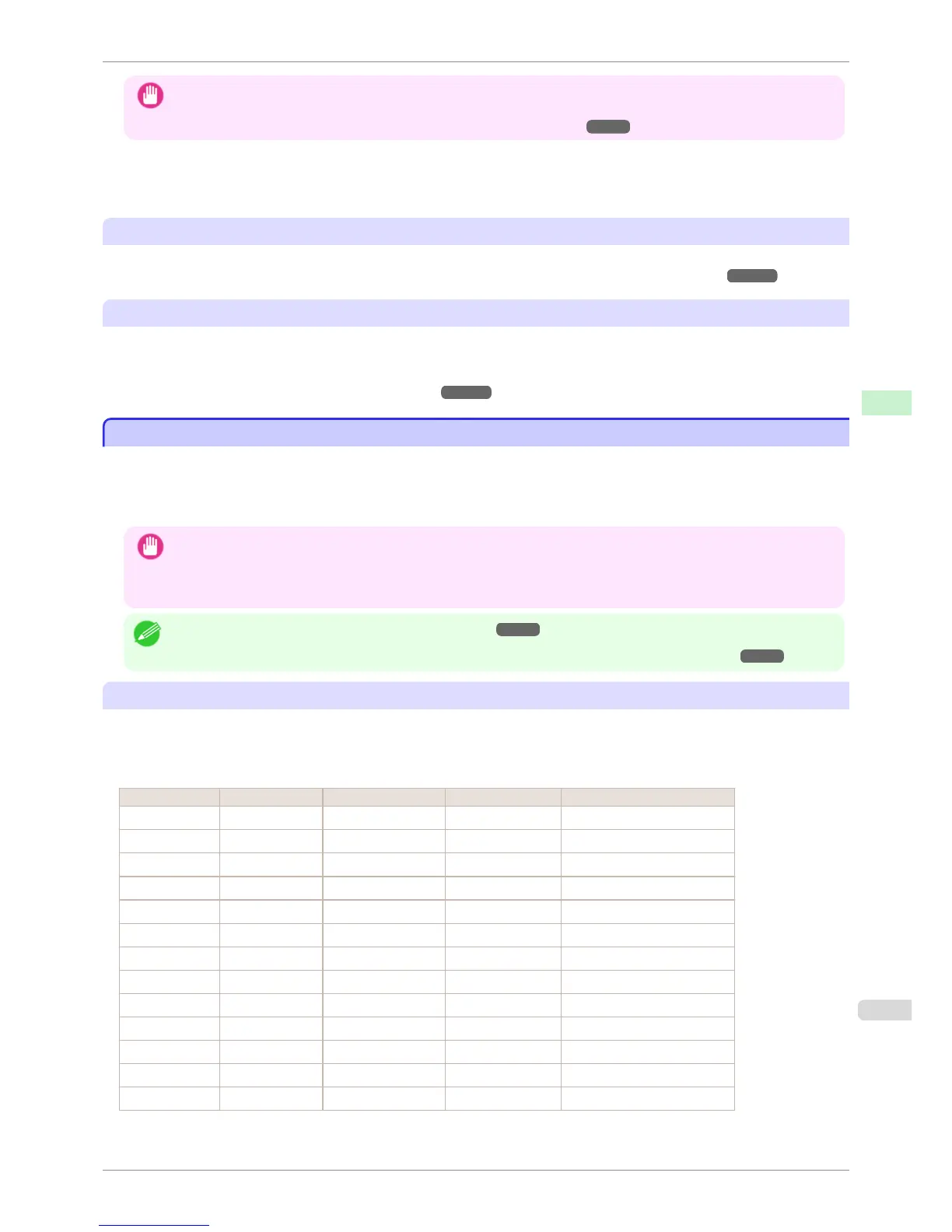
Since these settings anticipate a wide variety of paper other than genuine Canon paper and feed confirmed paper,
these settings will make it difficult for bleeding ink and the printhead rubbing to occur. Refer to the following table
for the relationships between the conditions of the paper other than genuine Canon paper and feed confirmed pa-
per and the media type to select.
Type Approximate weight Approximate thickness Printer control panel Printer driver
Plain Paper 70 g/m² 0.09 mm (0.0035 in.) Plain Paper Plain Paper
Coated Paper 90 g/m² 0.13 mm (0.0051 in.) LW. Coated Paper Lightweight Coated Paper
Coated Paper 170 g/m² 0.22 mm (0.0087 in.) HW. Coated Paper Heavyweight Coated Paper
Photo Paper 180 g/m² 0.18 mm (0.0071 in.) LW. Photo Paper Lightweight Photo Paper
Photo Paper 260 g/m² 0.26 mm (0.010 in.) HW. Photo Paper Heavyweight Photo Paper
Proof 80 g/m² 0.10 mm (0.0039 in.) News Proof Newsprint for Proofing
Art Paper 65 g/m² 0.15 mm (0.0059 in.) JPN Paper Washi Japanese Paper Washi
Art Paper 200 g/m² 0.35 mm (0.014 in.) HW. Art Paper Heavyweight Art Paper
Art Paper 300 g/m² 0.44 mm (0.017 in.) Ex HW. Art Paper Extra Heavyweight Art Paper
Sign/CAD Paper 470 g/m² 0.35 mm (0.014 in.) Bannr Vinyl Banner Vinyl
Sign/CAD Paper 300 g/m² 0.28 mm (0.011 in.) Adhesive Vinyl Adhesive Vinyl
Sign/CAD Paper 240 g/m² 0.18 mm (0.0071 in.) Glossy Film Glossy Film
Sign/CAD Paper 150 g/m² 0.11 mm (0.0043 in.) CAD Clear Film CAD Clear Film
iPF8400S
Printing on Paper Other Than Genuine Paper and feed confirmed Paper Using Existing Settings
User's Guide
Handling and Use of Paper Paper
461














 To Next Page