e
Basket Rod
Keeps Basket Arm R and Basket Arm L at the same angle.
f
Rod Holder
Holds the middle of the Basket Rod (cord side).
(See "Using the Output Stacker.")
➔P.500
Using the Output Stacker
Using the Output Stacker
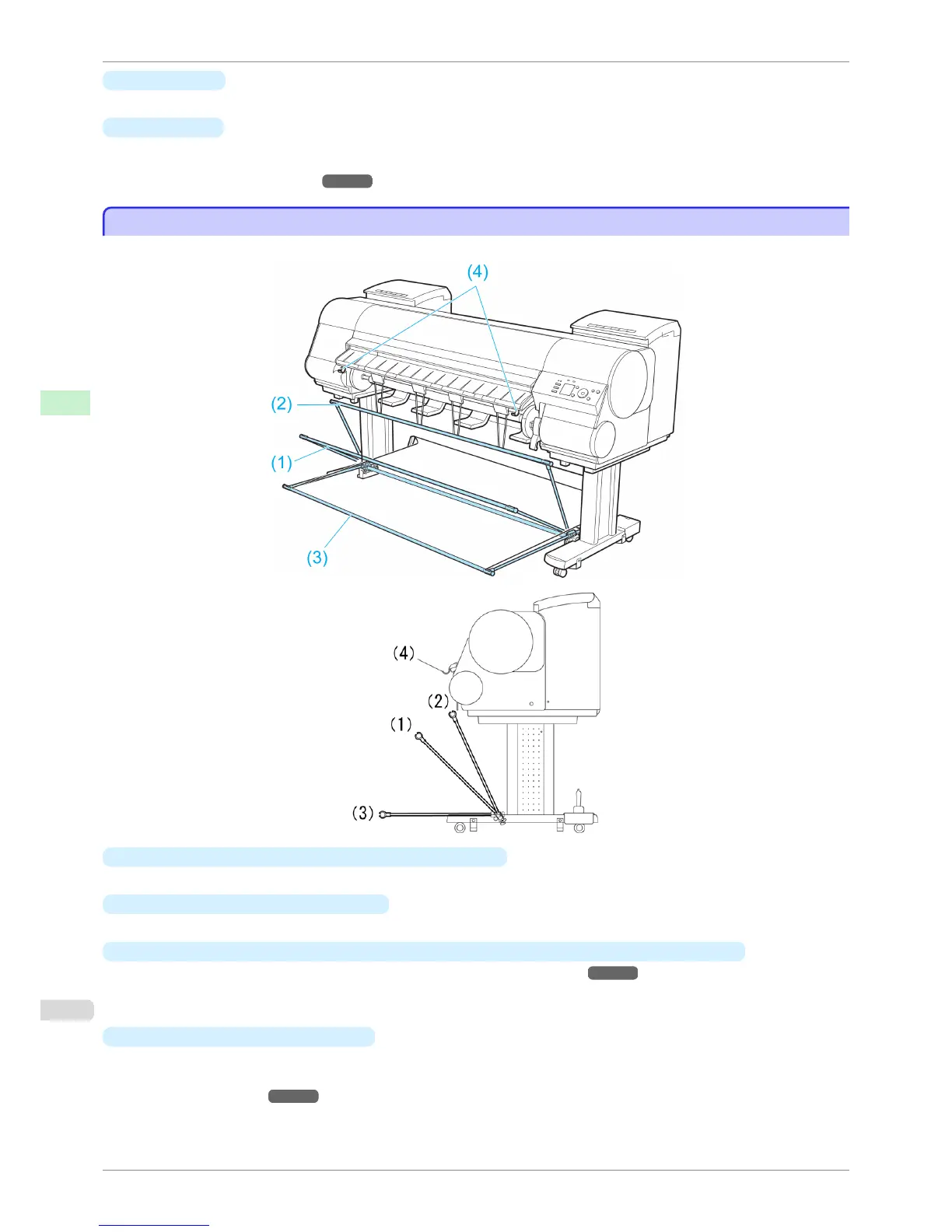
The Output Stacker can be held at four positions, as shown.
•
When storing printed documents on the Output Stacker
Use position (1).
•
When the Output Stacker is not used
Use position (2).
•
When the Media Take-up Unit is used, or when the Output Stacker is stored for long periods
Lower it to position (3) for storage. (See "Storing the Output Stacker.") ➔ P.504
When using the Output Stacker again after storage, reattach the Basket Rod on the front of the Output Stacker
to the tips of the left and right basket arms and pull it out completely.
•
When printing on large, stiff sheets
Use position (3).
Set it to position (4) when printing banners or when printing on delicate paper. (See "Using the output stacker
for ejection in front.") ➔ P.501
Using the Output Stacker
iPF8400S
User's Guide
Handling and Use of Paper Output Stacker
500














 To Next Page