This allows you to check the execution logs registered in the favorites.
•
Log Details button
Click this button to display the Execution Log Details dialog box.
This allows you to check the details of the selected execution log.
Changing the Printers Displayed in the Printer List
Changing the Printers Displayed in the Printer List
You can search for printers connected via the network or via USB and register them in the Printer list in the main
window or delete printers displayed in the Printer list.
Adding a Printer to the Printer List
1
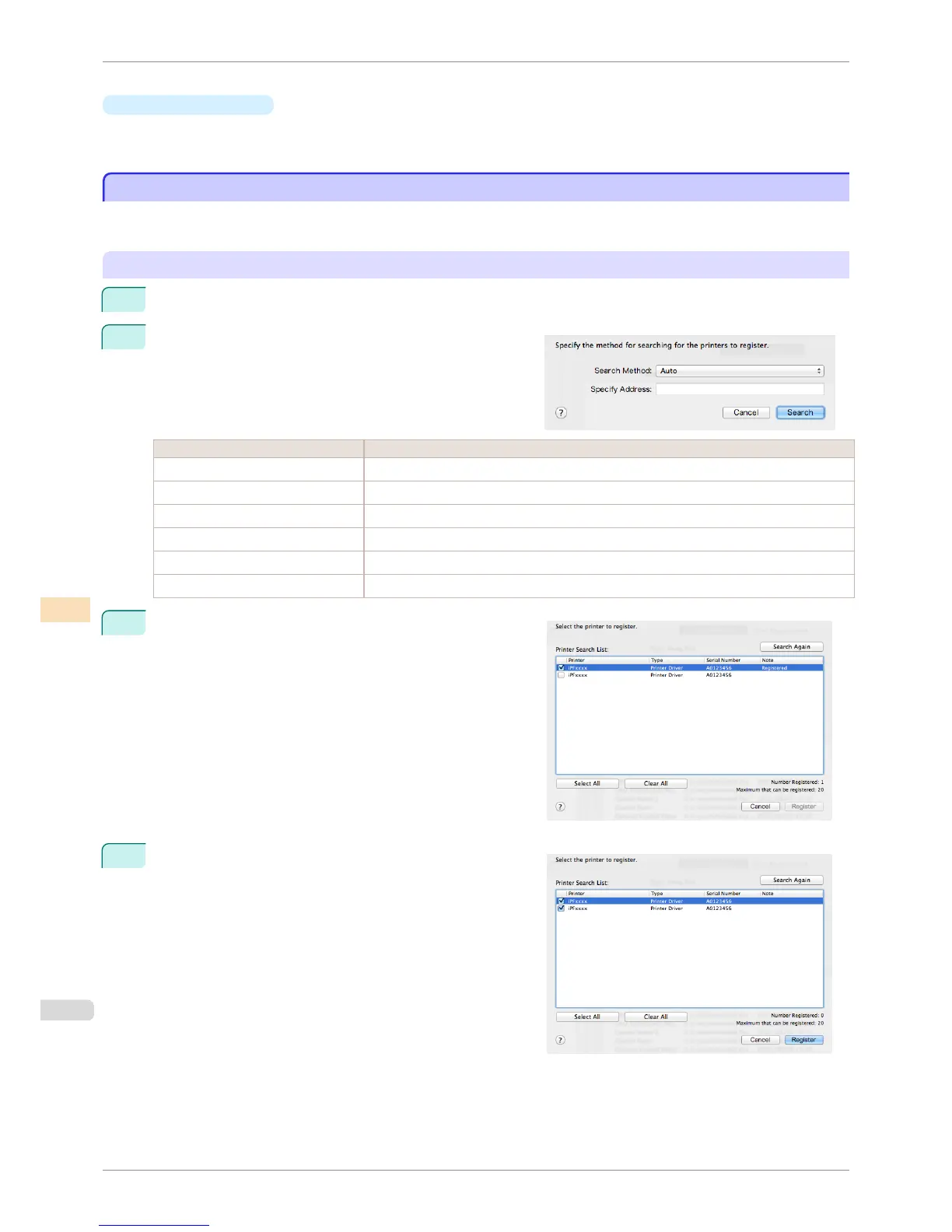
Select Manage Printer List > Register from the File menu.
2
In the Search Settings dialog box, select the method for
searching for the printers to display in the list and click the
Search button.
Setting Item Details
Auto Searches in the order Printer Driver, then IPv4 - Broadcast, then USB.
IPv4 - Specify Address Searches by specifying the IPv4 IP address in Specify Address.
IPv4 - Broadcast Searches using the IPv4 limited broadcast address.
USB Searches for printers connected via USB.
Bonjour Searches for printers connected by Bonjour.
Printer Driver Searches for printers for which the printer driver is installed.
3
The printer search starts and the search results are dis-
played in the Register Printer dialog box.
4
Select the check box for the printer to register from Printer
Search List and click the Register button.
Changing the Printers Displayed in the Printer List
iPF8400S
User's Guide
Color Management Color Calibration Management Console (Mac OS)
786














 To Next Page