Choosing the Document Type and Printing Conditions (Mac OS)
Choosing the Document Type and Printing Conditions (Mac OS)
You can specify your own print settings instead of using the Print Target presets. This topic describes how print
photographic images in monochrome.
1
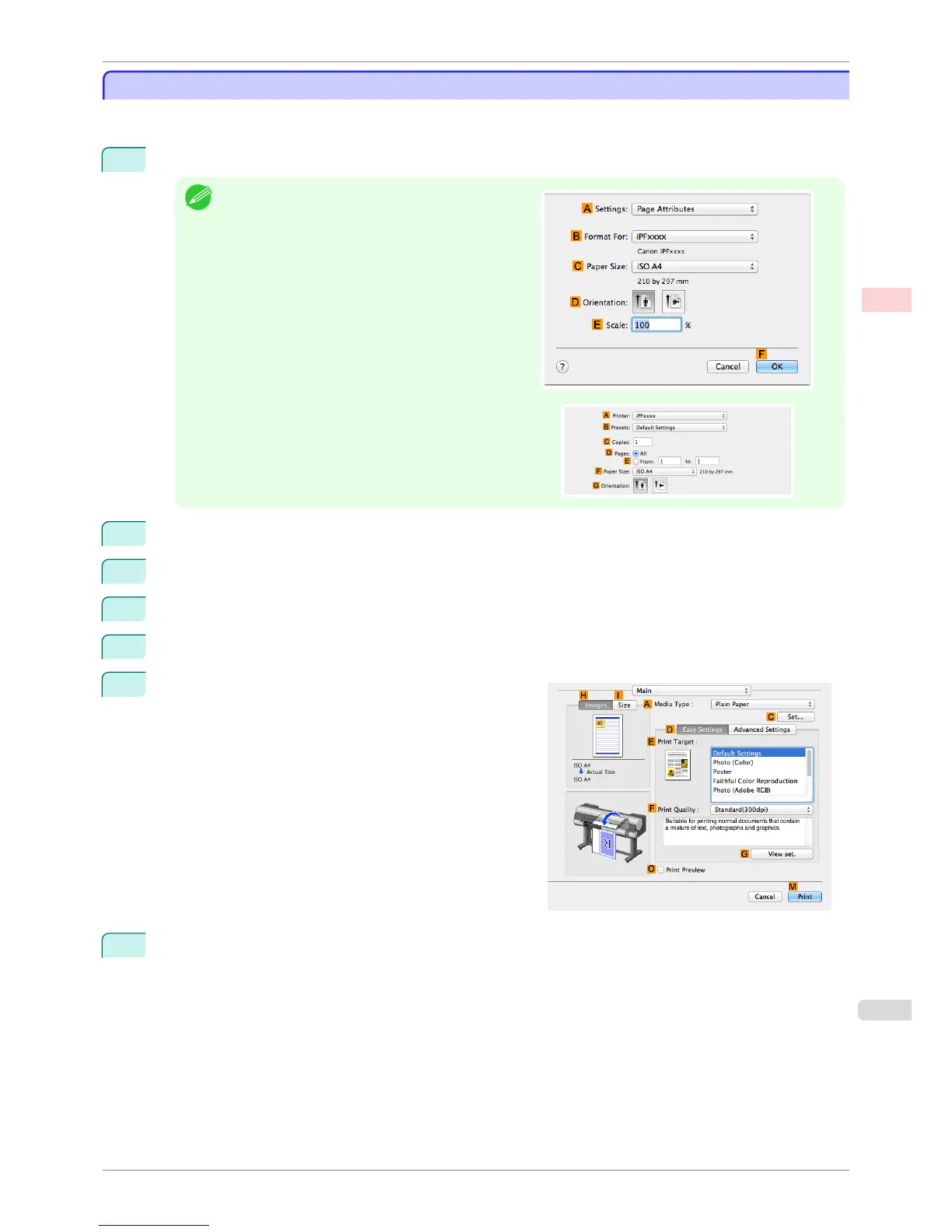
Choose Page Setup from the application menu to display the Page Attributes dialog box.
Note
•
The configuration method varies depending on the OS
and application software you are using.
If Page Setup is displayed in the application menu, the
settings are configured by opening the Page Attrib-
utes dialog box from Page Setup.
If it is not displayed, the settings are configured in the up-
per part of the printer driver displayed when you select
Print from the application software menu.
2
Select the printer in the B Format for list.
3
Choose the original size in the C Paper Size list.
4
Click F OK to close the dialog box.
5
In the application menu, choose Print.
6
Access the Main pane.
7
In the A Media Type list, select the type of paper that is loaded.
iPF8400S
Choosing the Document Type and Printing Conditions (Mac OS)
User's Guide
Enhanced Printing Options Adjusting Images
61














 To Next Page