10
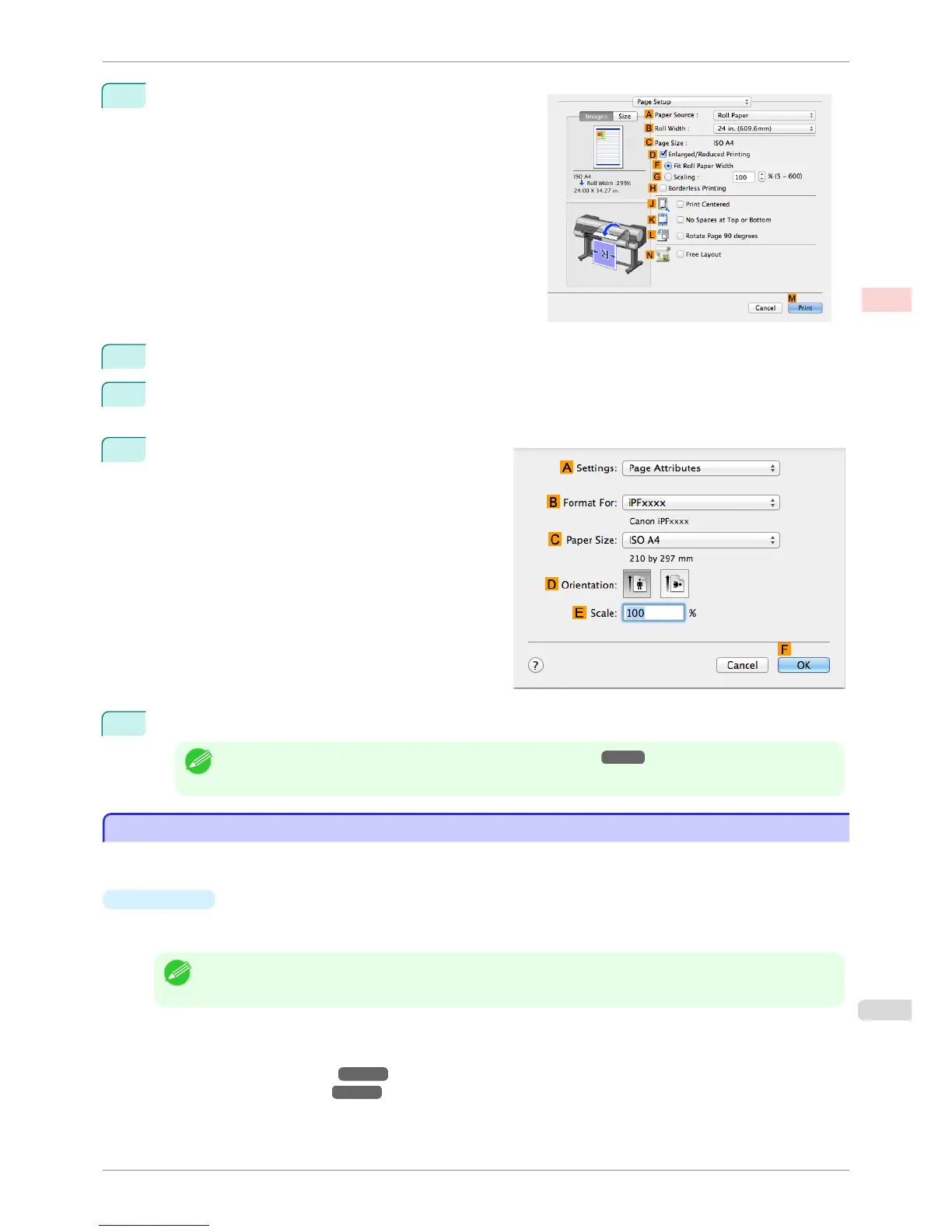
Access the Page Setup pane.
11
Select and click a roll paper in the A Paper Source list.
12
Select the paper width of the roll loaded in the printer for B Roll Width. In this case, ISO A2/A3 (420.0mm)
is selected.
13
Make sure the C Page Size setting matches the orig-
inal size as selected in C Paper Size in the Page At-
tributes dialog box—in this case, ISO A4.
14
Confirm the print settings, and then click M Print to start printing.
Note
• For tips on confirming print settings, see "Confirming Print Settings ." ➔ P.321
Using Favorites
Using Favorites
You can register print settings as Favorites to reuse settings from a particular job that met your expectations, or
settings for a particular page size that you will use repeatedly.
•
Favorites
Registering a favorite for later use. You can choose the settings you have registered from a list before printing,
and you can check the settings details.
Note
• You can also save the favorite settings as files. Using these files is a convenient way to print under the same condi-
tions on another computer. (In Windows.)
For instructions on using favorites to print, refer to the following topics, as appropriate for your computer and
operating system.
•
Using Favorites (Windows) ➔ P.154
•
Using Favorites (Mac OS) ➔ P.322
iPF8400S
Using Favorites
User's Guide
Enhanced Printing Options Other useful settings
143














 To Next Page