Note
• For details on supported sizes and types of rolls, see Paper Sizes or the Paper Reference Guide. (See "Paper
Sizes.") ➔ P.458 (See "Displaying the Paper Reference Guide.") ➔ P.462
• To view instructions as you attach the Roll Holder, press the Navigate button. (See "How to View Instructions With Navi-
gate.") ➔ P.580
1
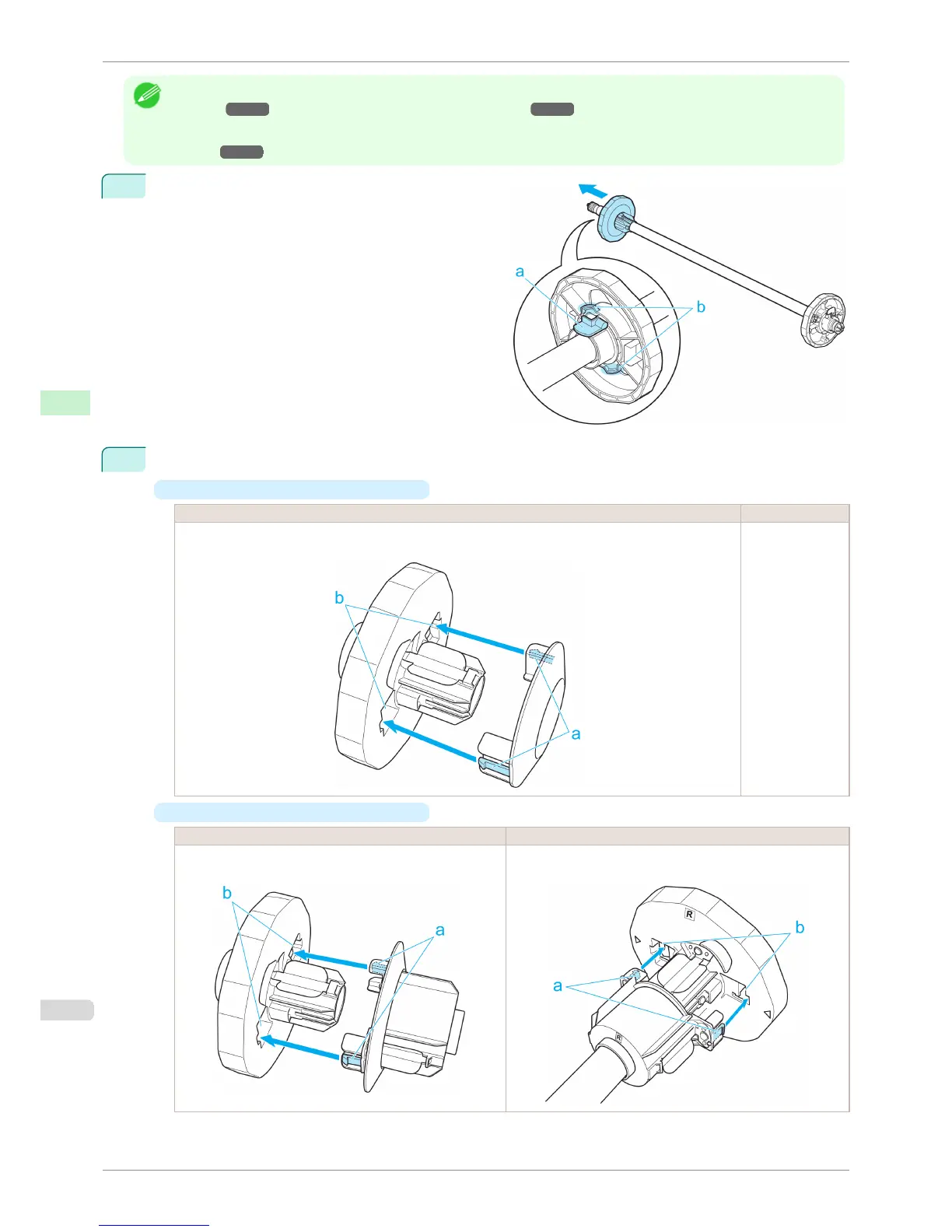
Lift the Holder Stopper lever (a) from the shaft side to
unlock it. Holding the Holder Stopper at the position
indicated (b), remove it from the Roll Holder.
2
Insert the respective attachments for the roll paper core on the Roll Holder and Holder Stopper.
•
Using rolls with a 2-inch paper core
Holder Stopper Side Roll Holder Side
Align the tips (a) of the 2-Inch Paper Core Attachment with the holes (b) of the Holder Stopper and insert it
firmly.
No attachment is
needed.
•
Using rolls with a 3-inch paper core
Holder Stopper Side Roll Holder Side
Align the tips (a) of 3-Inch Paper Core Attachment #2 with the
holes (b) of the Holder Stopper and insert it firmly.
Align the tips (a) of 3-Inch Paper Core Attachment #1 with the
holes (b) of the Roll Holder and insert it firmly.
Attaching the Roll Holder to Rolls
iPF8400S
User's Guide
Handling and Use of Paper Handling rolls
470














 To Next Page