2
Install Print Plug-In for Office.
For information about instsalling, see "Steps to install." ➔ P.281
Enabling Print Plug-In for Office for items disabled in Office applications
If a problem occurs, such as the system or an application terminating abnormally, the Microsoft Office application
disables add-ins as a safety precaution.
In this event, you will need to restore the disabled add-ins in order to display the imagePROGRAF Print Plug-In
toolbar/ribbon.
Use the procedure below to restore the add-ins disabled by Microsoft Office.
•
For Microsoft Office 2010
1
Select Options from the File menu.
2
From the list on the left side of the <application name> options dialog box, select Add-ins.
3
Select Disabled Items in the Manage combo box
and click the Go button.
4
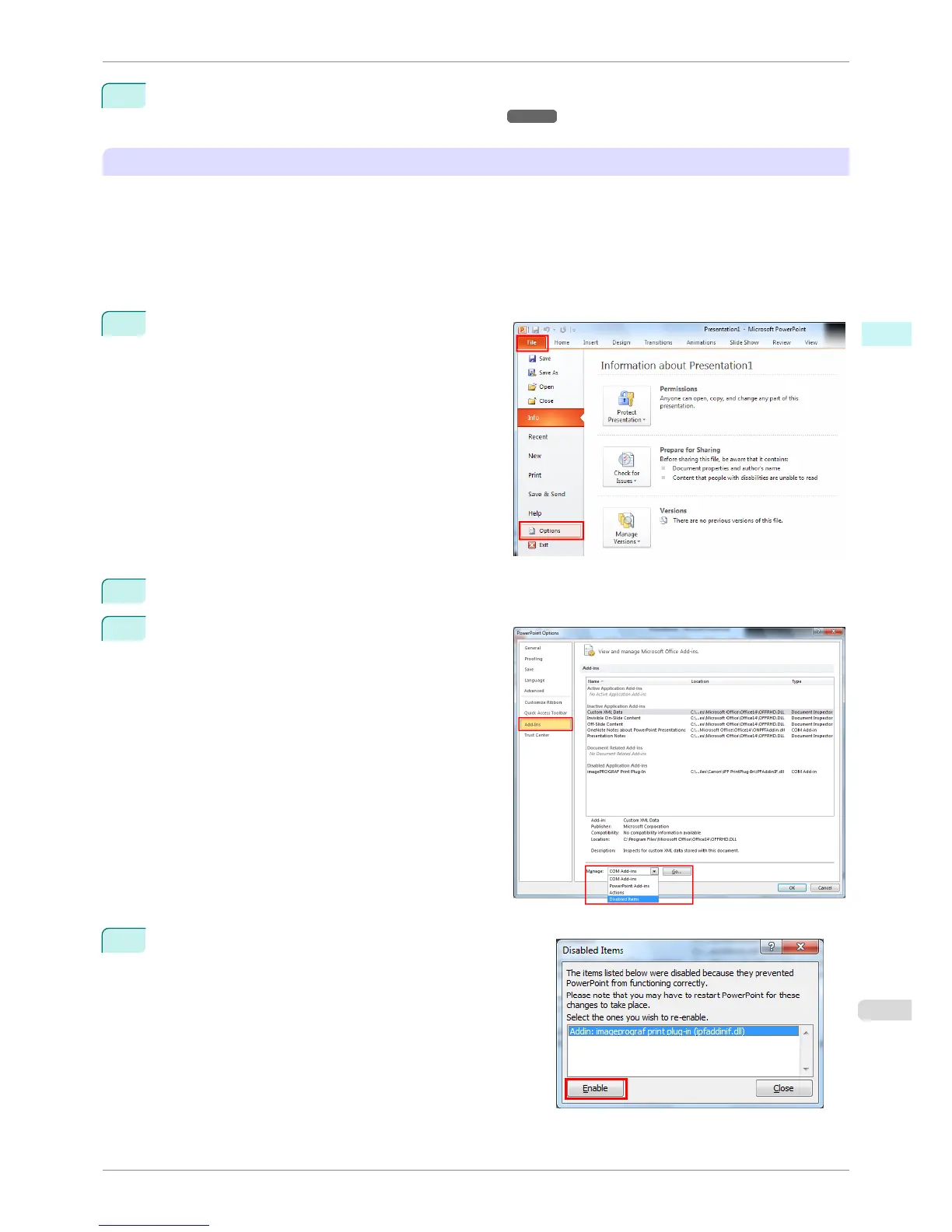
If Addin imageprograf print plug-in (ipfaddinif.dll) is dis-
played in the Disabled Items dialog box, select it and click
the Enable button.
iPF8400S
When Print Plug-In for Office is not displayed
User's Guide
Windows Software Print Plug-In for Office
285














 To Next Page