2
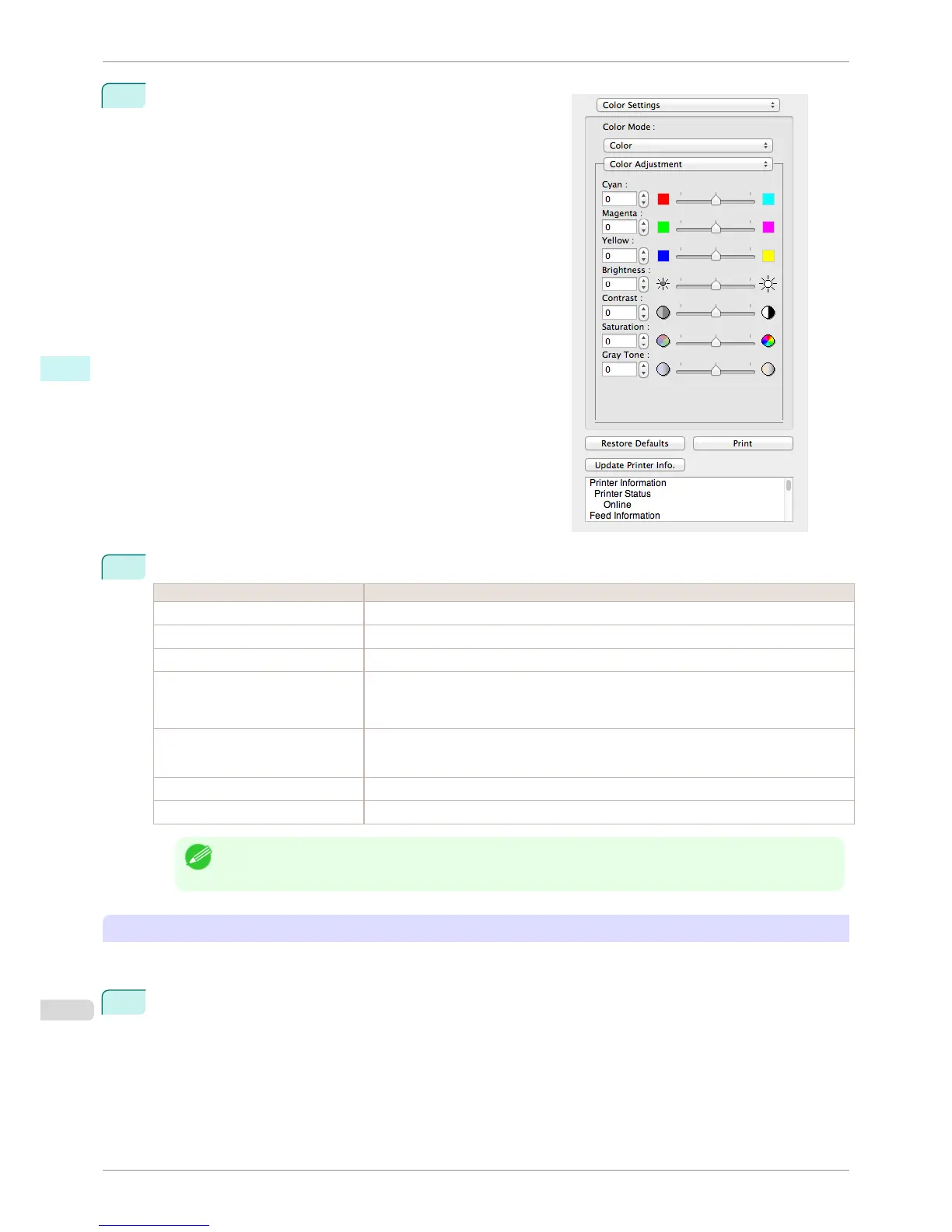
Select Color Adjustment.
3
Drag each slider to the left or right to adjust.
Setting Details
Cyan Adjusts the strength of colors to compensate the hues.
Magenta Adjusts the strength of colors to compensate the hues.
Yellow Adjusts the strength of colors to compensate the hues.
Brightness Adjusts the brightness of the entire image. When the results of the printout are brighter than
the original images such as the original photo before scanning and graphics created on the
display, or when you want to print in different degrees of brightness, use this feature.
Contrast Adjusts the relative brightness between the brightest and darkest portions of the image.
*For soft gradation, decrease the contrast. For hard gradation, increase the contrast.
Saturation Adjusts the hues for vivid color or dark color.
Gray Tone Adjusts gray from cool black (bluish tones) to warm black (reddish tones).
Note
• You can also click the up or down arrow, or enter the number directly to increase or decrease the value.
Adjusting Monochrome
Use the monochrome setting to print monochrome images of color photographs captured with a scanner or digital
camera or other color images.
1
Select Monochrome on Color Mode in the Color Settings panel.
Color Adjustment
iPF8400S
User's Guide
Mac OS Software Free Layout
368














 To Next Page