Note
• If any paper has been advanced that will not be used, a message is shown requesting you to remove it.
Press ▲ or ▼ to select Yes, and then press the OK button. Remove the paper and go to the next step.
2
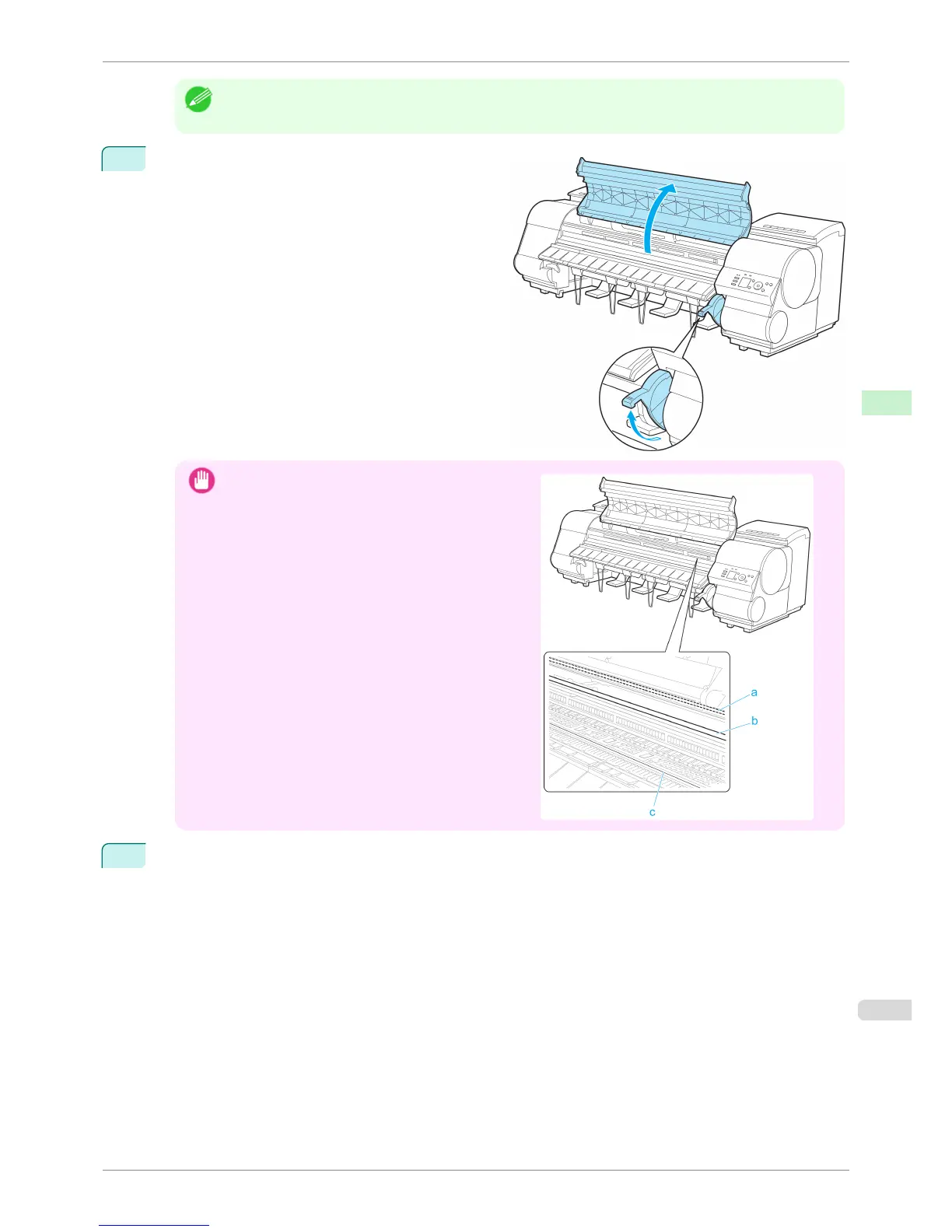
Lift the Release Lever and open the Top Cover.
Important
•
Do not touch the Linear Scale (a), Carriage Shaft (b),
or Fixed Blade (c). This may stain your hands and
damage the printer.
3
With a sheet lengthwise and printing-side up, insert it between the Platen (a) and the Paper Retainer (b).
Align the edges of the sheet as follows.
1.
Align the sheet with the Paper Alignment Line (c) at right.
2.
Align the inserted edge of the sheet with the leading edge of the Paper Alignment Line (d), as shown.
iPF8400S
Loading Sheets in the Printer
User's Guide
Handling and Use of Paper Handling sheets
493














 To Next Page