8
On the Color Adjustment sheet, adjust the color tones, brightness, and so on as desired.
Adjustment Item Description
D Cyan
Fine-tune color tones by adjusting the levels of Cyan, Magenta, and Yellow.
E Magenta
F Yellow
G Gray Tone
Adjust the gray tone. Choose cool black (tinged with blue), pure black (neutral), warm black
(tinged with red), and so on.
H Brightness
Adjust the brightness of printed images while keeping the darkest and lightest portions intact.
I Contrast
Adjust the contrast of the darkest and lightest portions relative to each other.
For soft gradation, decrease the contrast. For hard gradation, increase the contrast.
J Saturation
Adjust the level of color saturation, in a range from subdued to vivid.
Note
• Click Object Adjustment to open the Object Adjustment dialog box, which allows you to select the color ad-
justment target from Image, Graphics, and Text.
9
Close the Color Settings dialog box.
10
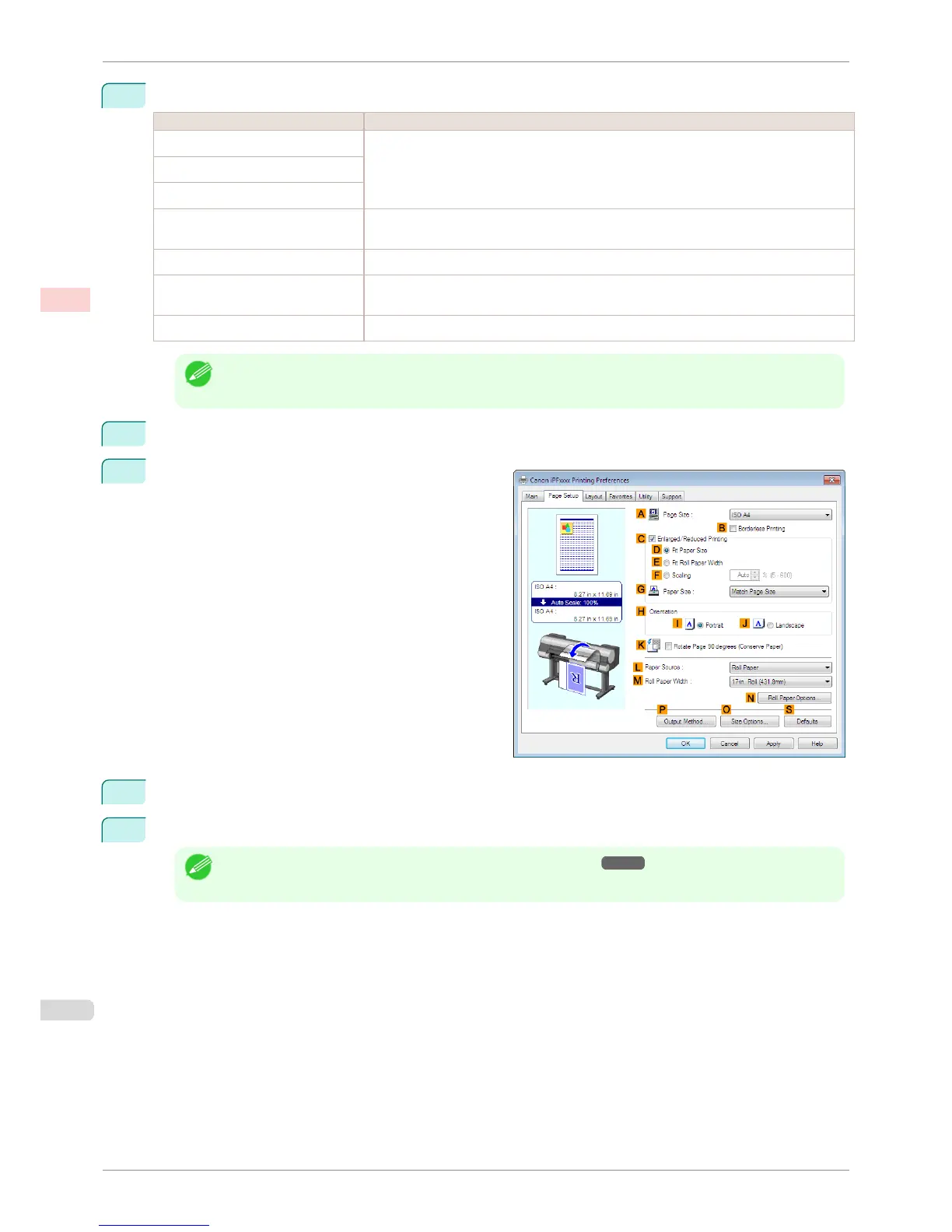
Click the Page Setup tab to display the Page Setup
sheet.
11
Confirm the settings of A Page Size, L Paper Source, and so on.
12
Confirm the print settings and print as desired.
Note
• For tips on confirming print settings, see "Confirming Print Settings ." ➔ P.153
Fine-Tuning Colors of Photos and Images (Windows)
iPF8400S
User's Guide
Enhanced Printing Options Adjusting Images
54














 To Next Page