5
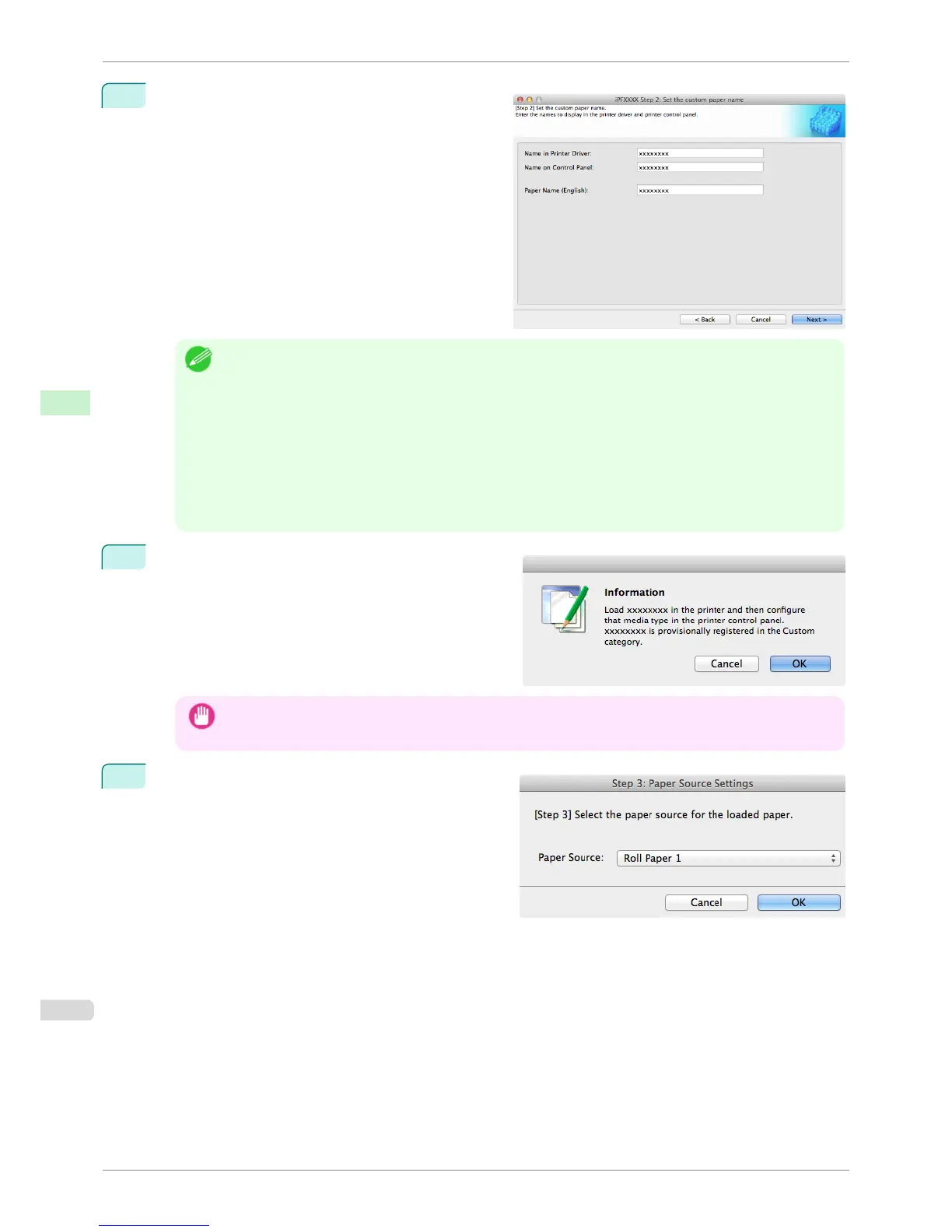
The Step 2: Set the custom paper name dialog box
is displayed.
Enter an arbitrary name to display in the printer con-
trol panel and printer driver, and then click the Next
button.
Note
• Depending on the selected standard paper, you might not be able to input the Name in Printer Driver and add
the created custom paper to the printer driver. To use the custom paper in the printer driver, create it by chang-
ing the standard paper to another paper.
• The characters that can be entered for Name in Printer Driver and Name on Control Panel are stated below.
alphanumeric, space, "-", ".", "_", "(", ")", "+", "%", ",", "/"
• For Name in Printer Driver up to 32 one Byte characters can be entered, and for Name on Control Panel up
to 16 one Byte characters can be entered.
• Paper Name (English) is used in keeping track of the amount of roll paper left, in status print, etc.
For Paper Name (English) up to 16 one Byte characters can be entered.
6
Load the custom paper in the printer and then click the
OK button.
Important
• Do not load paper that is curled or that has already been printed on.
7
The Step 3: Paper Source Settings dialog box is dis-
played. Select the paper source where the custom pa-
per is loaded and then click the OK button.
Add Custom Paper
iPF8400S
User's Guide
Handling and Use of Paper Media Configuration Tool (Mac OS)
562














 To Next Page