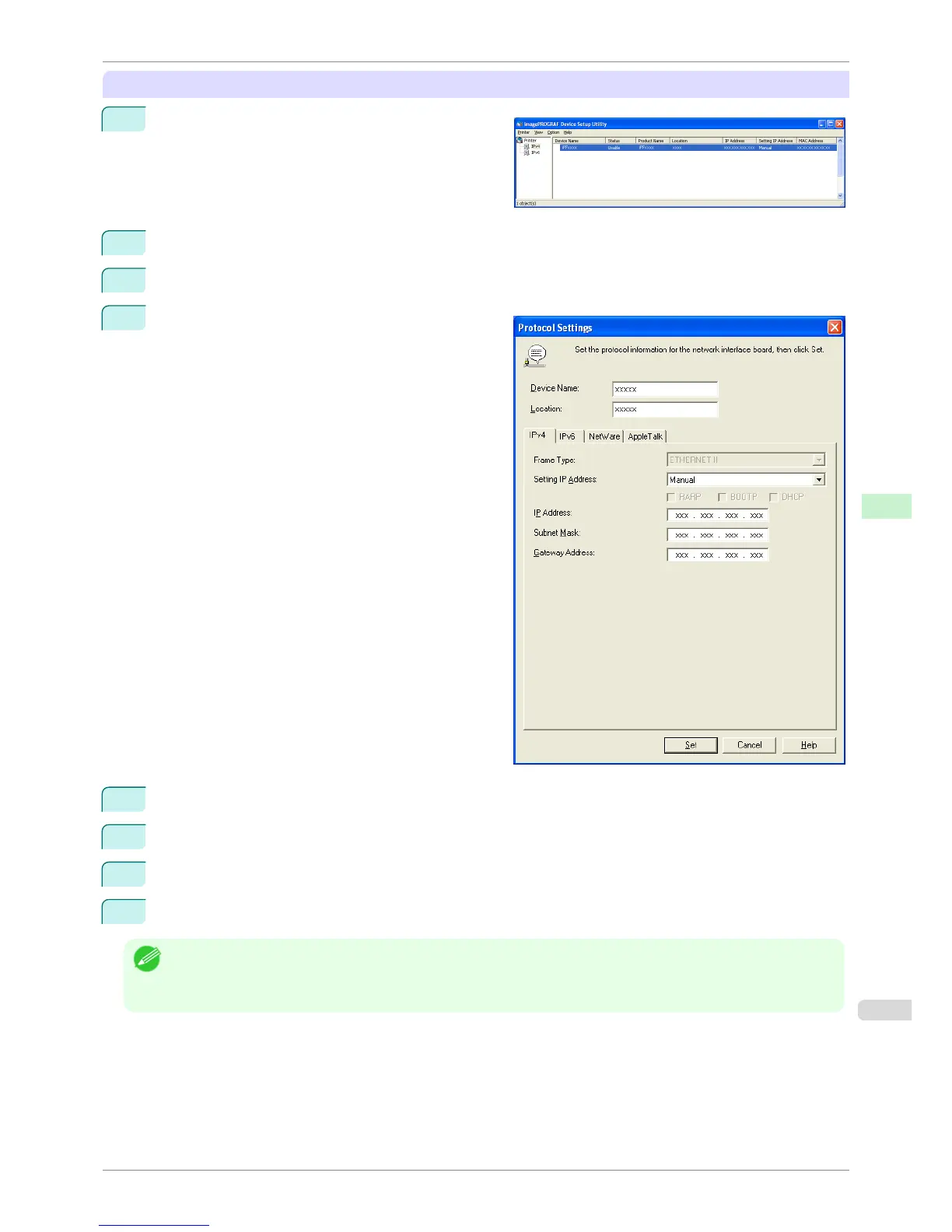
When specifying an IPv4 IP address
1
Start imagePROGRAF Device Setup Utility from
the start menu.
2
In the Device Name list displayed, select the printer to configure.
3
Choose Protocol Settings from the Printer menu.
4
Select the IPv4 tab.
5
In the
Setting IP Address list, choose Manual.
6
Enter the IP address assigned to the printer and click the Set button.
7
Click OK after the Confirmation message is displayed.
8
Exit imagePROGRAF Device Setup Utility.
Note
• To configure the IP address automatically, choose Auto in the Setting IP Address list and select DHCP, BOOTP, or
RARP.
• You can also specify the subnet mask and default gateway.
iPF8400S
Configuring the IP Address Using imagePROGRAF Device Setup Utility
User's Guide
Network Setting Device Setup Utility (Windows)
651














 To Next Page