3
Select the printer in the dialog box, and then display the printer driver dialog box. (See "Accessing the Print-
er Driver Dialog Box from Applications .") ➔ P.156
4
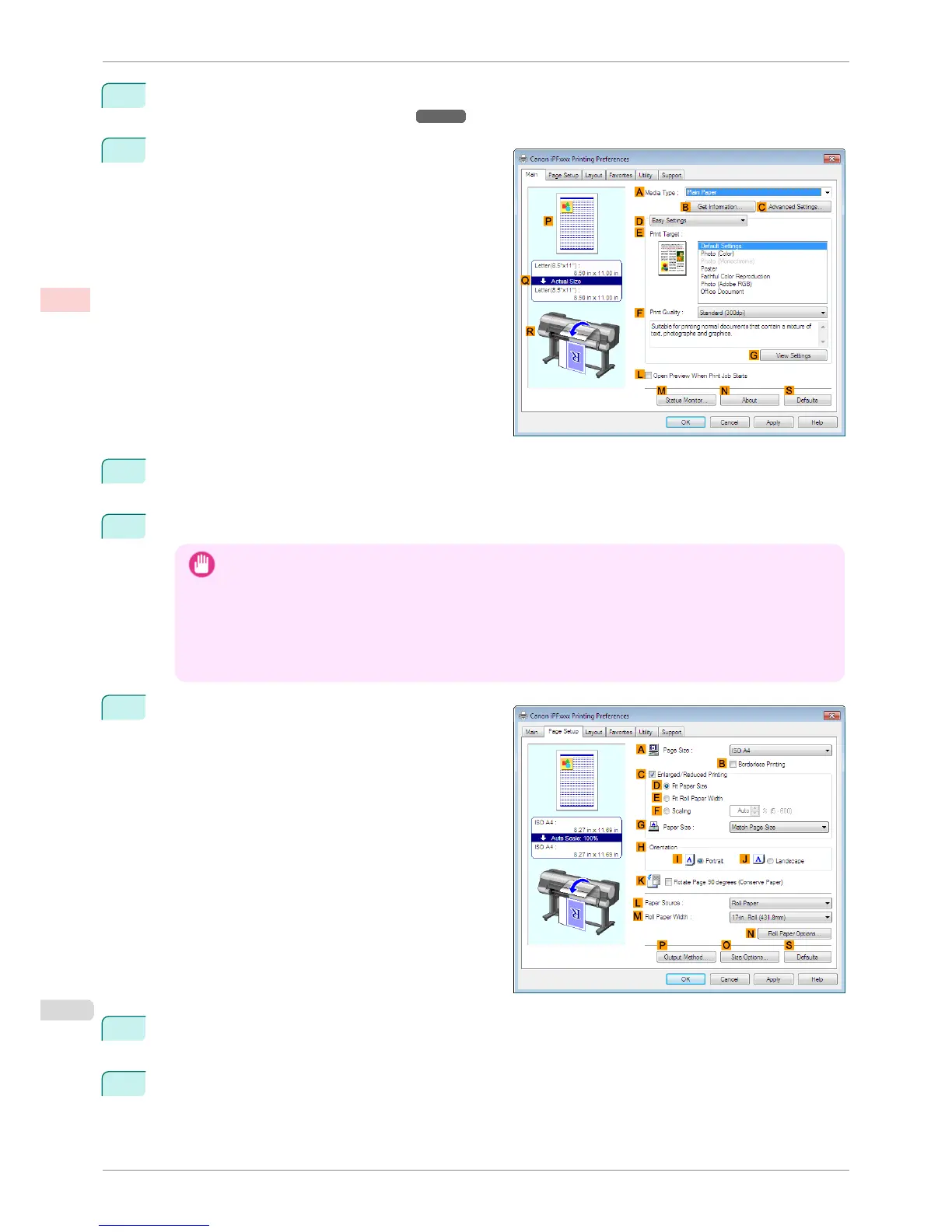
Make sure the Main sheet is displayed.
5
In the A Media Type list, select the type of paper that is loaded. In this case, click Canon Heavyweight
Coated Paper.
6
Select the print target in the E Print Target list.
Important
• When you are using paper that takes longer for ink to adhere for borderless printing and the Cutter Unit touch-
es printing surfaces that are not dry yet, it may damage the paper or the edge of the document that is cut,
depending on frequency of use. In this kind of situation, change the ink drying time using the following proce-
dure.
• Click Advanced Settings in Media Type.
• Select an ink drying time in the list for the Between Pages setting of Drying Time.
7
Click the Page Setup tab to display the Page Setup
sheet.
8
In the A Page Size list, click the size of the original as specified in the application. In this case, click
10"x12".
9
Select and click a roll paper in the L Paper Source list.
Borderless Printing by Resizing Originals to Match the Paper Size (Windows)
iPF8400S
User's Guide
Enhanced Printing Options Borderless Printing
86














 To Next Page