5
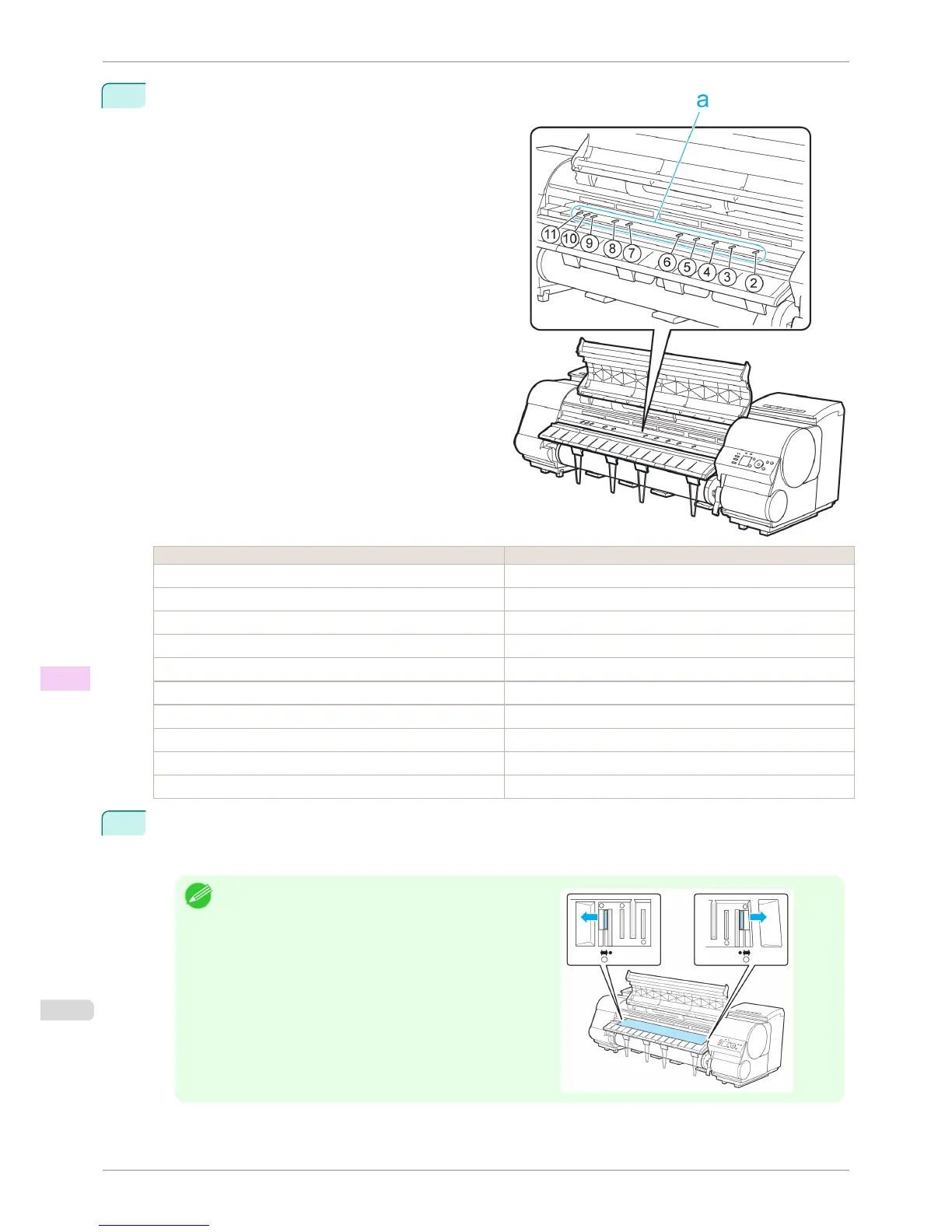
Refer to the following table to confirm the number on
the Platen (a) that corresponds to the size of paper
for printing.
Number Dimensions
2 254.0 mm (10.00 in)
3 355.6 mm (14.00 in)
4 431.8 mm (17.00 in)
5 515.0 mm (JIS B2 or B3)
6 594.0 mm (ISO A1 or A2) or 609.6 mm (24.00 in)
7 841.0 mm (ISO A0 or A1)
8 914.4 mm (36.00 in)
9 1030.0 mm (JIS B0 or B1)
10 1066.8 mm (42.00 in)
11 1117.6 mm (44.00 in)
6
Using the back of the Cleaning Brush, move the Switch to the side opposite ●, corresponding to the size of
the paper for printing.
In this case, note that you will move the switch in the opposite direction from the direction in step 4.
Note
•
The Switch only moves number 1 and the number that
matches the paper size. Set all of the switches where the
number does not match the paper size in switches number
2 and higher to the ● side.
Setting the Blue Switch on the Platen
iPF8400S
User's Guide
Troubleshooting Problems with the printing quality
870














 To Next Page