1-10
After you press A, you can press f or c to recall previous calculations, in sequence from
the newest to the oldest (Multi-Replay Function). Once you recall a calculation, you can use
e and d to move the cursor around the calculation and make changes in it to create a new
calculation.
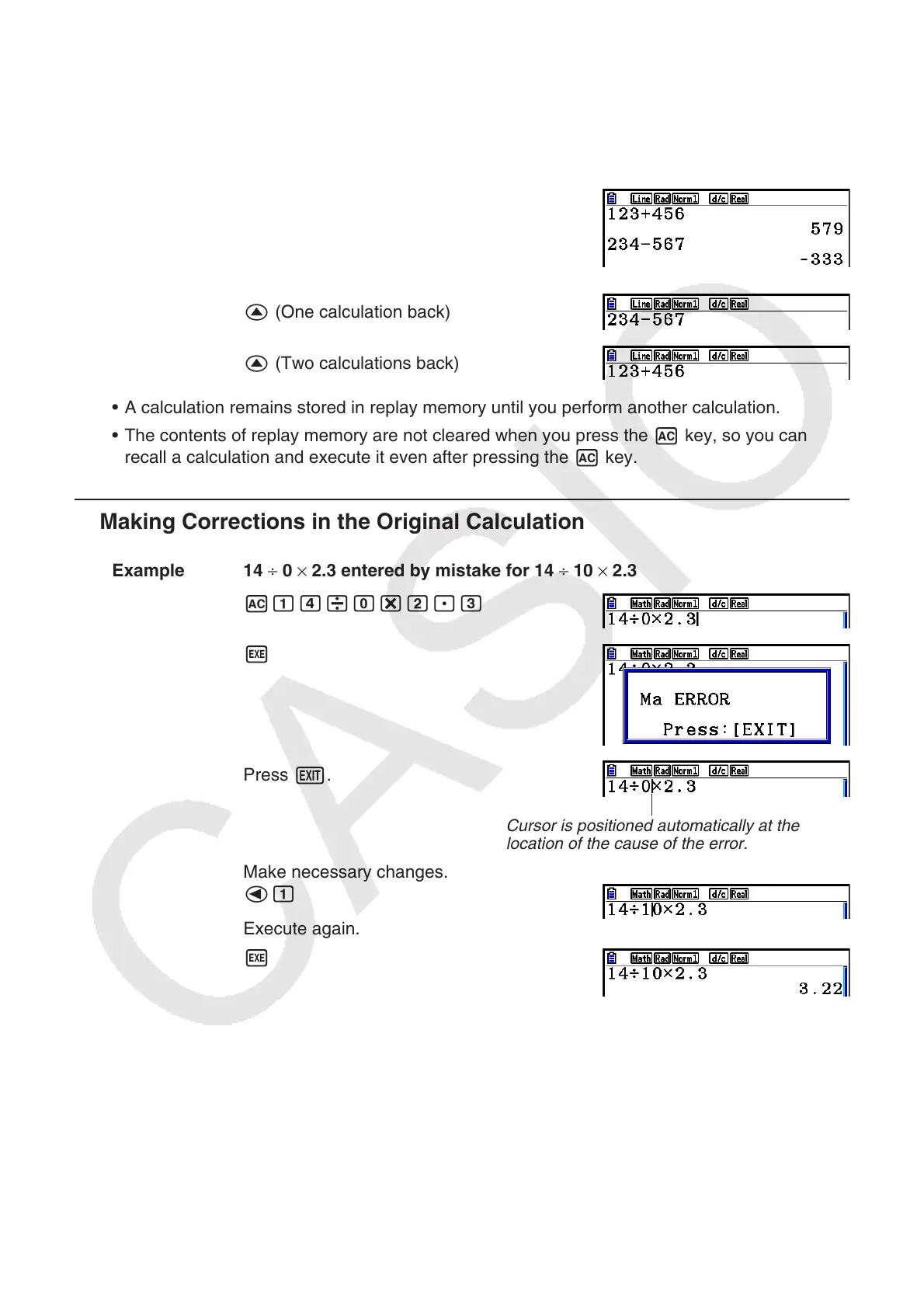
Example 2
Abcd+efgw
cde-fghw
A
f (One calculation back)
f (Two calculations back)
• A calculation remains stored in replay memory until you perform another calculation.
• The contents of replay memory are not cleared when you press the A key, so you can
recall a calculation and execute it even after pressing the A key.
k Making Corrections in the Original Calculation
Example 14 ÷ 0 × 2.3 entered by mistake for 14 ÷ 10 × 2.3
Abe/a*c.d
w
Press J.
Cursor is positioned automatically at the
location of the cause of the error.
Make necessary changes.
db
Execute again.
w



 To Next Page
 Loading...









